How do I use the Wholesome Girl and Samoyed Friendship Portrait template?
Choose the primary action to open PicX Studio with the available template settings. Review the model and format, personalize the creative direction, and generate when ready.
A lifestyle portrait prompt focusing on identity preservation and the interaction between a person and a large fluffy dog.
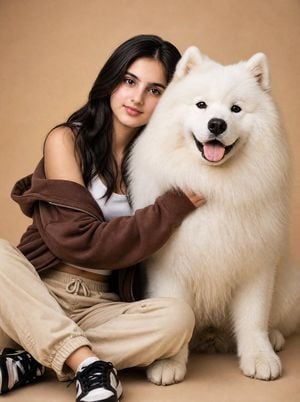
Use the provided reference image. Preserve {argument name="subject name" default="Main Ingrid"}'s exact facial identity, {argument name="ethnicity" default="warm Filipina features"}, long wavy black hair, natural smile, and medium natural body proportions. She is wearing a white fitted crop top, beige jogger cargo pants, a loose brown hoodie draped off one shoulder, and black-and-white sneakers. Standing closely beside her is a {argument name="dog breed" default="giant fluffy Samoyed"} with brilliant snow-white fur, a thick cloud-like coat, gentle dark eyes, a happy smiling expression, and an adorable tongue-out grin. Ingrid wraps one arm lovingly around the Samoyed's neck while resting her head softly against its fluffy shoulder. Both face the camera with warm, peaceful expressions, radiating trust and companionship. Clean beige seamless studio background, soft diffused studio lighting, ultra-realistic fur texture, photorealistic skin, luxury pet portrait photography, shallow depth of field, cinematic composition, warm cozy atmosphere, 8K, highly detailed, wholesome friendship portrait.
Choose the primary action to open PicX Studio with the available template settings. Review the model and format, personalize the creative direction, and generate when ready.
Yes. You can change the subject, setting, lighting, mood, format, and available model controls before creating your image.
This template is free to open and customize. Generation usage is shown in PicX Studio before you create.
Start with GPT Image 2, which is the model associated with this template. You can compare another compatible model for a different finish.
Follow a topic to a crawlable collection of related PicX Studio templates.