How do I use the Summer Poolside Water Splash Portrait template?
Edit the prompt in the box under the preview — the template's model and format are already selected — and press Generate. Your version appears right on this page.
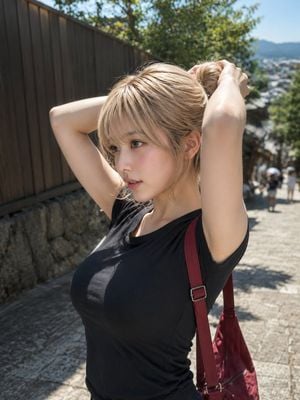
A detailed, structured prompt for generating a realistic portrait of a woman at a poolside, featuring intricate water splash details and natural lighting.

主題:{argument name="主題" default="夏の水しぶき"} 主体: 縦長の写真。プールサイドに立つ大人の女性を画面中央やや右に配置し、頭から太もも上までを大きく写す。左側には水しぶきとホースの流れ、右側には熱帯植物の濃い緑を広く入れる。人物は画面の約7割を占め、背景の奥行きは浅め。 人物・表情: 自然で現実感のある大人の女性。肩下までのやわらかなブラウンヘア、薄い前髪、軽く風を受けた毛先。顔はカメラ方向に向け、視線はまっすぐ落ち着いている。表情は控えめで、夏の日差しの中でも涼しげな雰囲気。肌は明るい光を受けて少し強めにハイライトが入る。 服装・ポーズ: {argument name="服装" default="淡いミントグリーン系の小さめホルターネックトップ"}に、白いレース縁と小花柄の繊細なデザイン。ボトムは{argument name="ボトム" default="淡いブルーのデニムショートパンツ"}で、サイドに白いレースアップ、裾は自然なフリンジ。画面左側の手で可愛いパステルカラーの散水ノズルを持ち、水を左上方向へ自然に噴射する。反対の手は体の横で力を抜き、指先を自然に下ろす。腰は少し傾け、片脚に重心を置く。 背景・光: 明るい屋外プールサイド。左下にターコイズブルーの水面、背後に白い壁、右側と奥に大きな熱帯植物。午前から昼前の強い自然光が左上から入り、髪の輪郭と肩にリムライトが出る。水しぶきは細かく、光を受けてきらめく。植物の影が背景に落ち、夏らしい明暗差を作る。 構図・カメラ: 縦構図、上半身寄りのミディアムポートレート。カメラは目線より少し低めの自然な高さ、50mm前後の写真レンズ。人物の顔と上半身にピントを合わせ、背景の葉はやや柔らかくぼかす。水しぶきは画面左上へ広がり、人物の顔にかからないようにする。 質感・スタイル: リアルな写真表現。夏の日差し、濡れた肌の細かな水滴、デニムの色落ち、レースの繊細な凹凸を丁寧に描写。彩度は明るく清潔感のある日系グラビア風フォト。過度な加工感を避け、自然な肌質と柔らかなハイライトを残す。
主題:{argument name="主題" default="夏の水しぶき"} 主体: 縦長の写真。プールサイドに立つ大人の女性を画面中央やや右に配置し、頭から太もも上までを大きく写す。左側には水しぶきとホースの流れ、右側には熱帯植物の濃い緑を広く入れる。人物は画面の約7割を占め、背景の奥行きは浅め。 人物・表情: 自然で現実感のある大人の女性。肩下までのやわらかなブラウンヘア、薄い前髪、軽く風を受けた毛先。顔はカメラ方向に向け、視線はまっすぐ落ち着いている。表情は控えめで、夏の日差しの中でも涼しげな雰囲気。肌は明るい光を受けて少し強めにハイライトが入る。 服装・ポーズ: {argument name="服装" default="淡いミントグリーン系の小さめホルターネックトップ"}に、白いレース縁と小花柄の繊細なデザイン。ボトムは{argument name="ボトム" default="淡いブルーのデニムショートパンツ"}で、サイドに白いレースアップ、裾は自然なフリンジ。画面左側の手で可愛いパステルカラーの散水ノズルを持ち、水を左上方向へ自然に噴射する。反対の手は体の横で力を抜き、指先を自然に下ろす。腰は少し傾け、片脚に重心を置く。 背景・光: 明るい屋外プールサイド。左下にターコイズブルーの水面、背後に白い壁、右側と奥に大きな熱帯植物。午前から昼前の強い自然光が左上から入り、髪の輪郭と肩にリムライトが出る。水しぶきは細かく、光を受けてきらめく。植物の影が背景に落ち、夏らしい明暗差を作る。 構図・カメラ: 縦構図、上半身寄りのミディアムポートレート。カメラは目線より少し低めの自然な高さ、50mm前後の写真レンズ。人物の顔と上半身にピントを合わせ、背景の葉はやや柔らかくぼかす。水しぶきは画面左上へ広がり、人物の顔にかからないようにする。 質感・スタイル: リアルな写真表現。夏の日差し、濡れた肌の細かな水滴、デニムの色落ち、レースの繊細な凹凸を丁寧に描写。彩度は明るく清潔感のある日系グラビア風フォト。過度な加工感を避け、自然な肌質と柔らかなハイライトを残す。
Edit the prompt in the box under the preview — the template's model and format are already selected — and press Generate. Your version appears right on this page.
Yes. You can change the subject, setting, lighting, mood, format, and available model controls before creating your image.
Opening and editing this template is free. Generating uses credits, shown on the Generate button when you are signed in.
Start with GPT Image 2, which is the model associated with this template. You can compare another compatible model for a different finish.
Follow a topic to a crawlable collection of related PicX Studio templates.