How do I use the Cinematic Rooftop Urban Portrait template?
Choose the primary action to open PicX Studio with the available template settings. Review the model and format, personalize the creative direction, and generate when ready.
A moody, high-fidelity prompt for a photorealistic medium shot of a man on a city rooftop, featuring dramatic dual-tone lighting and shallow depth of field.
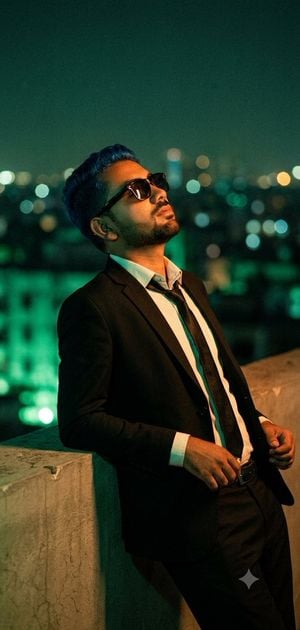
A cinematic low-angle medium shot captures a {argument name="subject" default="stylish man"} with uploaded face as reference leaning casually back against a concrete rooftop ledge at night, wearing a {argument name="outfit" default="sharp black suit"}, unbuttoned white dress shirt, loosened black tie, and dark sunglasses, with his head tilted upward. The scene utilizes {argument name="lighting" default="dramatic dual-tone lighting"}, blending vibrant emerald green ambient city glow with warm tungsten orange key light that highlights the texture of the clothing and skin. The background features a heavily blurred urban skyline with circular bokeh from skyscraper lights, shot on an 85mm lens at f/1.8 for shallow depth of field, emphasizing high-fidelity textures, raytraced lighting, and a moody, photorealistic 8k aesthetic.
Choose the primary action to open PicX Studio with the available template settings. Review the model and format, personalize the creative direction, and generate when ready.
Yes. You can change the subject, setting, lighting, mood, format, and available model controls before creating your image.
This template is free to open and customize. Generation usage is shown in PicX Studio before you create.
Start with GPT Image 2, which is the model associated with this template. You can compare another compatible model for a different finish.
Follow a topic to a crawlable collection of related PicX Studio templates.