
Cinematic Rain Fashion Transformation (Image-to-Image)
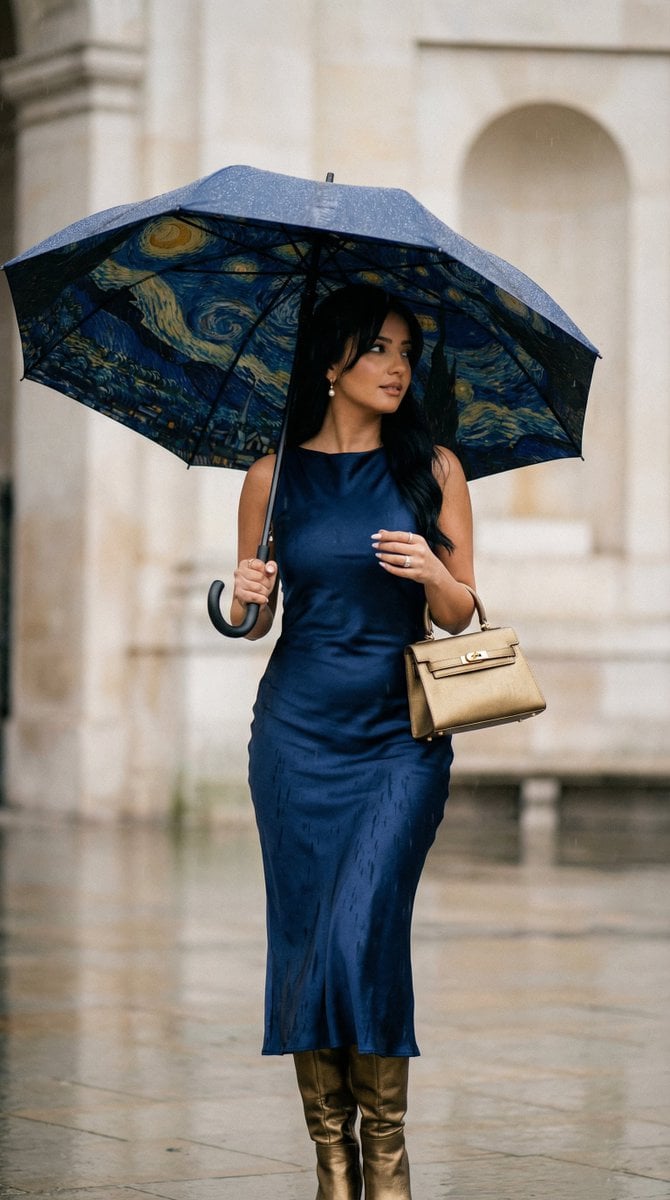
A highly detailed, structured image-to-image prompt for transforming a reference image of a woman into a cinematic art-fashion editorial shot.
- Prompt included
- Model and format preset
- Free template
The prompt behind this image
Copy the exact prompt behind Cinematic Rain Fashion Transformation (Image-to-Image), or open it in the studio and make it yours.
- Generation Request › Meta Data › Task Type
- cinematic_rain_fashion_transformation
- Generation Request › Meta Data › Language
- en
- Generation Request › Meta Data › Priority
- highest
- Generation Request › Meta Data › Version
- v2.0_STARRY_RAIN_STANDING_LOOK
- Generation Request › Input › Mode
- image_to_image
- Generation Request › Input › Reference Image Usage
- very_high
- Generation Request › Input › Preserve Identity
- true
- Generation Request › Input › Preserve Facial Features
- true
- Generation Request › Input › Notes
- Preserve the same woman's facial identity and proportions. Transform pose to standing naturally under umbrella in rain. Remove coat completely.
- Generation Request › Output › Aspect Ratio
- 4:5
- Generation Request › Output › Resolution
- ultra_high
- Generation Request › Output › Num Images
- 1
- Generation Request › Output › Sharpness
- cinematic_crisp
- Generation Request › Output › Grain
- subtle_35mm_film
- Generation Request › Scene › Environment
- light stone architectural background softly blurred
- Generation Request › Scene › Weather
- visible rainfall with cinematic rain streaks and soft wet ground reflections
- Generation Request › Scene › Lighting
- overcast rainy daylight with moody contrast
- Generation Request › Scene › Mood
- romantic, artistic, dreamy celestial atmosphere
- Generation Request › Subject › Person
- adult woman
- Generation Request › Subject › Pose
- standing gracefully under umbrella, one hand holding umbrella handle, other arm relaxed naturally
- Generation Request › Subject › Expression
- soft introspective gaze
- Generation Request › Subject › Wardrobe › Dress
- deep midnight blue satin dress, fluid silhouette, elegant movement, glossy satin reflections
- Generation Request › Subject › Wardrobe › Coat
- none
- Generation Request › Subject › Wardrobe › Bag
- metallic deep gold structured handbag
Raw JSON
{
  "generation_request": {
    "meta_data": {
      "task_type": "cinematic_rain_fashion_transformation",
      "language": "en",
      "priority": "highest",
      "version": "v2.0_STARRY_RAIN_STANDING_LOOK"
    },
    "input": {
      "mode": "image_to_image",
      "reference_image_usage": "very_high",
      "preserve_identity": true,
      "preserve_facial_features": true,
      "notes": "Preserve the same woman's facial identity and proportions. Transform pose to standing naturally under umbrella in rain. Remove coat completely."
    },
    "output": {
      "aspect_ratio": "4:5",
      "resolution": "ultra_high",
      "num_images": 1,
      "sharpness": "cinematic_crisp",
      "grain": "subtle_35mm_film"
    },
    "scene": {
      "environment": "light stone architectural background softly blurred",
      "weather": "visible rainfall with cinematic rain streaks and soft wet ground reflections",
      "lighting": "overcast rainy daylight with moody contrast",
      "mood": "romantic, artistic, dreamy celestial atmosphere"
    },
    "subject": {
      "person": "adult woman",
      "pose": "standing gracefully under umbrella, one hand holding umbrella handle, other arm relaxed naturally",
      "expression": "soft introspective gaze",
      "wardrobe": {
        "dress": "deep midnight blue satin dress, fluid silhouette, elegant movement, glossy satin reflections",
        "coat": "none",
        "bag": "metallic deep gold structured handbag",
        "boots": "knee-high boots matching the handbag tone (deep metallic gold or warm cognac tone), refined leather texture"
      }
    },
    "umbrella": {
      "color_base": "deep navy blue",
      "design": "Van Gogh Starry Night inspired swirling sky pattern",
      "details": "visible swirling brushstroke-style stars and moon in gold and cobalt tones, painterly texture effect on fabric",
      "finish": "matte umbrella fabric with artistic printed texture"
    },
    "camera": {
      "lens": "50mm prime",
      "aperture": "f/2.0",
      "focus": "sharp on subject, rain slightly motion-blurred",
      "angle": "eye-level cinematic framing"
    },
    "style": {
      "aesthetic": "cinematic art-fashion editorial",
      "color_palette": "midnight blue, cobalt, warm gold, soft stone neutrals",
      "texture_emphasis": "rain droplets on umbrella, satin sheen, painterly umbrella texture",
      "retouching": "natural skin texture preserved",
      "no": "AI glow, plastic skin, extra limbs, distorted anatomy, oversharpening, text, watermark"
    }
  }
}How to use Cinematic Rain Fashion Transformation (Image-to-Image) in 3 steps
- 1
Open
The prompt is already in the box next to the preview, with the template's model and format selected.
- 2…a portrait of your subject in softgolden-hour light, 85mm…
Personalize
Edit the subject and creative details for your destination.
- 3Generate
Generate
Press Generate — your image is created in PicX Studio, so you can compare it with the original and refine one variable at a time.
More like this
Templates with the same subject, style or setup. Open one to see its prompt.

Meet Me When It Rains

80s College Gate

1988 Mall Style

80s Polka Dot Saree

Rainy Monsoon Fashion Collage

Polo Ralph Lauren Luxury American Heritage Fashion Campaign

Cinematic Street Fashion Photographer Portrait

High-Fashion Editorial Magazine Cover ICON

Fine Art Monochrome Fashion Portrait

Korean Streetwear Minimalist Campaign Portrait

Cinematic Korean Streetwear Street Portrait

Korean Model Floating Magazine Pages Campaign
Make it yours
Cinematic Rain Fashion Transformation (Image-to-Image) works as-is. These are the safest ways to change it without losing the look.
Swap the setting
Keep the rest of the prompt and replace the location block. The current setting is “light stone architectural background softly blurred”.
Swap the light
One lighting change is enough to compare takes. Current light: “overcast rainy daylight with moody contrast”.
Change one field
Copy a single group, rewrite it, and generate again so you can see what that field is doing.
| If the result… | Why | Fix |
|---|---|---|
| The result drifts from the preview | Too many fields changed at once. | Reuse Cinematic Rain Fashion Transformation (Image-to-Image) as-is first, then change one group — subject, light, or setting. |
| Nano Banana 2 ignores part of the JSON | Some models flatten or skip nested keys. | Keep the same values and paste them as a short paragraph instead. |
More Nano Banana 2 templates
Other prompts made for Nano Banana 2.

Photorealistic Leaf Shaped Like a Dragon

K-Pop Idol Portrait Grid for Rapid Selection

Poetic Rain Forest Portrait During Golden Hour

Urban Street Portrait with Cartoon Inner Self Duo

Candid Nighttime Photo with Cat Prompt

High-Concept 3D Diorama Generation Prompt

Cinematic Futuristic Studio Portrait Template

Skincare Editorial Photography Collage Prompt

Hyper-Realistic Commercial Product Photography (Splash Effect)

Hyper-Realistic Nightclub Portrait Prompt
More image prompts
Fresh picks from across the catalog.
Landscape Painting with Color Palette for Nano-Banana-Pro
Skin Type Analysis Graphic
Ultra-Realistic Brain Sculpture Portrait

LLM Prompt for Website Generation
Abstract Chaos Character Art
AI Brand Guide Generation UI
Origami Style Global Infographic
Kawaii Stylebook Collage with Polaroid Effect
Basic Product Shot Prompt for Moving Parts
Ultra-Realistic Couple Mirror Selfie Prompt
Browse template categories
Cinematic Rain Fashion Transformation (Image-to-Image) questions
How do I use the Cinematic Rain Fashion Transformation (Image-to-Image) template?
Add your photo if the template asks for one, edit the prompt if you like — the template's model and format are already selected — and press Generate. Your version opens in PicX Studio.
Can I customize the Cinematic Rain Fashion Transformation (Image-to-Image) template?
Yes. You can change the subject, setting, lighting, mood, format, and available model controls before creating your image.
Is the Cinematic Rain Fashion Transformation (Image-to-Image) template free?
Opening and editing this template is free. Generating uses credits, shown on the Generate button when you are signed in.
Which AI model should I use?
Start with Nano Banana 2, which is the model associated with this template. You can compare another compatible model for a different finish.
Looking for something else? Browse all templates.

Your photo, any look
Thousands of ready templates for every top image and video model, from one credit balance.