How do I use the Retro Pixel Art Profile Picture template?
Edit the prompt in the box under the preview — the template's model and format are already selected — and press Generate. Your version appears right on this page.
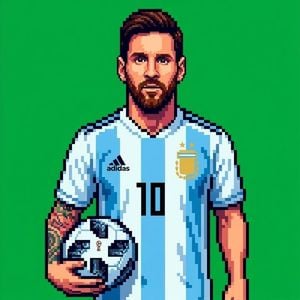
Creates a retro 16-bit or 32-bit pixel art profile picture from an uploaded reference image, maintaining the original pose and composition.

This template uses your photo — add one with the + button.
Create a square 1:1 profile picture using the uploaded image as the exact reference for the pose, composition, and pixel art style. Recreate the subject as detailed retro pixel art with large, clearly visible pixels, crisp stepped edges, bold dark outlines, dramatic pixelated shading, vibrant colors, and the sharp look of a classic 16-bit/32-bit arcade sprite. Use only a solid {argument name="background color" default="Pantone 354C green"} background ({argument name="hex code" default="#00B140"}). Do not include gradients, textures, text, logos, extra objects, or any photorealistic elements. Keep the raised glove, facial features, framing, and overall style exactly the same as in the reference image.
Create a square 1:1 profile picture using the uploaded image as the exact reference for the pose, composition, and pixel art style. Recreate the subject as detailed retro pixel art with large, clearly visible pixels, crisp stepped edges, bold dark outlines, dramatic pixelated shading, vibrant colors, and the sharp look of a classic 16-bit/32-bit arcade sprite. Use only a solid {argument name="background color" default="Pantone 354C green"} background ({argument name="hex code" default="#00B140"}). Do not include gradients, textures, text, logos, extra objects, or any photorealistic elements. Keep the raised glove, facial features, framing, and overall style exactly the same as in the reference image.
Edit the prompt in the box under the preview — the template's model and format are already selected — and press Generate. Your version appears right on this page.
Yes. You can change the subject, setting, lighting, mood, format, and available model controls before creating your image.
Opening and editing this template is free. Generating uses credits, shown on the Generate button when you are signed in.
Start with GPT Image 2, which is the model associated with this template. You can compare another compatible model for a different finish.
Follow a topic to a crawlable collection of related PicX Studio templates.