How do I use the Watercolor Sunset Portrait template?
Choose the primary action to open PicX Studio with the available template settings. Review the model and format, personalize the creative direction, and generate when ready.
Generates a nostalgic watercolor-and-charcoal portrait of a young woman against an ocean sunset with a handwritten Korean quote.
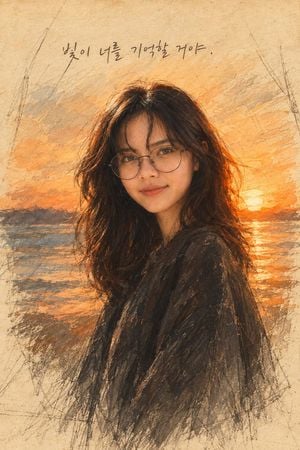
Create a timeless traditional watercolor portrait on aged beige textured paper, showing {argument name="subject description" default="a young woman with long dark wavy hair, round wire-frame glasses, soft natural makeup, and a calm slight smile"} in a three-quarter bust pose, facing the viewer. Preserve realistic natural facial proportions and a recognizable human likeness: detailed eyes, nose, lips, jawline, skin tone, and gentle expression. She wears {argument name="clothing" default="a loose dark charcoal shawl or coat"}. Set her against {argument name="background scene" default="a glowing orange sunset over the ocean with distant dark hills, shimmering water reflections, and the sun near the horizon"}. Use a hybrid style of delicate watercolor washes, charcoal pencil sketch lines, dry-brush texture, and expressive unfinished edges, with visible graphite construction marks around the border. The palette should be warm amber, burnt orange, sepia, muted blue-gray, and deep charcoal, with golden rim light in the hair. Add a single handwritten Korean phrase at the top center reading {argument name="handwritten quote" default="빛이 너를 기억할 거야."}. Vertical portrait composition, centered subject, nostalgic cinematic mood, soft paper grain, no modern UI elements, no watermark, no extra text.
Choose the primary action to open PicX Studio with the available template settings. Review the model and format, personalize the creative direction, and generate when ready.
Yes. You can change the subject, setting, lighting, mood, format, and available model controls before creating your image.
This template is free to open and customize. Generation usage is shown in PicX Studio before you create.
Start with GPT Image 2, which is the model associated with this template. You can compare another compatible model for a different finish.
Follow a topic to a crawlable collection of related PicX Studio templates.