How do I use the Pastel Pink Kurta Portrait Sketch template?
Choose the primary action to open PicX Studio with the available template settings. Review the model and format, personalize the creative direction, and generate when ready.
Generates a realistic pencil-and-watercolor portrait of a thoughtful South Asian man in traditional pastel attire for elegant profile or editorial artwork.
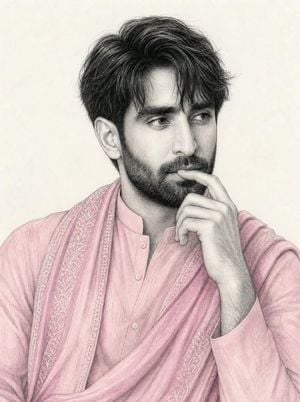
Create a refined hand-drawn portrait illustration of {argument name="character description" default="a handsome South Asian man in his late 20s with thick wavy black hair, strong brows, almond eyes, a straight nose, full lips, and a neatly trimmed dark beard"}. Show him from the chest up in a thoughtful three-quarter pose, head turned slightly to the viewer’s right, eyes looking off to the side, with his right index finger resting lightly against his lips and chin. Dress him in {argument name="outfit" default="a soft pastel pink traditional kurta with a matching draped shawl"}, including delicate embroidered floral borders on the shawl, subtle fabric folds, small front buttons, and a high band collar. Use a realistic pencil-and-charcoal portrait style with fine graphite linework, visible crosshatching, soft gray facial shading, and selective muted watercolor coloring only on the clothing. Keep the skin and hair mostly monochrome graphite, with detailed texture in the hair and beard. Background should be {argument name="background" default="a plain warm off-white paper texture"}, softly lit with no props, no text, no watermark, and no extra figures. The mood should be calm, elegant, introspective, and romantic, like a high-quality fashion portrait sketch.
Choose the primary action to open PicX Studio with the available template settings. Review the model and format, personalize the creative direction, and generate when ready.
Yes. You can change the subject, setting, lighting, mood, format, and available model controls before creating your image.
This template is free to open and customize. Generation usage is shown in PicX Studio before you create.
Start with GPT Image 2, which is the model associated with this template. You can compare another compatible model for a different finish.
Follow a topic to a crawlable collection of related PicX Studio templates.