How do I use the Indian Royal Bandhgala Portrait template?
Choose the primary action to open PicX Studio with the available template settings. Review the model and format, personalize the creative direction, and generate when ready.
Generates a luxurious ultra-realistic fashion portrait of a young Indian man in a terracotta bandhgala on a palace balcony at sunset.
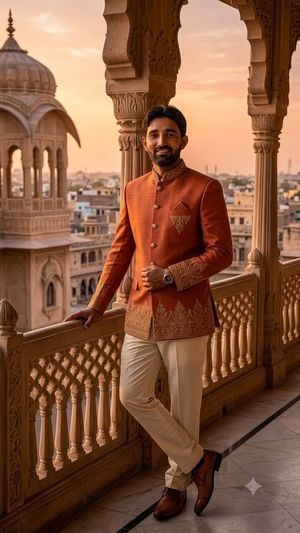
Create a premium ultra-realistic 8K full-body portrait of {argument name="character description" default="a handsome young Indian man"} standing on an ornate royal Indian palace balcony at sunset. He has short black hair, a neatly trimmed beard, warm medium-brown skin, natural skin texture, and a relaxed confident smile, looking directly at the camera. He wears {argument name="outfit" default="a unique terracotta-orange designer bandhgala jacket with gold embroidery on the collar, cuffs, pocket, and lower hem, paired with cream trousers"}, brown polished leather dress shoes, and a wristwatch. Pose him leaning casually against a carved sandstone balustrade, one hand resting on the railing and the other near the front buttons, with legs crossed naturally. The setting features intricate carved arches and pillars, a jali-style balcony railing, and a blurred heritage cityscape with a domed pavilion in the background. Use {argument name="lighting" default="warm golden-hour sunset lighting with a peach-orange sky"}, cinematic depth of field, realistic fabric texture, crisp facial detail, elegant luxury fashion editorial styling, shallow background blur, natural proportions, and high-end DSLR portrait realism. Vertical 9:16 composition, subject centered slightly right, full body visible from head to shoes. Avoid text, logos, watermarks, distorted hands, extra fingers, plastic skin, over-smoothing, or cartoon effects.
Choose the primary action to open PicX Studio with the available template settings. Review the model and format, personalize the creative direction, and generate when ready.
Yes. You can change the subject, setting, lighting, mood, format, and available model controls before creating your image.
This template is free to open and customize. Generation usage is shown in PicX Studio before you create.
Start with GPT Image 2, which is the model associated with this template. You can compare another compatible model for a different finish.
Follow a topic to a crawlable collection of related PicX Studio templates.