How do I use the Japanese Miniature Poster Ad template?
Choose the primary action to open PicX Studio with the available template settings. Review the model and format, personalize the creative direction, and generate when ready.
Generates a clean Japanese promotional poster showing one pet photo transformed into a miniature diorama poster for a photo service landing page or social ad.
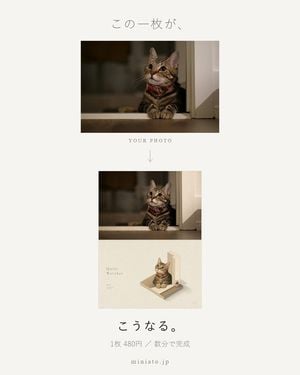
Goal: Create a minimalist Japanese promotional poster demonstrating a photo-to-miniature poster transformation service, using a tabby cat photo as the example. Canvas: Vertical 4:5 poster on a warm off-white background, centered composition, lots of negative space, soft editorial design, refined Japanese lifestyle aesthetic. Layout: At the top center place the Japanese headline 「この一枚が」 in thin gray handwritten-style typography. Below it, show the original photo as a landscape rectangle: a tabby cat with a red collar sitting at a window ledge at night, looking upward, warm indoor lighting, shallow depth of field. Under the photo, center the text “YOUR PHOTO” in small spaced serif capitals, then a thin downward arrow. Main demonstration: Below the arrow, place a larger vertical poster mockup. Its upper half repeats the same original cat photo unchanged. Its lower half becomes a miniature diorama illustration: the same tabby cat transformed into a small realistic figure sitting on a tiny beige platform beside a tall white wall/door frame, softly lit, with subtle shadows on an ivory background. Add small editorial text on the lower-left of this mini poster reading “Quiet Watcher” with tiny unreadable specification text beneath it, and tiny catalog-style marks in the lower-right. Bottom text: Under the mockup, center a bold Japanese line 「こうなる。」, then a smaller gray line 「1枚 480円 / 数分で完成」, and finally the website “miniato.jp” in spaced lowercase serif letters. Visual style: Minimal premium product ad, muted beige and gray palette, clean spacing, thin typography, soft shadows, photographic upper image, realistic miniature lower rendering, quiet and elegant mood. Use exactly 2 visible image panels before the bottom copy: 1 original landscape photo and 1 transformed vertical poster mockup. The transformed mockup contains exactly 2 stacked sections: the unchanged photo on top and the miniature diorama on bottom. Customizable details: Use {argument name="animal subject" default="a tabby cat with a red collar"}, {argument name="headline text" default="この一枚が"}, {argument name="result text" default="こうなる。"}, {argument name="price line" default="1枚 480円 / 数分で完成"}, and {argument name="website" default="miniato.jp"}.
Choose the primary action to open PicX Studio with the available template settings. Review the model and format, personalize the creative direction, and generate when ready.
Yes. You can change the subject, setting, lighting, mood, format, and available model controls before creating your image.
This template is free to open and customize. Generation usage is shown in PicX Studio before you create.
Start with GPT Image 2, which is the model associated with this template. You can compare another compatible model for a different finish.
Follow a topic to a crawlable collection of related PicX Studio templates.