Kodak Portra Film Style Mirror Selfie
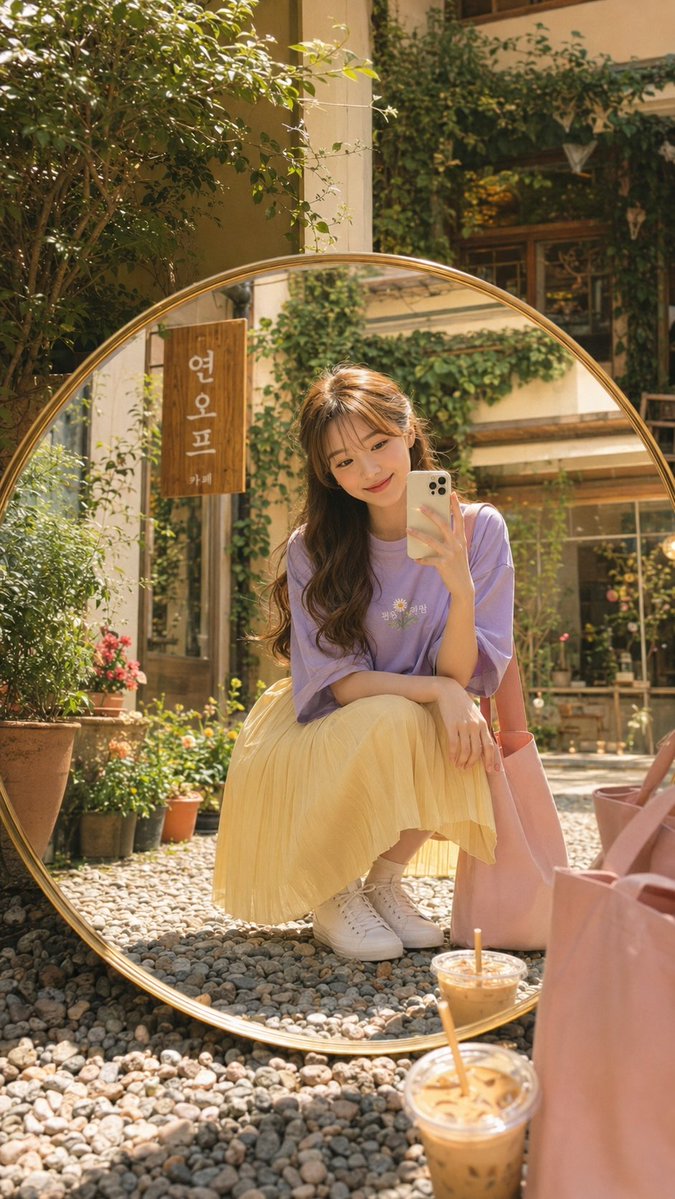
Hyper-realistic Kodak Portra 400 film photograph, dreamy soft aesthetic, warm natural sunlight, nostalgic {argument name="atmosphere" default="Korean café"} atmosphere, vertical 9:16 composition.
A beautiful {argument name="subject" default="young woman"} crouching gracefully in front of a large round gold-framed mirror placed on a pebble-covered courtyard, taking a mirror selfie with her smartphone. She looks at the screen with a gentle smile and relaxed expression.
Appearance: Fair glowing skin, soft natural makeup, subtle peach blush, glossy pink lips, delicate eyeliner, bright expressive eyes. Long light-brown wavy hair with soft curtain bangs and romantic curls cascading over her shoulders.
Outfit: {argument name="outfit" default="Oversized pastel lavender T-shirt featuring a small daisy illustration and subtle Korean typography"}, high-waisted butter-yellow pleated midi skirt, white crew socks, clean white canvas sneakers, soft pink shoulder tote bag.
Pose: Comfortable squat with knees together, one arm resting naturally on her leg while holding her phone. Relaxed shoulders, candid lifestyle photography feel, effortless charm.
Foreground: Two transparent iced latte cups with visible ice cubes, paper straws, soft condensation. Elegant pink tote bags beside the mirror. Creamy foreground bokeh and dreamy highlights.
Midground: Large circular gold-framed mirror reflecting the woman perfectly. Detailed gravel stones, warm sunlight, realistic reflections, soft shadows, potted plants surrounding the mirror, cinematic depth.
Background: Aesthetic Korean-style café exterior with cream-colored walls, wooden-framed windows, Korean signboard, lush ivy vines, flowers, potted plants, and a quiet pedestrian alley. Warm golden-hour sunlight filtering through trees, dreamy foliage bokeh.
Photography Style: Kodak Portra 400, warm pastel tones, soft focus, creamy highlights, realistic skin texture, subtle film grain, shallow depth of field, environmental portrait, HDR, photorealistic, magazine-quality editorial photography, 85mm lens, f/1.8, atmospheric depth, elegant composition, foreground-midground-background layering.
Negative Prompt: anime, cartoon, illustration, CGI, 3D render, painting, blurry face, distorted hands, extra fingers, duplicate objects, unrealistic proportions, overprocessed skin, harsh shadows, oversaturated colors, artificial lighting, watermark, logo, text, cropped subject, low quality.













![nano-banana-grwm-mirror-selfie-pink — Nano Banana 2
Prompt (JSON):
{
"type": "image_prompt",
"description": {
"subject": {
"main": "[NAME] com o](/_next/image?url=https%3A%2F%2Fcdn.picxstudio.com%2Fuploads%2Ftweet_img_10a_612da6f9-cf6d-417e-bdd5-cc1300d1d830.jpg&w=828&q=100)

![Naive doodle-style subject illustration — A doodle-style {argument name="subject" default="[subject]"}, naive lines, humorous shape exaggeration](https://pbs.twimg.com/media/G6Wl2YxbsAARB2b.jpg)












![Fire Cooking Photography with Ember and Smoke — [{argument name="dish" default="DISH"}] emerging dramatically from darkness, resting directly on glo…](https://pbs.twimg.com/media/HE_qFUyXQAAii2F.jpg)