
Red Triptych Build the Future Poster
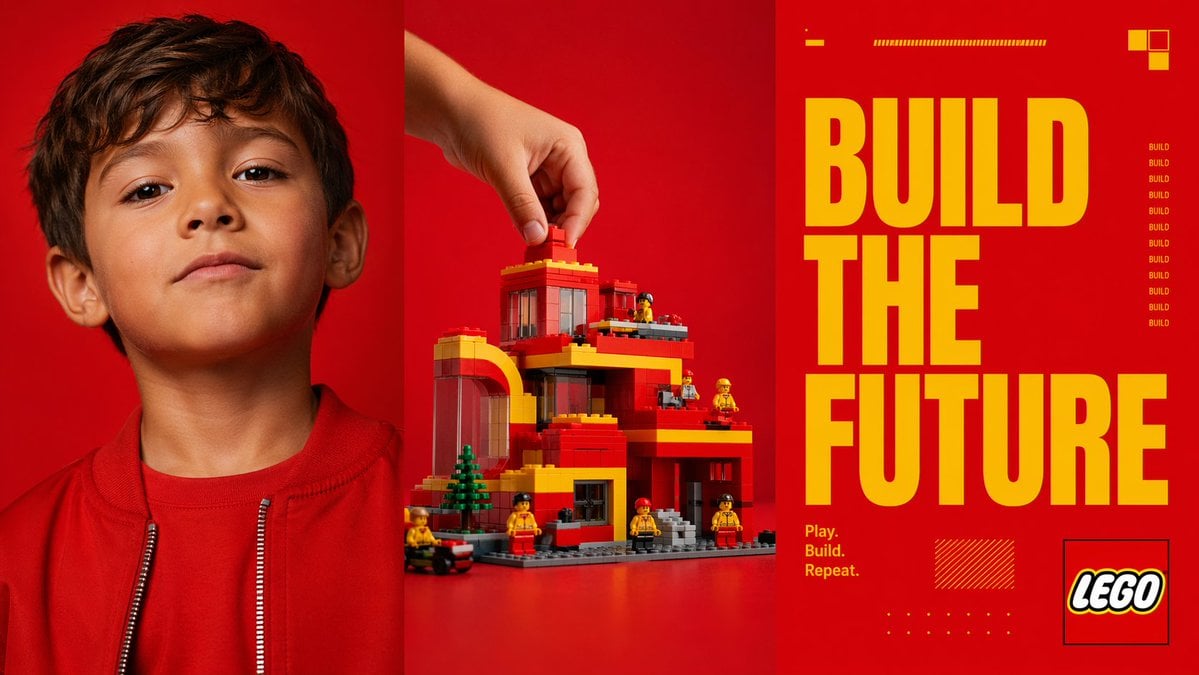
This prompt generates a bold three-panel toy-brand style advertisement combining a child portrait, a hand-built brick structure, and oversized slogan typography for campaign mockups or editorial posters.
- Prompt included
- Model and format preset
- Free template
The prompt behind this image
Copy the exact prompt behind Red Triptych Build the Future Poster, or open it in the studio and make it yours.
- Type
- triptych advertising poster
- Style
- bold modern toy-brand campaign, high-contrast studio photography mixed with graphic editorial design
- Format
- three equal vertical panels side by side
- Color Palette › Dominant Background
- vivid saturated red
- Color Palette › Accent
- bright yellow
- Color Palette › Secondary
- orange-red, black, white, gray
- Subject › Theme
- creative building and imagination
- Subject › Brand Style
- construction toy aesthetic
- Subject › Headline
- {argument name="headline text" default="BUILD THE FUTURE"}
- Subject › Tagline
- {argument name="tagline" default="Play. Build. Repeat."}
- Layout › Sections › 0 › Title
- left portrait panel
- Layout › Sections › 0 › Position
- left third
- Layout › Sections › 0 › Count
- 1
- Layout › Sections › 0 › Labels
- child portrait
- Layout › Sections › 1 › Title
- center build panel
- Layout › Sections › 1 › Position
- middle third
- Layout › Sections › 1 › Count
- 1
- Layout › Sections › 1 › Labels
- hand placing brick on toy building
- Layout › Sections › 2 › Title
- right typography panel
- Layout › Sections › 2 › Position
- right third
- Layout › Sections › 2 › Count
- 1
- Layout › Sections › 2 › Labels
- headline and brand graphics
- Layout › Panel Dividers
- thin dark vertical separations between all 3 panels
- Left Panel › Subject
- close-cropped portrait of a child from chest up
Raw JSON
{"type":"triptych advertising poster","style":"bold modern toy-brand campaign, high-contrast studio photography mixed with graphic editorial design","format":"three equal vertical panels side by side","color_palette":{"dominant_background":"vivid saturated red","accent":"bright yellow","secondary":"orange-red, black, white, gray"},"subject":{"theme":"creative building and imagination","brand_style":"construction toy aesthetic","headline":"{argument name=\"headline text\" default=\"BUILD THE FUTURE\"}","tagline":"{argument name=\"tagline\" default=\"Play. Build. Repeat.\"}"},"layout":{"sections":[{"title":"left portrait panel","position":"left third","count":1,"labels":["child portrait"]},{"title":"center build panel","position":"middle third","count":1,"labels":["hand placing brick on toy building"]},{"title":"right typography panel","position":"right third","count":1,"labels":["headline and brand graphics"]}],"panel_dividers":"thin dark vertical separations between all 3 panels"},"left_panel":{"subject":"close-cropped portrait of a child from chest up","counted_elements":{"people":1,"garments":2,"visible_facial_features":2},"appearance":{"age":"young child","hair":"short dark brown hair","clothing":["red crew-neck shirt","red zip-front jacket with silver zipper teeth"],"visible_features":["left ear visible","neck and lower face visible"]},"framing":"top of head slightly cropped, centered in panel","background":"solid vivid red seamless studio backdrop"},"center_panel":{"subject":"toy architecture scene being assembled","counted_elements":{"hands":1,"main_building":1,"mini_figures":6,"trees":1,"vehicles":1,"loose_bricks_being_placed":1},"action":"a human hand enters from the upper left and places a single red brick on the roof","building":{"style":"block-built modern multi-level house or civic building","colors":["red","yellow","gray","transparent dark window panels"],"features":["arched left-side structure","flat roof levels","multiple balconies or terraces","large windows","gray baseplate","front steps"]},"surroundings":{"mini_figures":"6 small construction-worker-like toy figures in yellow and red distributed around the structure","trees":"1 small green conifer-like tree near front left","vehicle":"1 small black and red wheeled vehicle at the lower left edge"},"background":"solid vivid red seamless studio backdrop","surface":"red tabletop continuous with backdrop"},"right_panel":{"subject":"graphic poster typography","counted_elements":{"headline_words":3,"small_repeated_word_instances":9,"decorative_blocks_top_right":3,"small_horizontal_bar_groups_top":2,"tagline_lines":3,"logo_boxes":1,"decorative_hatched_boxes":1,"decorative_dot_grids":1},"typography":{"main_text":"{argument name=\"headline text\" default=\"BUILD THE FUTURE\"}","arrangement":"three stacked lines, one word per line, very large condensed bold sans-serif in yellow occupying most of panel height","tagline":"{argument name=\"tagline\" default=\"Play. Build. Repeat.\"}","tagline_position":"lower left of right panel in small yellow text on 3 lines","repeated_side_text":"the word BUILD repeated vertically 9 times in small yellow text along the mid-right side"},"graphics":{"top_details":["1 short yellow dash near upper left","1 long thin yellow striped bar near top center"],"top_right":["cluster of 3 small square blocks in yellow and orange"],"bottom_details":["1 yellow hatched rectangle near lower center-left","1 small yellow dot grid near bottom center"],"logo":"{argument name=\"brand name\" default=\"LEGO\"} logo inside a thin black outlined square at lower right"},"background":"solid vivid red"},"lighting":"clean commercial studio lighting, crisp and saturated, minimal shadow, polished ad-campaign finish","composition":"striking triptych composition with photographic portrait on left, product build action in center, and oversized typographic slogan panel on right"}How to use Red Triptych Build the Future Poster in 3 steps
- 1Upload ImagePNG, JPG or paste
Add your photo
Upload the photo the template builds on. The prompt, model and format are already set.
- 2…a portrait of your subject in softgolden-hour light, 85mm…
Personalize
Edit the subject and creative details for your destination.
- 3Generate
Generate
Press Generate — your image is created in PicX Studio, so you can compare it with the original and refine one variable at a time.
More like this
Templates with the same subject, style or setup. Open one to see its prompt.

Panning Motion Soccer Kick Poster
Retro Geometric Future Culture Poster

Japan Travel Brochure Poster
Red New Year Countdown Poster

Cinematic Future Self Motivational Poster
Red Silhouette Team Event Poster

Cartoon TV Show Poster Pack

Trendy Cafe Drink Promo Poster

Urban Fashion Editorial Collage Streetwear Poster

Premium Fashion Editorial Cover Layout System

Polo Ralph Lauren Luxury American Heritage Fashion Campaign

Monochrome Halftone Editorial Fashion Poster
Make it yours
Red Triptych Build the Future Poster works as-is. These are the safest ways to change it without losing the look.
Swap the setting
Keep the rest of the prompt and replace the location block. The current setting is “vivid saturated red”.
Swap the light
One lighting change is enough to compare takes. Current light: “clean commercial studio lighting, crisp and saturated, minimal shadow, polished ”.
Change one field
Copy a single group, rewrite it, and generate again so you can see what that field is doing.
| If the result… | Why | Fix |
|---|---|---|
| The result drifts from the preview | Too many fields changed at once. | Reuse Red Triptych Build the Future Poster as-is first, then change one group — subject, light, or setting. |
| GPT Image 2 ignores part of the JSON | Some models flatten or skip nested keys. | Keep the same values and paste them as a short paragraph instead. |
More GPT Image 2 templates
Other prompts made for GPT Image 2.

Six VTuber Japanese Logo Sheet

Realistic Portrait of Woman and Deer

The Vista Modular Condo Poster

AI Model Routing Comparison Infographic

2.5D Anime Art Board

Isometric Productivity Desk Scene

New York Double Exposure Poster

Four-Panel AI Landscape Comparison

Japanese Tatami Lifestyle Magazine Cover

NESCAFÉ Coffee Map Poster
More image prompts
Fresh picks from across the catalog.
Sushi Commercial Photography and Exploded Diagram Prompt
Anonymized 2000s Family Dinner Photo

Ultra-realistic Indian Couple Cooking Portrait
Cinematic Black & White Portrait with Face Match
Humorous Temple Signboard with Goofy Monk
Candid Holiday Portrait with Sequin Dress and Red Hair

Cinematic 3D Action Advertisement Prompt

Hyper-Detailed Footballer Portrait Sketch Prompt
Anime Now Playing School Route Poster

Beauty Landing Page Hero Section
Browse template categories
Red Triptych Build the Future Poster questions
How do I use the Red Triptych Build the Future Poster template?
Add your photo if the template asks for one, edit the prompt if you like — the template's model and format are already selected — and press Generate. Your version opens in PicX Studio.
Can I customize the Red Triptych Build the Future Poster template?
Yes. You can change the subject, setting, lighting, mood, format, and available model controls before creating your image.
Is the Red Triptych Build the Future Poster template free?
Opening and editing this template is free. Generating uses credits, shown on the Generate button when you are signed in.
Which AI model should I use?
Start with GPT Image 2, which is the model associated with this template. You can compare another compatible model for a different finish.
Looking for something else? Browse all templates.

Your photo, any look
Thousands of ready templates for every top image and video model, from one credit balance.