
Exploded Technical Diagram Poster
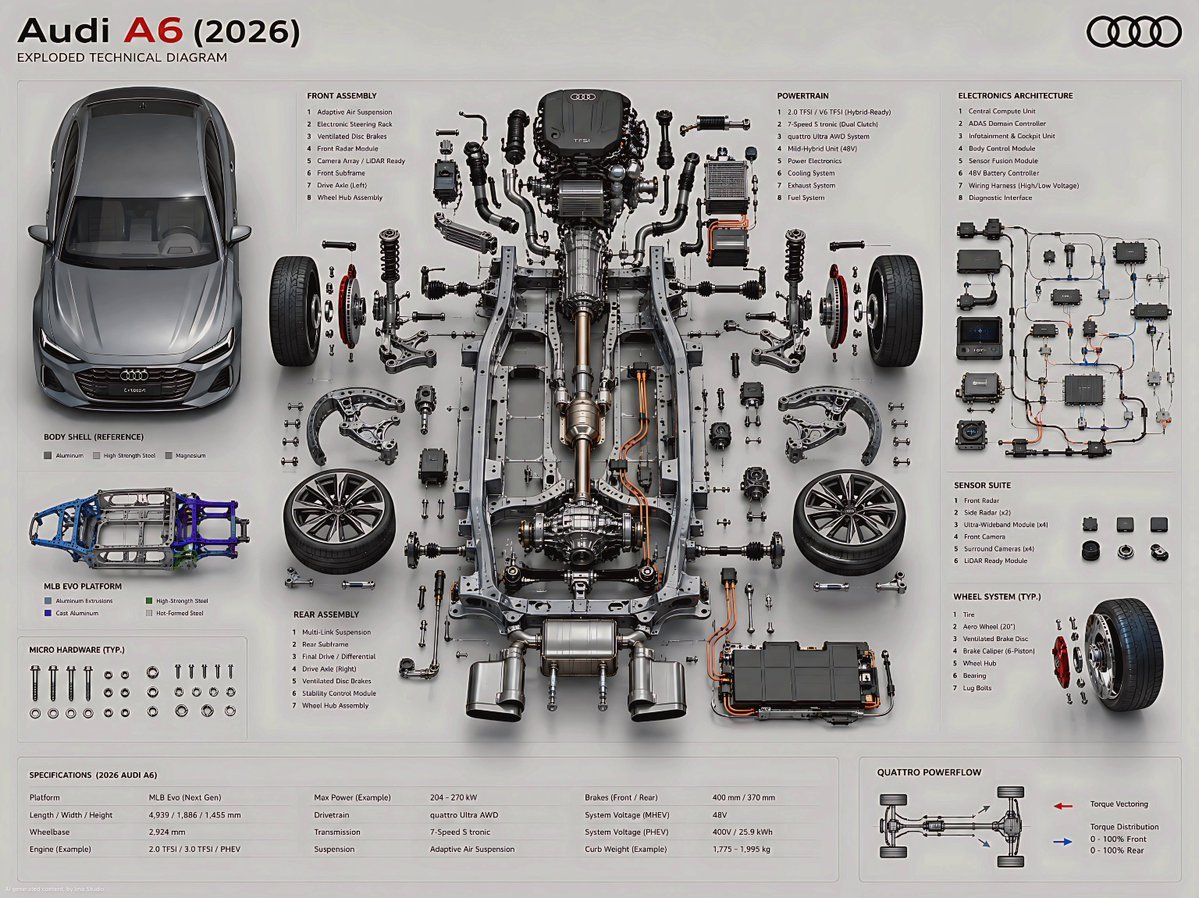
A highly detailed engineering prompt for creating a premium exploded technical diagram of a modern vehicle chassis and components.
- Prompt included
- Model and format preset
- Free template
The prompt behind this image
Copy the exact prompt behind Exploded Technical Diagram Poster, or open it in the studio and make it yours.
Create an ultra-high fidelity exploded technical diagram of a {argument name="car model" default="2026 Audi A6"}, presented as a premium engineering poster. Audi A6 (2026)Maintain a true orthographic top/front hybrid view with zero perspective distortion.CORE COMPOSITION RULE Place the primary chassis or structural platform perfectly centered as the core spine. Position the main body shell separately (left or top), aligned parallel as a reference form while preserving accurate proportions, stance, and real-world geometry of the 2026 Audi A6.EXPLODED ENGINEERING SYSTEM (MULTI-LAYER DEPTH STRUCTURE) Design a multi-layered exploded system with components separated across depth (Z-axis) and planar spacing:Micro hardware (bolts, screws, washers): tightly grouped in precision clusters Functional assemblies: moderately spaced with clear mechanical relationships Major systems: widely separated for structural clarity and engineering hierarchy SUBSYSTEM BREAKDOWN (MODERN AUDI ARCHITECTURE) Organize parts into realistic automotive engineering subsystems:Front Assemblyadaptive suspension system (Audi drive select calibrated damping) precision steering rack with electronic assist advanced braking system (ventilated discs + regenerative integration if hybrid) sensor suite (front radar, LiDAR-ready modules, camera array) Rear Assemblyrear multi-link suspension system drivetrain assembly (quattro AWD torque distribution unit) rear differential system (or integrated e-axle for hybrid/EV variant) stability and traction control modules Chassis / Structurelightweight MLB Evo / next-gen Audi modular platform architecture reinforced aluminum and high-strength steel hybrid frame vibration isolation subframes crash-optimized energy absorption zones Powertrainturbocharged inline-4 / V6 hybrid-compatible engine architecture transmission system (dual-clutch S tronic representation) intake, exhaust, and thermal management routing optional mild-hybrid or plug-in hybrid battery integration partial internal exposure showing combustion or electric assist layering Electronics SystemECU and domain control architecture (centralized compute unit) wiring harness with ultra-clean routed geometry driver assistance systems (ADAS module cluster) infotainment + digital cockpit processing unit sensor fusion computing core Wheel System4 wheels symmetrically placed rim, tire, brake disc, hub assembly separated in exploded layers precise axle alignment and rotational geometry Audi signature aerodynamic rim design ENGINEERING REALISM RULE Maintain strict mechanical connectivity between all systems Align shafts, axles, and torque paths accurately Preserve left/right symmetry with controlled functional asymmetry only Group micro-components in structured clusters near their assemblies Avoid decorative or random placement — everything must reflect real automotive engineering logic VISUAL STYLE & MATERIAL LANGUAGE Use modern Audi design precision:brushed aluminum + matte graphite structural materials carbon-reinfo
How to use Exploded Technical Diagram Poster in 3 steps
- 1
Open
The prompt is already in the box next to the preview, with the template's model and format selected.
- 2…a portrait of your subject in softgolden-hour light, 85mm…
Personalize
Edit the subject and creative details for your destination.
- 3Generate
Generate
Press Generate — your image is created in PicX Studio, so you can compare it with the original and refine one variable at a time.
More like this
Templates with the same subject, style or setup. Open one to see its prompt.
Technical exploded view diagram of a device

Japan Travel Brochure Poster
Technical Cutaway Diagram

Cartoon TV Show Poster Pack

Trendy Cafe Drink Promo Poster

Urban Fashion Editorial Collage Streetwear Poster

Premium Fashion Editorial Cover Layout System

Polo Ralph Lauren Luxury American Heritage Fashion Campaign

Monochrome Halftone Editorial Fashion Poster

Retro Mirror Luxury Fashion Campaign Poster

Luxury Fashion Campaign Typography Poster System

Premium Fashion Editorial Campaign Poster System
Make it yours
Exploded Technical Diagram Poster works as-is. These are the safest ways to change it without losing the look.
Change one field
Copy a single group, rewrite it, and generate again so you can see what that field is doing.
Keep the frame, change the subject
Hold the composition and light of Exploded Technical Diagram Poster, then swap wardrobe, props or the person for a new take.
| If the result… | Why | Fix |
|---|---|---|
| The result drifts from the preview | Too many fields changed at once. | Reuse Exploded Technical Diagram Poster as-is first, then change one group — subject, light, or setting. |
| The model over-stylizes the scene | The prose prompt leaves finish and camera underspecified. | Add one camera or lighting sentence and stay on GPT Image 2. |
More GPT Image 2 templates
Other prompts made for GPT Image 2.

Six VTuber Japanese Logo Sheet

Realistic Portrait of Woman and Deer

The Vista Modular Condo Poster

AI Model Routing Comparison Infographic

2.5D Anime Art Board

Isometric Productivity Desk Scene

New York Double Exposure Poster

Four-Panel AI Landscape Comparison

Japanese Tatami Lifestyle Magazine Cover

NESCAFÉ Coffee Map Poster
More image prompts
Fresh picks from across the catalog.

Raw iPhone Street Photo of Woman

Dynamic Video Prompt: Banana Float Rocket

Cinematic Portrait of Middle-Aged Man in Suit

MacBook Webcam Window Photo

Man Sleeping on Giant Smartphone

Korean Hanbok Fashion Triptych

Unexpected High-End Product Concepts Prompt

Sophisticated City Balcony Portrait Prompt

High-Fashion Winter Editorial in Snow

3D Digital Fashion Artwork
Browse template categories
Exploded Technical Diagram Poster questions
How do I use the Exploded Technical Diagram Poster template?
Add your photo if the template asks for one, edit the prompt if you like — the template's model and format are already selected — and press Generate. Your version opens in PicX Studio.
Can I customize the Exploded Technical Diagram Poster template?
Yes. You can change the subject, setting, lighting, mood, format, and available model controls before creating your image.
Is the Exploded Technical Diagram Poster template free?
Opening and editing this template is free. Generating uses credits, shown on the Generate button when you are signed in.
Which AI model should I use?
Start with GPT Image 2, which is the model associated with this template. You can compare another compatible model for a different finish.
Looking for something else? Browse all templates.

Your photo, any look
Thousands of ready templates for every top image and video model, from one credit balance.