How do I use the Photorealistic Shibuya Street Selfie template?
Choose the primary action to open PicX Studio with the available template settings. Review the model and format, personalize the creative direction, and generate when ready.
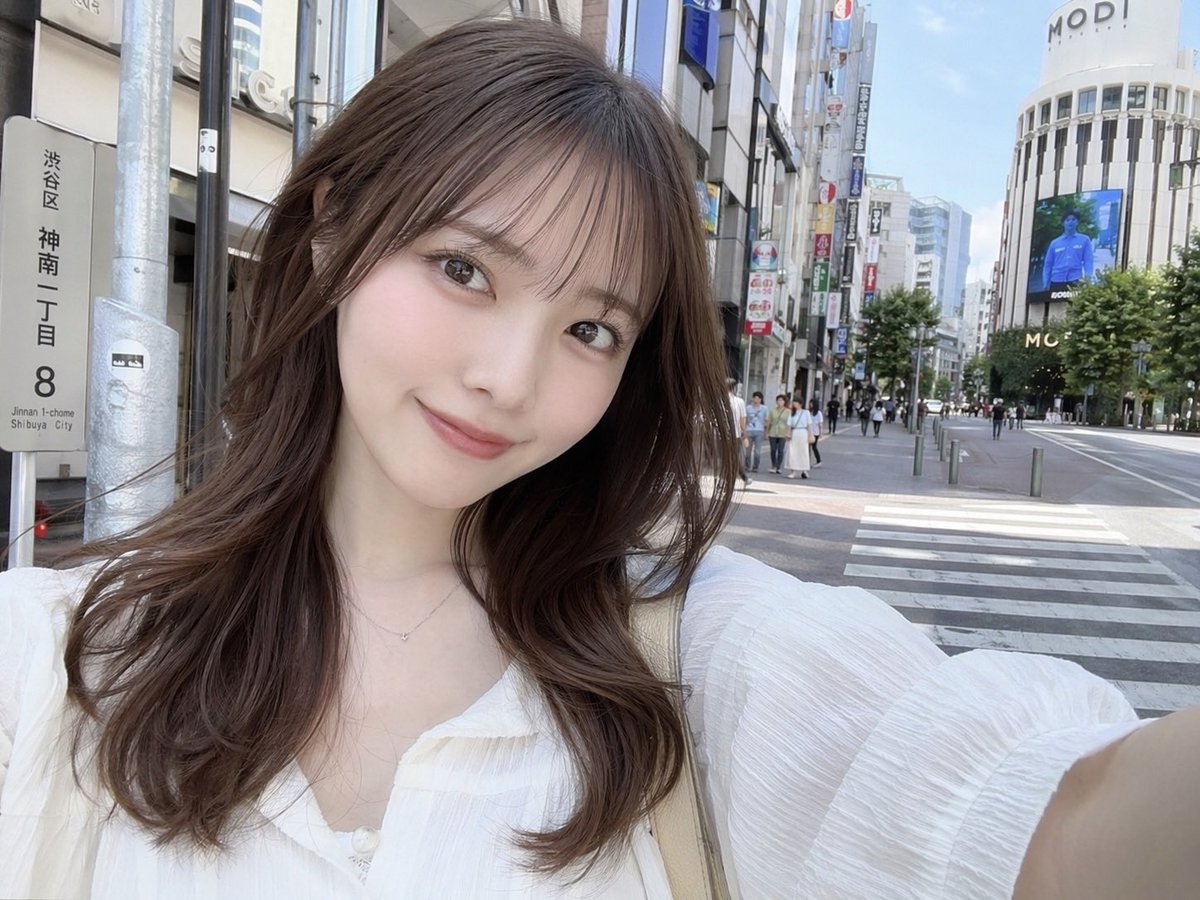
Generates a photorealistic selfie of a young woman on a Japanese city street with customizable text on signs and buildings. (free to use) — Free AI image template on PicX Studio.
A photorealistic selfie of a young Japanese woman standing on a sunny city street in {argument name="location" default="Shibuya, Japan"}. She has a soft smile, fair skin, light makeup, and {argument name="hair style" default="long wavy brown hair with see-through bangs"}. She is wearing a {argument name="clothing" default="white textured blouse"} with a delicate necklace and a beige shoulder bag strap visible. The background features a bustling urban environment with a crosswalk, pedestrians on the sidewalk, and a large white commercial building displaying the text {argument name="building text" default="MODI"} at the top along with a digital billboard. On the left side of the frame, a vertical street sign clearly displays the text {argument name="street sign text" default="渋谷区 神南一丁目 8"}. The image has a bright, natural daylight aesthetic typical of a casual social media photo.
Use Photorealistic Shibuya Street Selfie to plan an AI image around gpt-image-2 generation, themes such as en and gpt-image-2. Match the preview's composition first, then personalize the subject, setting, and mood for your own project.
Use the primary action to load the template settings in PicX Studio.
Adjust the subject and creative details for your destination.
Create the image, compare the result with the preview, and refine one variable at a time.
A continuous mix — similar concepts first, woven with same-model prompts and fresh picks from the catalog.
Choose the primary action to open PicX Studio with the available template settings. Review the model and format, personalize the creative direction, and generate when ready.
Yes. You can change the subject, setting, lighting, mood, format, and available model controls before creating your image.
This template is free to open and customize. Generation usage is shown in PicX Studio before you create.
Start with gpt-image-2, which is the model associated with this template. You can compare another compatible model for a different finish.
Follow a topic to a crawlable collection of related PicX Studio templates.
39,157 public templates available. Verified via the PicX Studio public templates API; refreshed hourly.
A continuous mix — similar concepts first, woven with same-model prompts and fresh picks from the catalog.