
Neon Loop Mode Music App Poster
A futuristic Spotify-style mobile app concept poster showcasing a loop-listening experience UI, suitable for redesign presentations, product concepts, and social media case studies.
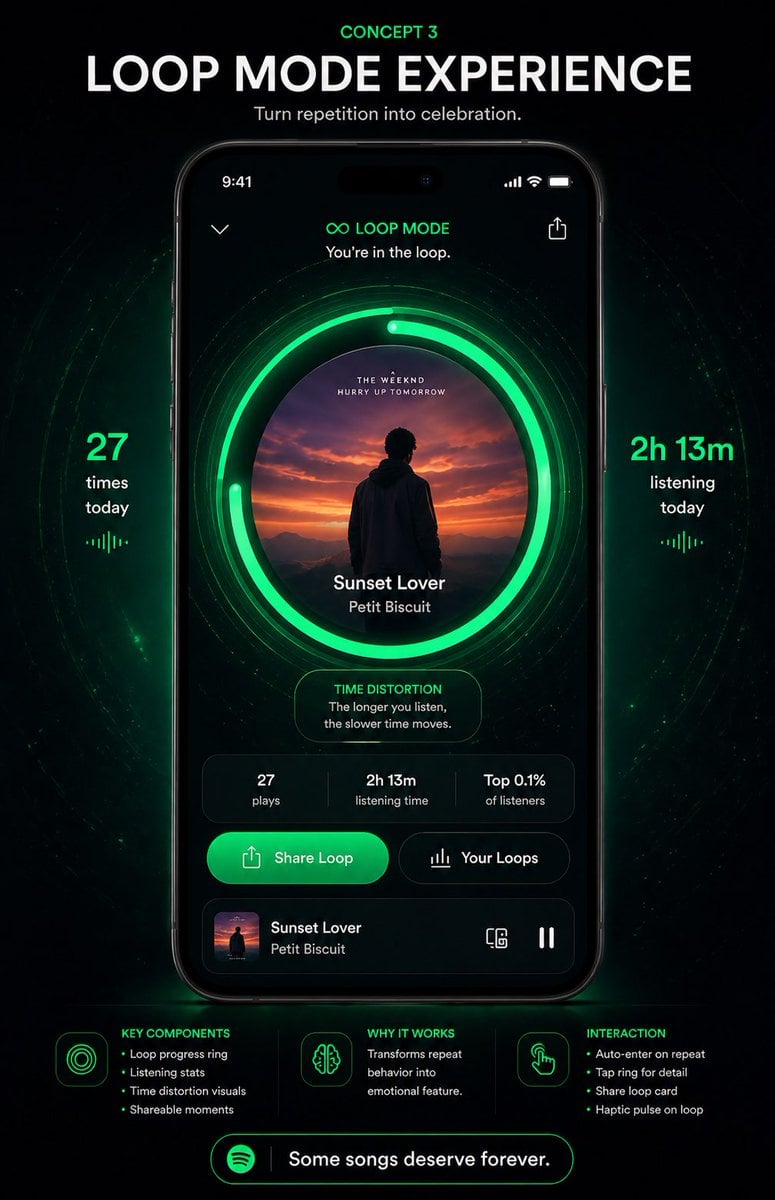
- Prompt included
- Model and format preset
- Free template
The prompt behind this image
Copy the exact prompt behind Neon Loop Mode Music App Poster, or open it in the studio and make it yours.
- Type
- music app concept poster
- Brand
- Spotify-inspired premium UI concept
- Theme
- futuristic neon green on black, immersive repetition as celebration
- Poster › Background
- deep black with subtle cosmic texture, faint particles, and concentric glowing green wave rings radiating behind the phone
- Poster › Aspect Ratio
- portrait 9:16
- Poster › Style
- high-end product presentation, sleek app redesign mockup, dramatic glow, crisp typography, polished UI, premium tech advertising
- Headline › Kicker
- {argument name="concept label" default="CONCEPT 3"}
- Headline › Title
- {argument name="headline text" default="LOOP MODE EXPERIENCE"}
- Headline › Subtitle
- {argument name="tagline" default="Turn repetition into celebration."}
- Centerpiece › Device
- front-facing modern smartphone centered vertically
- Centerpiece › Screen › Status Bar
- 9:41 time, signal, wifi, battery
- Centerpiece › Screen › Top Controls
- back chevron left, share icon right
- Centerpiece › Screen › Mode Header › Icon
- infinity symbol
- Centerpiece › Screen › Mode Header › Title
- LOOP MODE
- Centerpiece › Screen › Mode Header › Subtitle
- You're in the loop.
- Centerpiece › Screen › Main Visual › Artwork Shape
- large centered circle
- Centerpiece › Screen › Main Visual › Artwork
- sunset scene with a silhouetted person facing distant mountains and orange-purple sky
- Centerpiece › Screen › Main Visual › Ring System › Count
- 3
- Centerpiece › Screen › Main Visual › Ring System › Description
- 1 album-art circle plus 2 bright segmented neon-green loop progress rings around it, with additional faint concentric halo lines
- Centerpiece › Screen › Main Visual › Track Info › Title
- {argument name="song title" default="Sunset Lover"}
- Centerpiece › Screen › Main Visual › Track Info › Artist
- {argument name="artist name" default="Petit Biscuit"}
- Centerpiece › Screen › Insight Card › Title
- TIME DISTORTION
- Centerpiece › Screen › Insight Card › Text
- The longer you listen, the slower time moves.
- Centerpiece › Screen › Stats Row › Count
- 3
Raw JSON
{"type":"music app concept poster","brand":"Spotify-inspired premium UI concept","theme":"futuristic neon green on black, immersive repetition as celebration","poster":{"background":"deep black with subtle cosmic texture, faint particles, and concentric glowing green wave rings radiating behind the phone","aspect_ratio":"portrait 9:16","style":"high-end product presentation, sleek app redesign mockup, dramatic glow, crisp typography, polished UI, premium tech advertising"},"headline":{"kicker":"{argument name=\"concept label\" default=\"CONCEPT 3\"}","title":"{argument name=\"headline text\" default=\"LOOP MODE EXPERIENCE\"}","subtitle":"{argument name=\"tagline\" default=\"Turn repetition into celebration.\"}"},"centerpiece":{"device":"front-facing modern smartphone centered vertically","screen":{"status_bar":"9:41 time, signal, wifi, battery","top_controls":["back chevron left","share icon right"],"mode_header":{"icon":"infinity symbol","title":"LOOP MODE","subtitle":"You're in the loop."},"main_visual":{"artwork_shape":"large centered circle","artwork":"sunset scene with a silhouetted person facing distant mountains and orange-purple sky","ring_system":{"count":3,"description":"1 album-art circle plus 2 bright segmented neon-green loop progress rings around it, with additional faint concentric halo lines"},"track_info":{"title":"{argument name=\"song title\" default=\"Sunset Lover\"}","artist":"{argument name=\"artist name\" default=\"Petit Biscuit\"}"}},"insight_card":{"title":"TIME DISTORTION","text":"The longer you listen, the slower time moves."},"stats_row":{"count":3,"items":["27 plays","2h 13m listening time","Top 0.1% of listeners"]},"action_buttons":{"count":2,"items":["Share Loop","Your Loops"]},"mini_player":{"thumbnail":"same sunset album art","title":"Sunset Lover","artist":"Petit Biscuit","right_icons":["device/connect icon","pause icon"]}}},"side_metrics":{"count":2,"left":{"value":"27","label":"times today","decoration":"small vertical equalizer glyph below"},"right":{"value":"2h 13m","label":"listening today","decoration":"small vertical equalizer glyph below"}},"bottom_info":{"sections":[{"title":"KEY COMPONENTS","position":"bottom left","count":4,"labels":["Loop progress ring","Listening stats","Time distortion visuals","Shareable moments"]},{"title":"WHY IT WORKS","position":"bottom center","count":1,"labels":["Transforms repeat behavior into emotional feature."]},{"title":"INTERACTION","position":"bottom right","count":4,"labels":["Auto-enter on repeat","Tap ring for detail","Share loop card","Haptic pulse on loop"]}],"footer_pill":{"icon":"Spotify-like circular logo","text":"Some songs deserve forever."}},"colors":{"primary":"electric Spotify green glow","secondary":"black, charcoal, dark gray","accent":"white typography and subtle emerald highlights"},"lighting":"strong green bloom around progress rings and beneath the phone, with soft vignette edges"}How to use Neon Loop Mode Music App Poster in 3 steps
- 1Upload ImagePNG, JPG or paste
Add your photo
Upload the photo the template builds on. The prompt, model and format are already set.
- 2…a portrait of your subject in softgolden-hour light, 85mm…
Personalize
Edit the subject and creative details for your destination.
- 3Generate
Generate
Press Generate — your image is created in PicX Studio, so you can compare it with the original and refine one variable at a time.
More like this
Templates with the same subject, style or setup. Open one to see its prompt.

Neon Glitch Cyber Symbiote Music Poster
Synthwave Retro Superhero Music Poster

Cartoon TV Show Poster Pack
Victory Aura Superhero Neon Poster
Victory Aura Football Poster

Gpt2 Youtube Thumbnail Anime Music Bootcamp Promo Poster

Our Song was on a Cassette

80s Neon Disco Night

Japan Travel Brochure Poster
Naruto Uzumaki Baryon Mode Poster
Swiss Geometric Music Poster
Dark Mode Dictionary Entry App
Make it yours
Neon Loop Mode Music App Poster works as-is. These are the safest ways to change it without losing the look.
Swap the setting
Keep the rest of the prompt and replace the location block. The current setting is “deep black with subtle cosmic texture, faint particles, and concentric glowing g”.
Swap the light
One lighting change is enough to compare takes. Current light: “strong green bloom around progress rings and beneath the phone, with soft vignet”.
Change one field
Copy a single group, rewrite it, and generate again so you can see what that field is doing.
| If the result… | Why | Fix |
|---|---|---|
| The result drifts from the preview | Too many fields changed at once. | Reuse Neon Loop Mode Music App Poster as-is first, then change one group — subject, light, or setting. |
| GPT Image 2 ignores part of the JSON | Some models flatten or skip nested keys. | Keep the same values and paste them as a short paragraph instead. |
More GPT Image 2 templates
Other prompts made for GPT Image 2.

Six VTuber Japanese Logo Sheet

Realistic Portrait of Woman and Deer

The Vista Modular Condo Poster

AI Model Routing Comparison Infographic

2.5D Anime Art Board

Isometric Productivity Desk Scene

New York Double Exposure Poster

Four-Panel AI Landscape Comparison

Japanese Tatami Lifestyle Magazine Cover

NESCAFÉ Coffee Map Poster
More image prompts
Fresh picks from across the catalog.
Sprite sheet for 2D NES platformer

Red Studio Fashion Editorial with Motion Echo Effect

Soccer Fans Hidden Camera Cinematic Shot
Surrealist Fashion Brand Poster
Sci-Fi Celestial Voyager Character Sheet
Nano Banana Pro Prompt for Teto Kasane in Pirate Attire
Soft Focus High-Angle Selfie Prompt
Dramatic Action Scene Image Generation Prompt (Lovart/Nano Banana Pro)
Lounge Suit Cinematic Portrait
Urban Fantasy Coexistence Crossing
Browse template categories
Neon Loop Mode Music App Poster questions
How do I use the Neon Loop Mode Music App Poster template?
Add your photo if the template asks for one, edit the prompt if you like — the template's model and format are already selected — and press Generate. Your version opens in PicX Studio.
Can I customize the Neon Loop Mode Music App Poster template?
Yes. You can change the subject, setting, lighting, mood, format, and available model controls before creating your image.
Is the Neon Loop Mode Music App Poster template free?
Opening and editing this template is free. Generating uses credits, shown on the Generate button when you are signed in.
Which AI model should I use?
Start with GPT Image 2, which is the model associated with this template. You can compare another compatible model for a different finish.
Looking for something else? Browse all templates.

Your photo, any look
Thousands of ready templates for every top image and video model, from one credit balance.