How do I use the Naruto Uzumaki Baryon Mode Poster template?
Choose the primary action to open PicX Studio with the available template settings. Review the model and format, personalize the creative direction, and generate when ready.
A dark, intense anime poster featuring Naruto Uzumaki in his powerful Baryon Mode, characterized by fiery chakra and cinematic lighting.
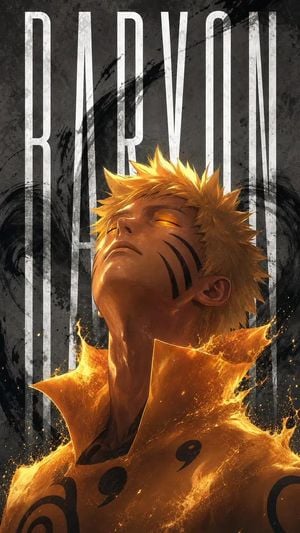
Ultra-detailed dark anime poster of {argument name="character" default="Naruto Uzumaki"} in {argument name="form" default="Baryon Mode"}, glowing {argument name="eye color" default="amber/orange"} eyes, intense cinematic lighting, fiery chakra cloak dissolving into sparks and liquid flame, black whisker markings and Baryon Mode facial stripes, sharp spiky blond hair, dramatic shadows, gritty textured charcoal-gray background with black ink swirl brush strokes, giant tall condensed white typography spelling “NARUTO” vertically behind him, high-contrast composition, poster design, centered character, moody atmosphere, painterly anime realism, masterpiece, insane detail, glowing embers, textured brush splash effects, epic key visual, vertical wallpaper, 9:16 Negative prompt low quality, blurry, extra fingers, bad anatomy, deformed face, duplicate features, cropped head, messy text, wrong outfit colors, oversaturated skin, flat lighting, low detail, watermark, logo, jpeg artifacts
Choose the primary action to open PicX Studio with the available template settings. Review the model and format, personalize the creative direction, and generate when ready.
Yes. You can change the subject, setting, lighting, mood, format, and available model controls before creating your image.
This template is free to open and customize. Generation usage is shown in PicX Studio before you create.
Start with GPT Image 2, which is the model associated with this template. You can compare another compatible model for a different finish.
Follow a topic to a crawlable collection of related PicX Studio templates.