
Swiss Geometric Music Poster
A Bauhaus-inspired abstract typography poster for an experimental music series or cultural event.
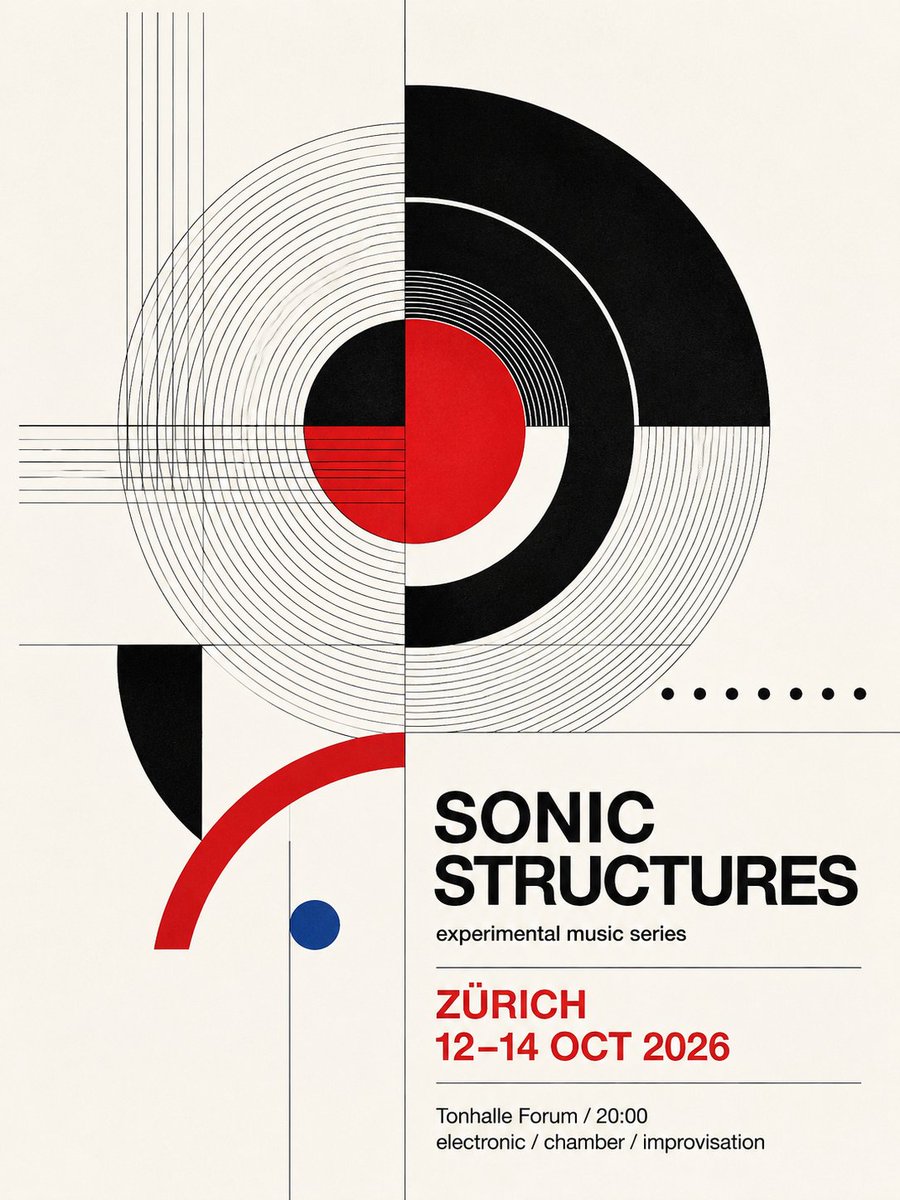
- Prompt included
- Model and format preset
- Premium template
The prompt behind this image
Copy the exact prompt behind Swiss Geometric Music Poster, or open it in the studio and make it yours.
Goal: Create a clean Swiss modernist typography poster for an experimental music event, using precise geometric abstraction and bold asymmetrical layout. Canvas: Vertical poster, 3:4 aspect ratio, warm off-white paper background with subtle print texture. Use a strict grid, thin gray construction lines, and high-contrast black, red, and one blue accent. Layout: The composition is split by a thin vertical center line and a thin horizontal line across the lower third. The upper half contains a large abstract circular sound-wave motif centered slightly above the middle, crossing the vertical axis. The lower right contains the event typography block, aligned left. Leave generous negative space and keep the design crisp, flat, and print-like. Geometric elements: Include exactly 7 main geometric feature groups: 1 large set of fine concentric gray circles around the center, 1 thick black partial ring on the upper right, 1 red central circle partially overlapped by white and black circular segments, 1 cluster of thin vertical gray lines near the upper left edge, 1 cluster of thin horizontal gray lines crossing from the left into the center, 1 thick red quarter-arc sweeping upward from the lower left, and 1 small solid blue circle below the main composition. Add exactly 7 small black dots in a horizontal row to the right of the main circle. Include a black semicircular shape cropped on the left side below the horizontal divider. Text content: Set the main headline in bold uppercase black sans-serif: {argument name="headline text" default="SONIC STRUCTURES"}. Under it, add the small subtitle: {argument name="subtitle text" default="experimental music series"}. Below a thin divider line, set the location and date in bold red uppercase: {argument name="location" default="ZÜRICH"} and {argument name="date" default="12–14 OCT 2026"}. Below another thin divider line, add the small black details: {argument name="venue and time" default="Tonhalle Forum / 20:00"} and a final genre line reading "electronic / chamber / improvisation". Visual style: Bauhaus-inspired Swiss International Style, experimental music festival poster, sharp vector geometry, balanced asymmetry, bold Helvetica-like typography, minimal palette of black, red, blue, gray, and off-white. Use clean flat shapes, no shadows, no photographs, no gradients, no decorative borders, no watermark.
How to use Swiss Geometric Music Poster in 3 steps
- 1Upload ImagePNG, JPG or paste
Add your photo
Upload the photo the template builds on. The prompt, model and format are already set.
- 2…a portrait of your subject in softgolden-hour light, 85mm…
Personalize
Edit the subject and creative details for your destination.
- 3Generate
Generate
Press Generate — your image is created in PicX Studio, so you can compare it with the original and refine one variable at a time.
More like this
Templates with the same subject, style or setup. Open one to see its prompt.

Neon Glitch Cyber Symbiote Music Poster
Synthwave Retro Superhero Music Poster

Gpt2 Youtube Thumbnail Anime Music Bootcamp Promo Poster
Swiss Editorial Underground Music Poster

Our Song was on a Cassette

Japan Travel Brochure Poster

Cartoon TV Show Poster Pack

Trendy Cafe Drink Promo Poster

Urban Fashion Editorial Collage Streetwear Poster

Premium Fashion Editorial Cover Layout System

Polo Ralph Lauren Luxury American Heritage Fashion Campaign

Monochrome Halftone Editorial Fashion Poster
Make it yours
Swiss Geometric Music Poster works as-is. These are the safest ways to change it without losing the look.
Change one field
Copy a single group, rewrite it, and generate again so you can see what that field is doing.
Keep the frame, change the subject
Hold the composition and light of Swiss Geometric Music Poster, then swap wardrobe, props or the person for a new take.
| If the result… | Why | Fix |
|---|---|---|
| The result drifts from the preview | Too many fields changed at once. | Reuse Swiss Geometric Music Poster as-is first, then change one group — subject, light, or setting. |
| The model over-stylizes the scene | The prose prompt leaves finish and camera underspecified. | Add one camera or lighting sentence and stay on GPT Image 2. |
More GPT Image 2 templates
Other prompts made for GPT Image 2.

Six VTuber Japanese Logo Sheet

Realistic Portrait of Woman and Deer

The Vista Modular Condo Poster

AI Model Routing Comparison Infographic

2.5D Anime Art Board

Isometric Productivity Desk Scene

New York Double Exposure Poster

Four-Panel AI Landscape Comparison

Japanese Tatami Lifestyle Magazine Cover

NESCAFÉ Coffee Map Poster
More image prompts
Fresh picks from across the catalog.
Four-Panel Manga: Judgment of the Ministry of Magic
Detailed JSON prompt for a casual portrait of a young woman in a sports jersey
Surreal Strawberry Picking Forest
Hyper-Realistic Commercial Beverage Photography

Micro Diorama Scene Generator

X Sairah 0 Google Gemini Nano Banana Pro
Lisbon Travel Poster
Fashion Editorial Photography Prompt

Cinematic Close-up Portrait with Dramatic Lighting

Gpt2 Fisheye Sky Crouch Portrait
Browse template categories
Swiss Geometric Music Poster questions
How do I use the Swiss Geometric Music Poster template?
Add your photo if the template asks for one, edit the prompt if you like — the template's model and format are already selected — and press Generate. Your version opens in PicX Studio.
Can I customize the Swiss Geometric Music Poster template?
Yes. You can change the subject, setting, lighting, mood, format, and available model controls before creating your image.
Is the Swiss Geometric Music Poster template free?
Opening and editing this template is free. Generating uses credits, shown on the Generate button when you are signed in.
Which AI model should I use?
Start with GPT Image 2, which is the model associated with this template. You can compare another compatible model for a different finish.
Looking for something else? Browse all templates.

Your photo, any look
Thousands of ready templates for every top image and video model, from one credit balance.