How do I use the Eight-Panel Hanfu Clothing Reference Poster template?
Choose the primary action to open PicX Studio with the available template settings. Review the model and format, personalize the creative direction, and generate when ready.
Generates a square Chinese Hanfu fashion reference poster comparing eight traditional women's clothing forms in a photorealistic educational layout. Change the subject, setting, or lighting one variable at a time.
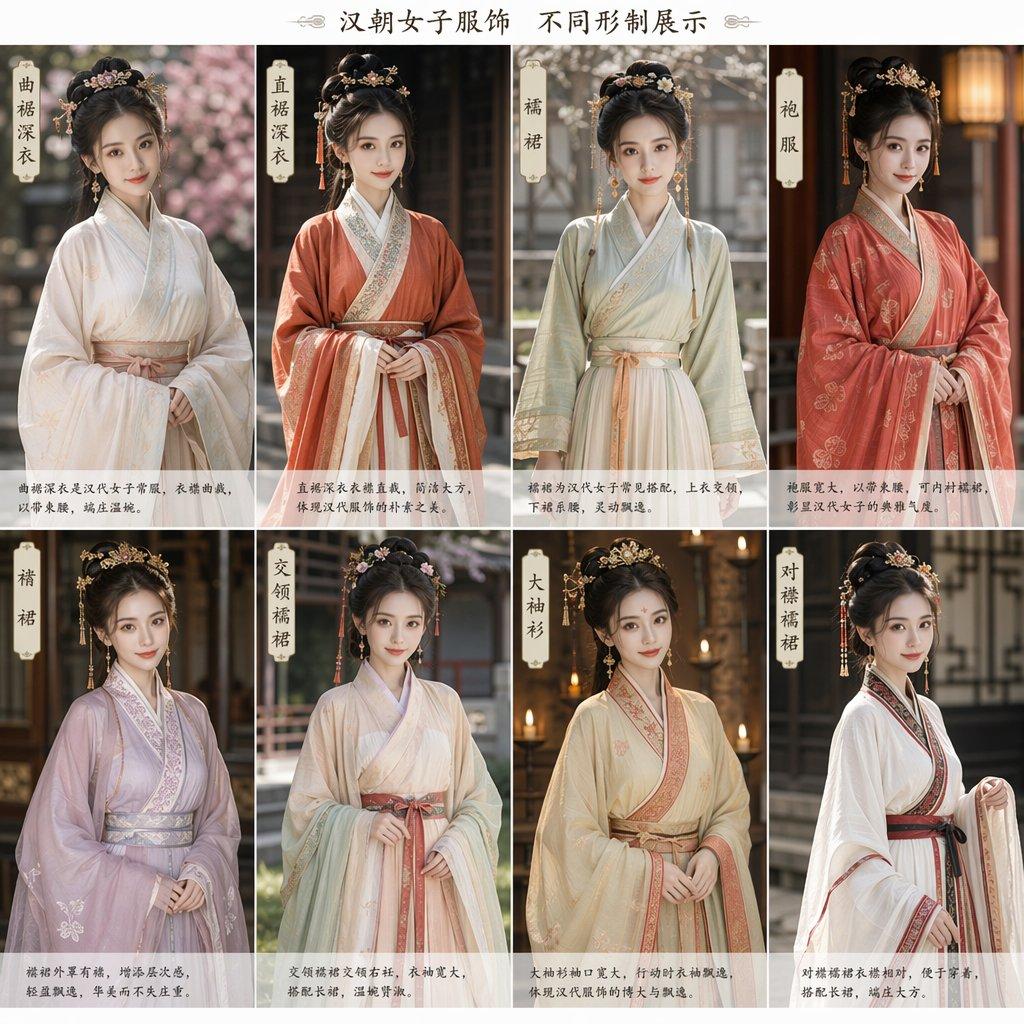
Goal: Create a square educational fashion reference poster showing {argument name="theme" default="Han dynasty women's clothing in different forms"}, with eight photorealistic full-body female models wearing traditional Chinese Hanfu. Faces should be softly blurred or left featureless for privacy, while clothing, hairstyles, and accessories are highly detailed. Canvas: Square 1:1 poster, clean off-white background with thin gutters between panels. At the top center, add the Chinese title {argument name="headline text" default="汉朝女子服饰 不同形制展示"} in elegant dark brown calligraphy-style serif lettering, with small decorative flourishes on both sides. Layout: Arrange exactly 8 vertical image panels in a 4 columns by 2 rows grid. Each panel contains one standing woman from about knees to head, centered, hands folded or gently holding sleeves, with a shallow-depth-of-field traditional courtyard or palace background. Each panel has a small vertical cream paper label near the upper left or upper right with black Chinese calligraphy, plus a short Chinese description in a translucent white strip along the bottom. Eight panels, counted and labeled exactly: 1. 「曲裾深衣」 — white layered robe with wrapped curved front, pale peach sash, very wide sleeves, ornate floral updo, pink blossom courtyard background. 2. 「直裾深衣」 — rust-orange outer robe over cream inner layers, embroidered lapels, wide belt, long sleeve drape, dark wooden interior background. 3. 「襦裙」 — light sage-green short jacket over cream high-waisted skirt, crossed collar, peach waist ties, delicate gold hair ornaments, pale outdoor garden background. 4. 「袍服」 — rich coral-red robe with floral embroidery, broad sleeves, layered collar, gold hairpins and dangling ornaments, warm lantern-lit interior. 5. 「襦裙」 — pale lavender jacket and skirt ensemble, soft translucent wide sleeves with subtle floral embroidery, silver-pink sash, dark traditional architectural background. 6. 「交领襦裙」 — ivory and light mint crossed-collar top with flowing skirt, muted rose waist belt, layered sleeve edges, floral hair accessories, courtyard corridor background. 7. 「大袖衫」 — cream-gold large-sleeved robe with peach embroidered collar and wide sash, ceremonial elegant silhouette, candlelit palace background. 8. 「对襟襦裙」 — white front-opening jacket and skirt with black and red trim, dark red sash, restrained sleeve embroidery, traditional lattice-window background. Visual style: Photorealistic historical costume photography, soft natural light, shallow depth of field, warm neutral color grading, detailed silk, gauze, embroidery, brocade borders, sashes, hairpins, floral crowns, dangling tassel ornaments, and Tang/Han-inspired courtly styling. Keep the models similar in pose and scale for comparison. Text content: Use Chinese characters only for the main title, panel labels, and small bottom captions. The bottom captions may be short, handwritten-style explanatory Chinese text; keep them legible-looking but not overly dominant. Constraints: Exactly 8 panels and exactly 8 women, no extra people, no modern clothing, no weapons, no logos, no watermark, no photorealistic facial identity; emphasize {argument name="clothing detail level" default="intricate embroidery, layered silk textures, and accurate draping"}.
Choose the primary action to open PicX Studio with the available template settings. Review the model and format, personalize the creative direction, and generate when ready.
Yes. You can change the subject, setting, lighting, mood, format, and available model controls before creating your image.
This template is free to open and customize. Generation usage is shown in PicX Studio before you create.
Start with GPT Image 2, which is the model associated with this template. You can compare another compatible model for a different finish.
© 2026 PicX Studio. All rights reserved.

Follow a topic to a crawlable collection of related PicX Studio templates.
43,474 public templates available. Verified via the PicX Studio public templates API; refreshed hourly.





![clean-minimalist-player-editorial-poster — A professional sports graphic design poster of [Player Name], designed in a clean, modern, and minimalist editorial s](/_next/image?url=https%3A%2F%2Fcdn.picxstudio.com%2Fuploads%2Fmeigen_5524a0a10196_94b81982-ef58-45e9-8d49-9b017a7f26cb.jpg&w=828&q=100)
![campaign-smoke-national-symbols-world-cup — A hyper-realistic cinematic campaign poster for [Country]. Thick [Color One] and [Color Two] smoke e…](/_next/image?url=https%3A%2F%2Fcdn.picxstudio.com%2Fuploads%2Fmeigen_ce5bae0e0712_50be07ac-9537-419b-9c47-694fe49ef3d8.jpg&w=828&q=100)

![Cartoon TV Show Poster Pack — A bold Cartoon Network-style promotional poster for [SHOW], featuring the main characters in a flat 2D illustrated style with thic](/_next/image?url=https%3A%2F%2Fcdn.picxstudio.com%2Fuploads%2Fimg0_107064d3-b797-488a-a32e-d75dea9d3b4c.jpg&w=828&q=100)
![vertical-football-star-campaign-poster — Create a vertical 9:16 high-resolution football star campaign poster.
Player: [Player Name]
Player concept: [football](/_next/image?url=https%3A%2F%2Fcdn.picxstudio.com%2Fuploads%2Fmeigen_996a192156cb_45d1d198-bb81-4272-be3f-df0eda9f0a74.jpg&w=828&q=100)





![Japan Travel Brochure Poster — Create a vertical vintage travel-brochure infographic poster titled “[COUNTRY/DESTINATION]: [TAGLINE]”, using a warm parchment-pa](/_next/image?url=https%3A%2F%2Fcdn.picxstudio.com%2Fuploads%2Fp0_982bf820-bb34-4c43-8a6d-42d799d7282b.jpg&w=828&q=100)









![Minimalist Flat Vector Travel Poster — Premium minimalist flat-vector travel poster for {argument name="city name" default="[CITY_NAME]"}, 3:4 vertical format.](https://cms-assets.youmind.com/media/1787917359711_3ug846_HQX205cbMAA6F6S-300x400.jpg)