How do I use the Cinematic Tech Leaders Smoking Portrait template?
Choose the primary action to open PicX Studio with the available template settings. Review the model and format, personalize the creative direction, and generate when ready.
This prompt generates a dramatic vertical golden-hour portrait of two well-known tech figures in branded black clothing, useful for editorial-style AI photography and social media comparisons. Change the subject, setting, or lighting one variable at a time.
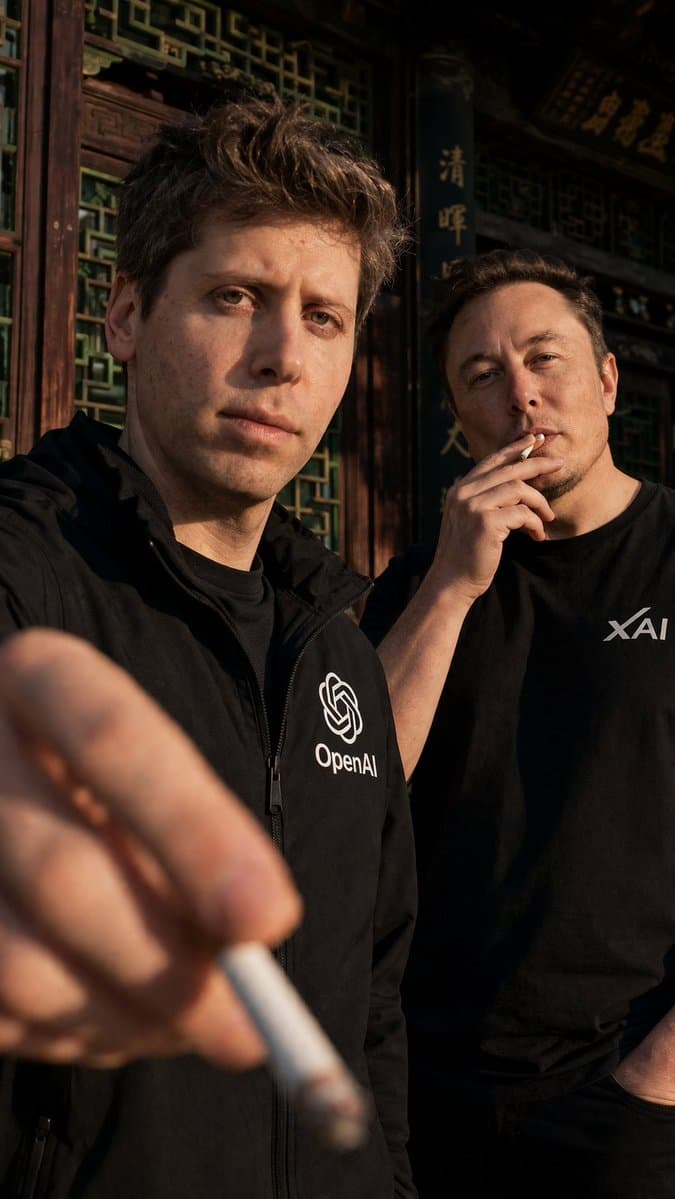
A high-quality cinematic portrait in a 9:16 vertical aspect ratio showing {argument name="foreground person" default="Sam Altman"} standing in the left foreground outdoors in front of a traditional ornate dark wood Chinese-style building with intricate green lattice windows and carved architectural details. He faces the camera and wears a black zip-up jacket with a clearly visible white OpenAI logo on the chest. His arm is extended toward the viewer, holding 1 cigarette extremely close to the lens in the lower-left foreground, making the cigarette and hand large, soft, and out of focus with strong depth-of-field blur. Slightly behind him on the right stands {argument name="background person" default="Elon Musk"}, looking at the camera while holding 1 cigarette near his mouth, wearing a black T-shirt with a white xAI logo on the chest, with his other hand tucked into a pocket. Use warm golden-hour sunlight from the side, creating sharp shadows, realistic skin texture, high contrast, and a moody amber tone across the faces, clothing, and wooden facade. The composition should feel candid but polished, tightly cropped from about mid-thigh upward, with the foreground figure dominating the frame and the second figure partially overlapped behind him. Emphasize realistic photography, cinematic color grading, shallow depth of field, natural facial proportions, subtle smoke mood, and crisp branding details on the {argument name="left chest logo" default="OpenAI"} jacket and {argument name="right chest logo" default="xAI"} shirt.
Choose the primary action to open PicX Studio with the available template settings. Review the model and format, personalize the creative direction, and generate when ready.
Yes. You can change the subject, setting, lighting, mood, format, and available model controls before creating your image.
This template is free to open and customize. Generation usage is shown in PicX Studio before you create.
Start with GPT Image 2, which is the model associated with this template. You can compare another compatible model for a different finish.
© 2026 PicX Studio. All rights reserved.

Follow a topic to a crawlable collection of related PicX Studio templates.
43,474 public templates available. Verified via the PicX Studio public templates API; refreshed hourly.


![69-untitled — FORMAT: 15s / 145 BPM / 14 SHOTS
SUBJECT: @[image1]
WARDROBE: Clean modern outfit
ENVIRONMENT: Street / indoor transitions
MOOD: Discovery → contr](/_next/image?url=https%3A%2F%2Fcdn.picxstudio.com%2Fuploads%2Fpost69_img0_d45faecf-38c3-4bcb-81a4-f6eb1cf42bb2.jpg&w=828&q=100)
















![118-google-nano-banana-pro-skincare-product- — A professional skincare shot of a [product container] with [cap/lid], labeled [brand, product, descriptor, volume](/_next/image?url=https%3A%2F%2Fcdn.picxstudio.com%2Fuploads%2Fpost118_img0_332898b8-29ea-42a9-87ab-9ed746a3f944.jpg&w=828&q=100)





![Minimalist Flat Vector Travel Poster — Premium minimalist flat-vector travel poster for {argument name="city name" default="[CITY_NAME]"}, 3:4 vertical format.](https://cms-assets.youmind.com/media/1787917359711_3ug846_HQX205cbMAA6F6S-300x400.jpg)