How do I use the Desert Western Fashion Editorial template?
Choose the primary action to open PicX Studio with the available template settings. Review the model and format, personalize the creative direction, and generate when ready.
A stunning fashion editorial prompt featuring a red-haired woman in a leather corset dress within a sunlit desert landscape. Change the subject, setting, or lighting one variable at a time.
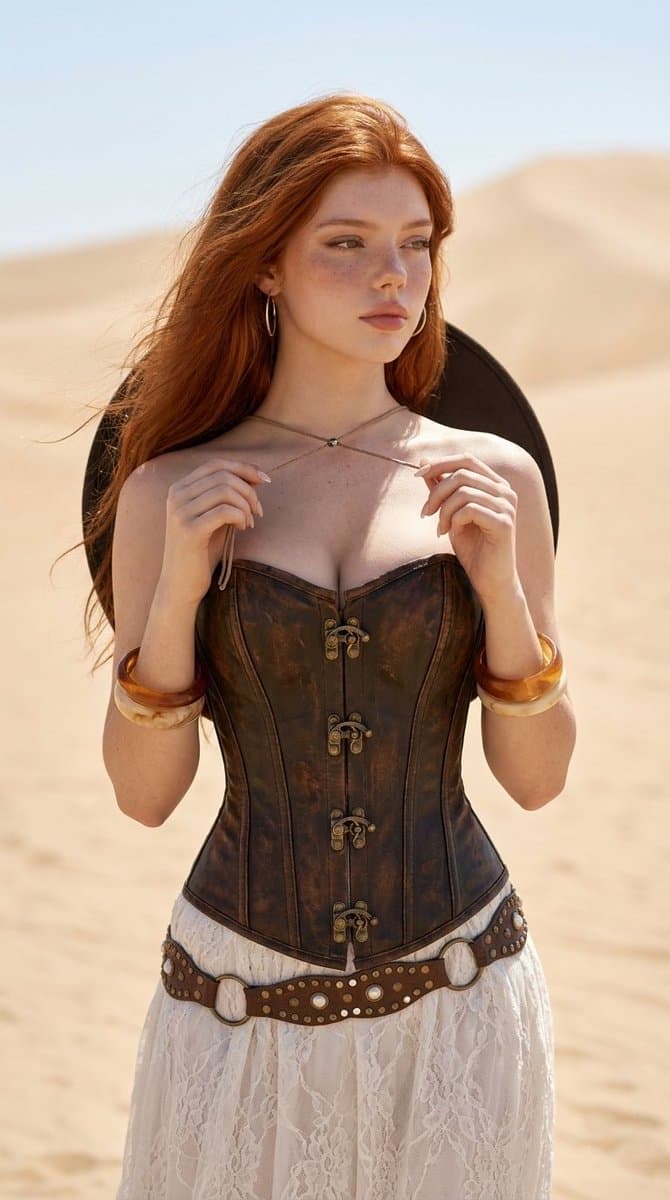
{ "prompt": "{argument name="subject description" default="A stunning red-haired woman standing in a sunlit desert landscape with rocky mountains in the background. She wears a dark brown leather corset dress with vintage western details, lace accents, and multiple studded belts around her waist."} Her {argument name="hair style" default="long wavy ginger hair"} flows naturally in the wind, eyes closed with a calm dreamy expression. Accessories include translucent amber bangles and a wide-brim dark cowboy hat resting behind her shoulders. {argument name="lighting" default="Warm golden-hour lighting"}, cinematic composition, ultra-detailed skin texture, soft shadows, shallow depth of field, fashion editorial style, realistic photography, earthy desert tones, high detail, 85mm lens look.", "negative_prompt": "blurry, low quality, extra limbs, deformed hands, bad anatomy, duplicate accessories, cartoon, anime, overexposed, distorted face, cropped head, unrealistic proportions, noisy image", "style": "cinematic western fashion editorial", "lighting": "golden hour natural sunlight", "camera": { "lens": "85mm", "aperture": "f/1.8", "depth_of_field": "shallow" }, "quality": "ultra detailed", "aspect_ratio": "2:3" }
Choose the primary action to open PicX Studio with the available template settings. Review the model and format, personalize the creative direction, and generate when ready.
Yes. You can change the subject, setting, lighting, mood, format, and available model controls before creating your image.
This template is free to open and customize. Generation usage is shown in PicX Studio before you create.
Start with GPT Image 2, which is the model associated with this template. You can compare another compatible model for a different finish.
© 2026 PicX Studio. All rights reserved.

Follow a topic to a crawlable collection of related PicX Studio templates.
43,474 public templates available. Verified via the PicX Studio public templates API; refreshed hourly.







![Minimalist Flat Vector Travel Poster — Premium minimalist flat-vector travel poster for {argument name="city name" default="[CITY_NAME]"}, 3:4 vertical format.](https://cms-assets.youmind.com/media/1787917359711_3ug846_HQX205cbMAA6F6S-300x400.jpg)