PicX Studio

Japanese Coworking Pricing Flyer

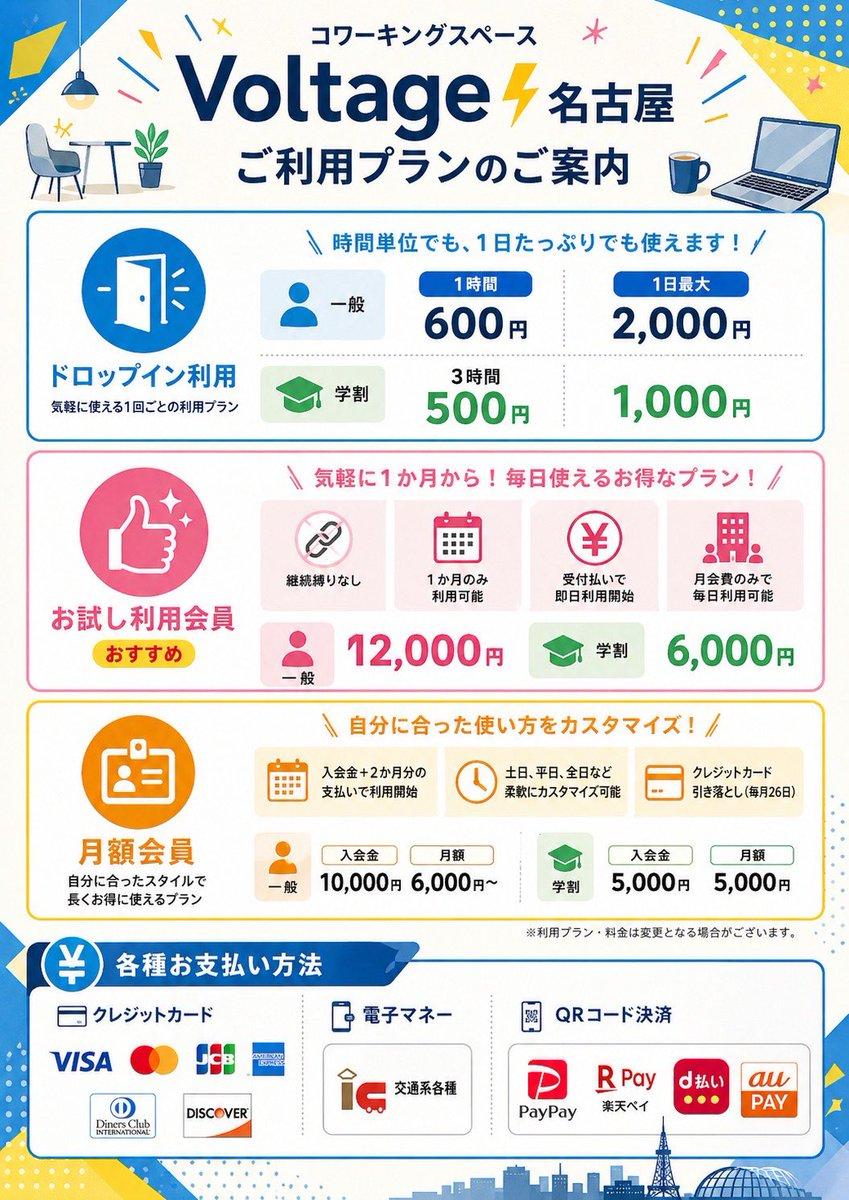
This prompt generates a polished Japanese coworking-space pricing poster with multiple plan sections, payment methods, and storefront-ready infographic styling.

Japanese Coworking Pricing Flyer — AI image template example
GPT Image 2Free
ExampleJapanese Coworking Pricing Flyer
Prompt
Settings
GPT Image 23:4
  • Prompt included
  • Model and format preset
  • Free template

The prompt behind this image

Copy the exact prompt behind Japanese Coworking Pricing Flyer, or open it in the studio and make it yours.

Structured prompt · 37 fields
Type
Japanese coworking space pricing flyer
Style
clean flat vector infographic, corporate promotional poster, white background with bright blue, yellow, pink, green, and orange accent colors, rounded boxes, friendly icons, bold Japanese typography, high readability, print-ready vertical A4 poster design
Brand › Name
{argument name="brand name" default="Voltage 名古屋"}
Brand › Category
coworking space
Brand › Headline
コワーキングスペース
Brand › Subheadline
ご利用プランのご案内
Layout › Orientation
portrait
Layout › Sections › 0 › Title
header
Layout › Sections › 0 › Position
top
Layout › Sections › 0 › Count
6
Layout › Sections › 0 › Labels
コワーキングスペース, Voltage 名古屋, ご利用プランのご案内, small cafe table and chair illustration, coffee mug icon, open laptop icon
Layout › Sections › 1 › Title
ドロップイン利用
Layout › Sections › 1 › Position
upper middle
Layout › Sections › 1 › Count
6
Layout › Sections › 1 › Labels
door icon, 一般, 学生, 1時間 600円, 1日最大 2,000円, 3時間 500円 / 1,000円
Layout › Sections › 2 › Title
お試し利用会員
Layout › Sections › 2 › Position
middle
Layout › Sections › 2 › Count
8
Layout › Sections › 2 › Labels
thumbs up icon, おすすめ, 継続縛りなし, 1か月のみ利用可能, 受付払いで即日利用開始, 月会費のみで毎日利用可能, 一般 12,000円, 学生 6,000円
Layout › Sections › 3 › Title
月額会員
Layout › Sections › 3 › Position
lower middle
Layout › Sections › 3 › Count
9
Layout › Sections › 3 › Labels
ID card icon, 入会金+2か月分の支払いで利用開始, 土日、平日、全日など柔軟にカスタマイズ可能, クレジットカード引き落とし(毎月26日), 一般, 入会金 10,000円, 月額 6,000円〜, 学生, 入会金 5,000円 / 月額 5,000円
Layout › Sections › 4 › Title
各種お支払い方法
Raw JSON
{"type":"Japanese coworking space pricing flyer","style":"clean flat vector infographic, corporate promotional poster, white background with bright blue, yellow, pink, green, and orange accent colors, rounded boxes, friendly icons, bold Japanese typography, high readability, print-ready vertical A4 poster design","brand":{"name":"{argument name=\"brand name\" default=\"Voltage 名古屋\"}","category":"coworking space","headline":"コワーキングスペース","subheadline":"ご利用プランのご案内"},"layout":{"orientation":"portrait","sections":[{"title":"header","position":"top","count":6,"labels":["コワーキングスペース","Voltage 名古屋","ご利用プランのご案内","small cafe table and chair illustration","coffee mug icon","open laptop icon"]},{"title":"ドロップイン利用","position":"upper middle","count":6,"labels":["door icon","一般","学生","1時間 600円","1日最大 2,000円","3時間 500円 / 1,000円"]},{"title":"お試し利用会員","position":"middle","count":8,"labels":["thumbs up icon","おすすめ","継続縛りなし","1か月のみ利用可能","受付払いで即日利用開始","月会費のみで毎日利用可能","一般 12,000円","学生 6,000円"]},{"title":"月額会員","position":"lower middle","count":9,"labels":["ID card icon","入会金+2か月分の支払いで利用開始","土日、平日、全日など柔軟にカスタマイズ可能","クレジットカード引き落とし(毎月26日)","一般","入会金 10,000円","月額 6,000円〜","学生","入会金 5,000円 / 月額 5,000円"]},{"title":"各種お支払い方法","position":"bottom","count":12,"labels":["クレジットカード","電子マネー","QRコード決済","VISA","Mastercard","JCB","AMERICAN EXPRESS","Diners Club INTERNATIONAL","DISCOVER","交通系各種","PayPay","R Pay / d払い / au PAY"]}],"footer":"small disclaimer text and Nagoya skyline silhouette with tower and dome"},"visuals":{"background_elements":["blue diagonal corner shapes","yellow geometric confetti","small starbursts and lines","light dotted patterns","city skyline silhouette at bottom"],"icon_style":"simple flat rounded icons inside colored circles or soft rectangular cards","section_colors":["blue drop-in section","pink trial membership section","orange monthly membership section","blue payment methods section"]},"text_language":"Japanese","image_goal":"a polished promotional price guide poster for a coworking space branch in Nagoya, suitable for storefront display or social media announcement","customizable_fields":{"location":"{argument name=\"location name\" default=\"名古屋\"}","main headline":"{argument name=\"main headline\" default=\"ご利用プランのご案内\"}","accent color":"{argument name=\"accent color\" default=\"bright blue and yellow\"}","poster size":"{argument name=\"poster size\" default=\"vertical A4\"}"}}

How to use Japanese Coworking Pricing Flyer in 3 steps

  1. 1
    Upload ImagePNG, JPG or paste

    Add your photo

    Upload the photo the template builds on. The prompt, model and format are already set.

  2. 2
    …a portrait of your subject in softgolden-hour light, 85mm…

    Personalize

    Edit the subject and creative details for your destination.

  3. 3
    Generate

    Generate

    Press Generate — your image is created in PicX Studio, so you can compare it with the original and refine one variable at a time.

Make it yours

Japanese Coworking Pricing Flyer works as-is. These are the safest ways to change it without losing the look.

  • Swap the setting

    Keep the rest of the prompt and replace the location block. The current setting is “blue diagonal corner shapes, yellow geometric confetti, small starbursts and lin”.

  • Change one field

    Copy a single group, rewrite it, and generate again so you can see what that field is doing.

  • Keep the frame, change the subject

    Hold the composition and light of Japanese Coworking Pricing Flyer, then swap wardrobe, props or the person for a new take.

Troubleshooting Japanese Coworking Pricing Flyer
If the result…WhyFix
The result drifts from the previewToo many fields changed at once.Reuse Japanese Coworking Pricing Flyer as-is first, then change one group — subject, light, or setting.
GPT Image 2 ignores part of the JSONSome models flatten or skip nested keys.Keep the same values and paste them as a short paragraph instead.

Japanese Coworking Pricing Flyer questions

How do I use the Japanese Coworking Pricing Flyer template?

Add your photo if the template asks for one, edit the prompt if you like — the template's model and format are already selected — and press Generate. Your version opens in PicX Studio.

Can I customize the Japanese Coworking Pricing Flyer template?

Yes. You can change the subject, setting, lighting, mood, format, and available model controls before creating your image.

Is the Japanese Coworking Pricing Flyer template free?

Opening and editing this template is free. Generating uses credits, shown on the Generate button when you are signed in.

Which AI model should I use?

Start with GPT Image 2, which is the model associated with this template. You can compare another compatible model for a different finish.

Looking for something else? Browse all templates.

Your photo, any look

Thousands of ready templates for every top image and video model, from one credit balance.

FREEClaim Free Image Generation