
Optical Hardware Setup Diagram
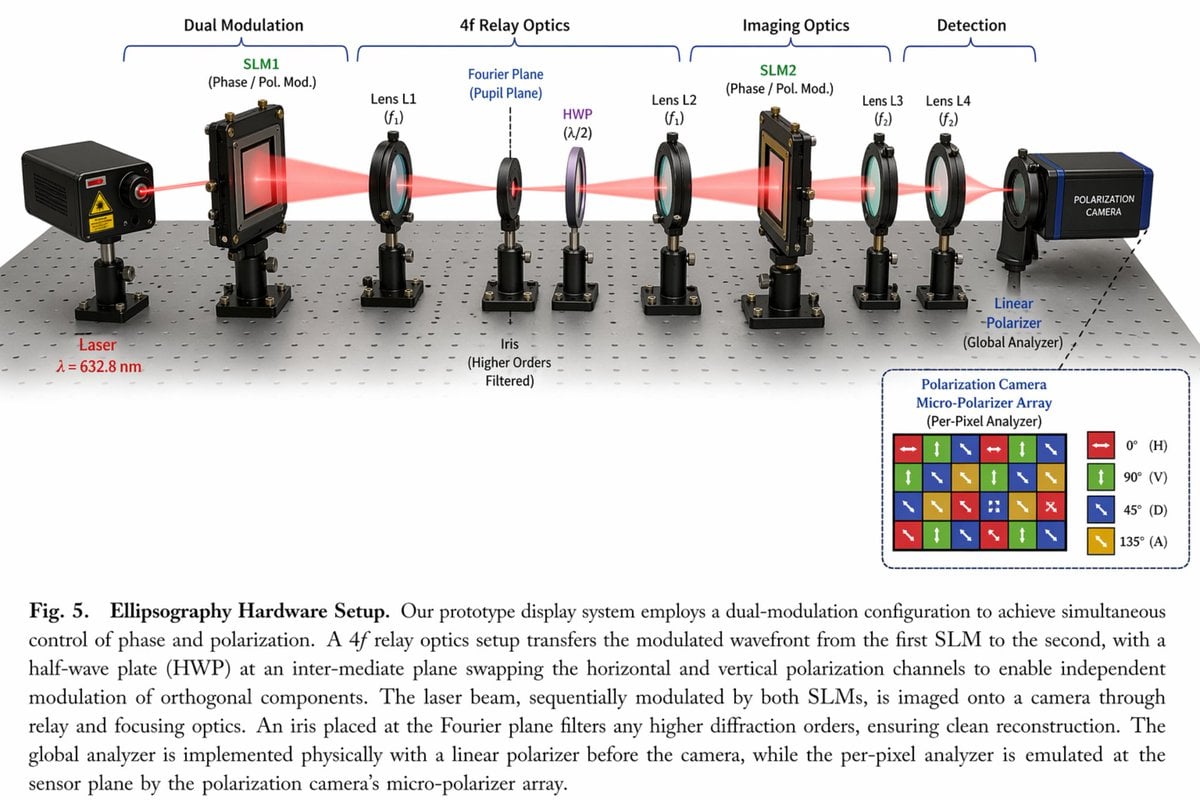
Generates a detailed scientific diagram of an optical hardware setup with 11 labeled components, a beam path, an inset micro-polarizer array, and a figure caption.
- Prompt included
- Model and format preset
- Free template
The prompt behind this image
Copy the exact prompt behind Optical Hardware Setup Diagram, or open it in the studio and make it yours.
- Type
- scientific optical setup diagram
- Main Setup › Base
- optical breadboard table with grid of mounting holes
- Main Setup › Beam
- red laser beam passing horizontally through all components
- Main Setup › Top Grouping Brackets
- {argument name="first component group" default="Dual Modulation"}, 4f Relay Optics, Imaging Optics, Detection
- Main Setup › Components Left To Right › 0 › Name
- Laser
- Main Setup › Components Left To Right › 0 › Label
- {argument name="laser wavelength" default="λ = 632.8 nm"}
- Main Setup › Components Left To Right › 0 › Appearance
- black rectangular box
- Main Setup › Components Left To Right › 1 › Name
- SLM1
- Main Setup › Components Left To Right › 1 › Label
- (Phase / Pol. Mod.)
- Main Setup › Components Left To Right › 1 › Appearance
- black square device on post
- Main Setup › Components Left To Right › 2 › Name
- Lens L1
- Main Setup › Components Left To Right › 2 › Label
- (f1)
- Main Setup › Components Left To Right › 2 › Appearance
- lens in black ring mount
- Main Setup › Components Left To Right › 3 › Name
- Iris
- Main Setup › Components Left To Right › 3 › Label
- Fourier Plane (Pupil Plane) / (Higher Orders Filtered)
- Main Setup › Components Left To Right › 3 › Appearance
- black ring mount with dashed line above
- Main Setup › Components Left To Right › 4 › Name
- HWP
- Main Setup › Components Left To Right › 4 › Label
- (λ/2)
- Main Setup › Components Left To Right › 4 › Appearance
- purple-tinted optic in black ring mount
- Main Setup › Components Left To Right › 5 › Name
- Lens L2
- Main Setup › Components Left To Right › 5 › Label
- (f1)
- Main Setup › Components Left To Right › 5 › Appearance
- lens in black ring mount
- Main Setup › Components Left To Right › 6 › Name
- SLM2
- Main Setup › Components Left To Right › 6 › Label
- (Phase / Pol. Mod.)
Raw JSON
{
  "type": "scientific optical setup diagram",
  "main_setup": {
    "base": "optical breadboard table with grid of mounting holes",
    "beam": "red laser beam passing horizontally through all components",
    "top_grouping_brackets": [
      "{argument name=\"first component group\" default=\"Dual Modulation\"}",
      "4f Relay Optics",
      "Imaging Optics",
      "Detection"
    ],
    "components_left_to_right": [
      { "name": "Laser", "label": "{argument name=\"laser wavelength\" default=\"λ = 632.8 nm\"}", "appearance": "black rectangular box" },
      { "name": "SLM1", "label": "(Phase / Pol. Mod.)", "appearance": "black square device on post" },
      { "name": "Lens L1", "label": "(f1)", "appearance": "lens in black ring mount" },
      { "name": "Iris", "label": "Fourier Plane (Pupil Plane) / (Higher Orders Filtered)", "appearance": "black ring mount with dashed line above" },
      { "name": "HWP", "label": "(λ/2)", "appearance": "purple-tinted optic in black ring mount" },
      { "name": "Lens L2", "label": "(f1)", "appearance": "lens in black ring mount" },
      { "name": "SLM2", "label": "(Phase / Pol. Mod.)", "appearance": "black square device on post" },
      { "name": "Lens L3", "label": "(f2)", "appearance": "lens in black ring mount" },
      { "name": "Lens L4", "label": "(f2)", "appearance": "lens in black ring mount" },
      { "name": "Linear Polarizer", "label": "(Global Analyzer)", "appearance": "lens in black ring mount" },
      { "name": "Polarization Camera", "label": "POLARIZATION CAMERA", "appearance": "blue and black box camera" }
    ]
  },
  "inset_diagram": {
    "position": "bottom right, dashed border",
    "title": "{argument name=\"inset title\" default=\"Polarization Camera Micro-Polarizer Array\"} (Per-Pixel Analyzer)",
    "visuals": "4x4 grid of colored squares with white directional arrows",
    "legend_count": 4,
    "legend_labels": [
      "red right-arrow 0° (H)",
      "green up-arrow 90° (V)",
      "blue diagonal-arrow 45° (D)",
      "yellow diagonal-arrow 135° (A)"
    ]
  },
  "bottom_caption": {
    "figure_number": "Fig. 5.",
    "title": "{argument name=\"setup title\" default=\"Ellipsography Hardware Setup.\"}",
    "description": "{argument name=\"figure caption\" default=\"Our prototype display system employs a dual-modulation configuration to achieve simultaneous control of phase and polarization. A 4f relay optics setup transfers the modulated wavefront...\"}"
  }
}How to use Optical Hardware Setup Diagram in 3 steps
- 1Upload ImagePNG, JPG or paste
Add your photo
Upload the photo the template builds on. The prompt, model and format are already set.
- 2…a portrait of your subject in softgolden-hour light, 85mm…
Personalize
Edit the subject and creative details for your destination.
- 3Generate
Generate
Press Generate — your image is created in PicX Studio, so you can compare it with the original and refine one variable at a time.
More like this
Templates with the same subject, style or setup. Open one to see its prompt.
Scientific Optical Hardware Diagram

WordPress Blog Setup Diagram Generation Prompt

Cinematic Studio Portrait Lighting Setup
Photography Tutorial and Camera Setup Infographic

Optical Occlusion and Depth Layers

Traditional Chinese Opera Setup Sketch

Graphic Portrait with Optical Illusion Background
Character Figure Product Photography Setup
Luxury Hardware Wallet Landing Page

Desktop AI Agent Architecture Diagram

Cloud AI Agent Architecture Diagram
Retro 3D Claymation Desk Setup
Make it yours
Optical Hardware Setup Diagram works as-is. These are the safest ways to change it without losing the look.
Change one field
Copy a single group, rewrite it, and generate again so you can see what that field is doing.
Keep the frame, change the subject
Hold the composition and light of Optical Hardware Setup Diagram, then swap wardrobe, props or the person for a new take.
| If the result… | Why | Fix |
|---|---|---|
| The result drifts from the preview | Too many fields changed at once. | Reuse Optical Hardware Setup Diagram as-is first, then change one group — subject, light, or setting. |
| GPT Image 2 ignores part of the JSON | Some models flatten or skip nested keys. | Keep the same values and paste them as a short paragraph instead. |
More GPT Image 2 templates
Other prompts made for GPT Image 2.

Six VTuber Japanese Logo Sheet

Realistic Portrait of Woman and Deer

The Vista Modular Condo Poster

AI Model Routing Comparison Infographic

2.5D Anime Art Board

Isometric Productivity Desk Scene

New York Double Exposure Poster

Four-Panel AI Landscape Comparison

Japanese Tatami Lifestyle Magazine Cover

NESCAFÉ Coffee Map Poster
More image prompts
Fresh picks from across the catalog.

Cozy Cafe Study Session UGC Prompt

3D Logo Render with Fur Texture
Ultra-Real 16K Cinematic Scene of Romantic Date on Mars
Arcade Portrait to Kyoto Travel Photo

Inuyasha Plush Toy Generation Prompt

Fantasy Guild Receptionist Novel Cover

High-Angle Editorial Street-Style Photo

Minimalist Cobalt-Blue Fashion Studio Shoot

Stylized Pop Art Vector Portrait

Champion Monster Adventure Poster
Browse template categories
Optical Hardware Setup Diagram questions
How do I use the Optical Hardware Setup Diagram template?
Add your photo if the template asks for one, edit the prompt if you like — the template's model and format are already selected — and press Generate. Your version opens in PicX Studio.
Can I customize the Optical Hardware Setup Diagram template?
Yes. You can change the subject, setting, lighting, mood, format, and available model controls before creating your image.
Is the Optical Hardware Setup Diagram template free?
Opening and editing this template is free. Generating uses credits, shown on the Generate button when you are signed in.
Which AI model should I use?
Start with GPT Image 2, which is the model associated with this template. You can compare another compatible model for a different finish.
Looking for something else? Browse all templates.

Your photo, any look
Thousands of ready templates for every top image and video model, from one credit balance.