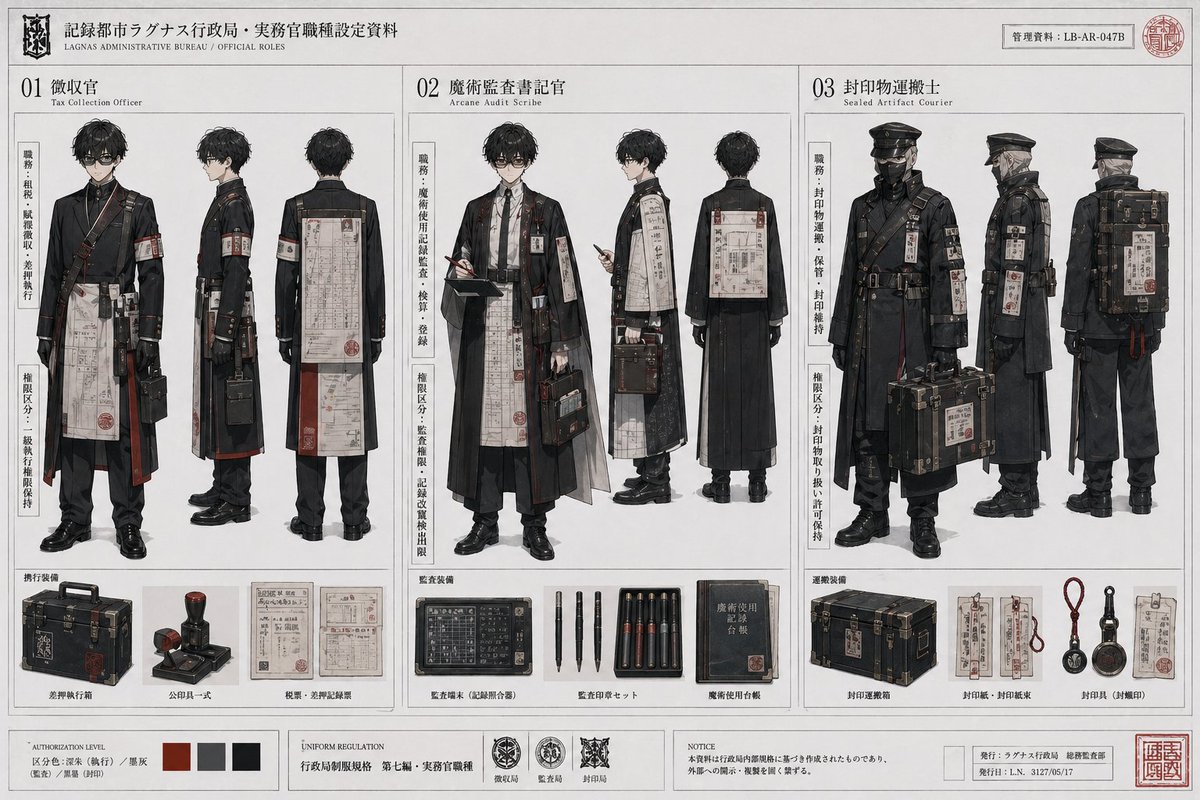
Provocative Gym Mirror Selfie Duo
{
"image_analysis": {
"overall_scene": "Provocative gym mirror selfie of two young smiling women viewed from behind, posing to emphasize glutes and lower bodies, one holding phone, under cool blue-purple ambient lighting.",
"subjects": [
{
"position": "left",
"identity": "{argument name="subject 1 likeness" default="Billie Eilish resemblance"}",
"age_appearance": "Early 20s",
"build": "Curvy athletic hourglass, pronounced glutes, toned legs, fair smooth skin",
"hair": "Medium-length curly brown in high messy bun with loose strands",
"face": "Visible smiling at camera",
"other_details": "None prominent"
},
{
"position": "right (holding phone)",
"identity": "{argument name="subject 2 likeness" default="Sydney Sweeney resemblance"}",
"age_appearance": "Early 20s",
"build": "Curvy athletic, pronounced glutes, toned legs/back, fair smooth skin",
"hair": "Long wavy reddish-auburn/orange, loose over shoulders",
"face": "Visible smiling at camera",
"other_details": "Holding iPhone"
}
],
"pose": "Rear-view mirror selfie: legs slightly apart, hands on hips, backs arched to accentuate glutes and scrunch-butt leggings, confident teasing gym pose",
"clothing": {
"left_woman": "White long-sleeve open-back crop top with twisted back, light blue high-waisted scrunch-butt leggings with ruched seam",
"right_woman": "White halter-neck sports bra, light purple high-waisted scrunch-butt leggings with ruched seam"
},
"lighting_and_color": {
"lighting": "Cool blue/purple LED ambient, moody highlights on skin/fabric, mirror reflections",
"color_palette": "Cool tones dominant: white tops, blue/purple leggings, dark gym floor"
},
"background": "Modern gym in mirrors: cardio machines left, weights right, exposed ducts, dark rubber floor, blurred distant gym-goers",
"photography_style": "Photorealistic vertical mirror selfie, high-res sharp details on ruched fabric/skin/hair, rear lower-body focus"
},
"generated_prompt": {
"full_text_prompt": "photorealistic vertical gym mirror selfie from behind of two beautiful athletic young women early 20s, left with curly brown high messy bun wearing white open-back long-sleeve crop top and light blue scrunch-butt leggings, right with long wavy reddish hair wearing white halter sports bra and light purple scrunch-butt leggings holding iPhone, both hands on hips backs arched emphasizing pronounced glutes/toned legs, modern gym mirrors cardio/weight equipment cool blue-purple lighting, highly detailed ruched textures skin sheen hair, sharp lower-body focus, confident teasing fitness vibe, 8k masterpiece",
"negative_prompt": "deformed, ugly, bad anatomy, extra limbs, blurry, low quality, cartoon, illustration, painting, watermark, text, over/underexposed, children, elderly, mutated hands, front view",
"recommended_parameters": {
}




















![Minimalist Flat Vector Travel Poster — Premium minimalist flat-vector travel poster for {argument name="city name" default="[CITY_NAME]"}, 3:4 vertical format.](https://cms-assets.youmind.com/media/1787917359711_3ug846_HQX205cbMAA6F6S-300x400.jpg)






















![Deconstructed Ingredients Visualization — ( Deconstructed_Ingredients_{argument name="dish name" default="[DISH_NAME]"} * 1.5 ) +
( Miniature…](https://pbs.twimg.com/media/HEYWiLEbYAA3lky.jpg)










![Fire Cooking Photography with Ember and Smoke — [{argument name="dish" default="DISH"}] emerging dramatically from darkness, resting directly on glo…](https://pbs.twimg.com/media/HE_qFUyXQAAii2F.jpg)