How do I use the Chrome Futuristic Fashion Portrait template?
Choose the primary action to open PicX Studio with the available template settings. Review the model and format, personalize the creative direction, and generate when ready.
A cool-toned cyber editorial portrait featuring a silver-clad model surrounded by abstract chrome structures, useful for futuristic fashion or album-cover visuals. Change the subject, setting, or lighting one variable at a time.
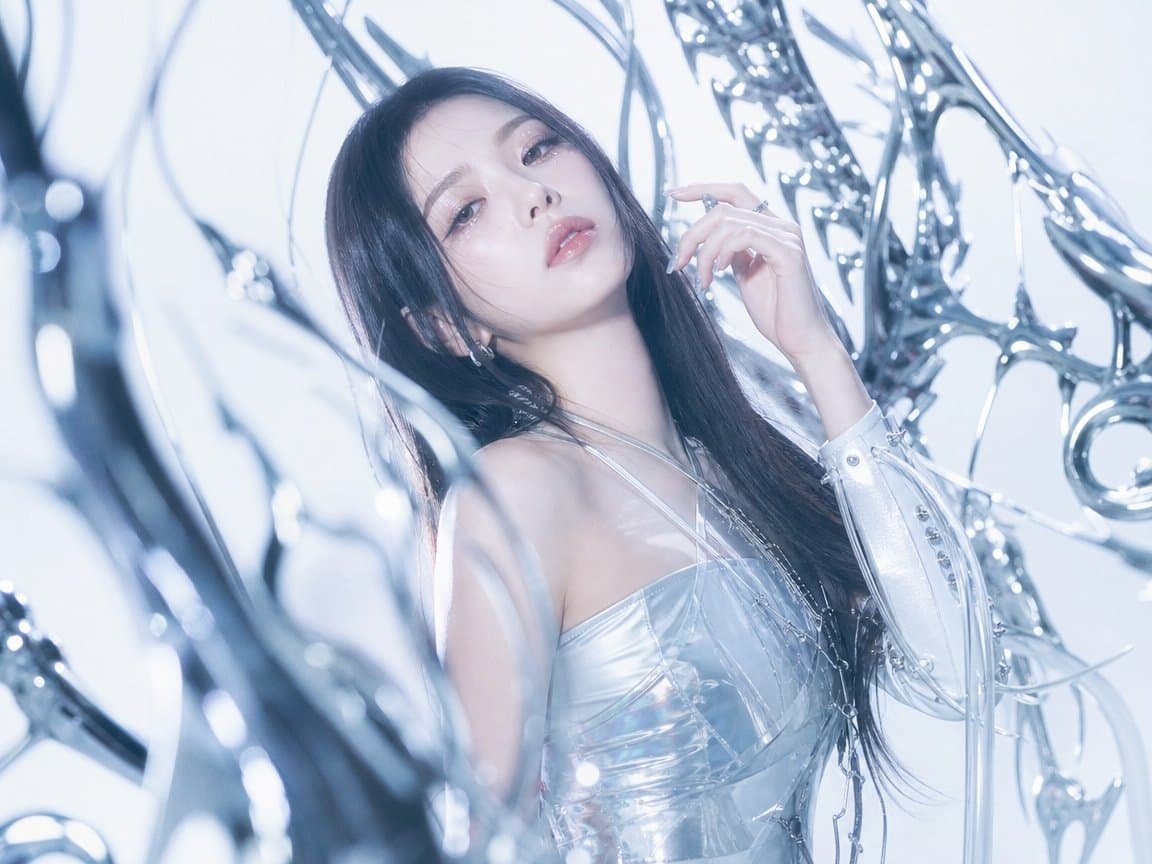
Create a high-fashion cyber-futuristic editorial portrait of a {argument name="subject" default="young woman with long dark hair"} in an icy chrome environment. The model is framed from the upper torso up, slightly leaning back and turned three-quarters toward camera, with the face deliberately obscured by a centered opaque square censor block in a muted gray-lavender tone. She wears a glossy silver translucent PVC corset or bustier with clear straps and reflective panels, plus one visible futuristic white-silver sleeve or glove on the raised right arm, decorated with small metallic studs, buttons, and dangling transparent tubes. Her right hand is lifted near her face with elegant long manicured nails and silver rings, while her dark hair falls over one shoulder. Surround her with exactly 6 prominent abstract chrome structures: 1 large blurred curved chrome blade in the left foreground, 1 thin arcing wire near the upper left, 1 horn-like chrome spike above the head, 1 intricate spiked chrome lattice across the upper right, 1 circular ring-like chrome loop at the right edge, and 1 soft translucent curved tube crossing the lower center foreground. Use a pale white and cool blue studio background, high-key lighting, soft bloom, shallow depth of field, glossy reflections, ethereal sci-fi fashion styling, cold metallic color grading, and a polished magazine-cover look. Keep the image text-free, watermark-free, and do not add extra people or props beyond the chrome abstract set pieces.
Choose the primary action to open PicX Studio with the available template settings. Review the model and format, personalize the creative direction, and generate when ready.
Yes. You can change the subject, setting, lighting, mood, format, and available model controls before creating your image.
This template is free to open and customize. Generation usage is shown in PicX Studio before you create.
Start with GPT Image 2, which is the model associated with this template. You can compare another compatible model for a different finish.
© 2026 PicX Studio. All rights reserved.

Follow a topic to a crawlable collection of related PicX Studio templates.
43,474 public templates available. Verified via the PicX Studio public templates API; refreshed hourly.










![69-untitled — FORMAT: 15s / 145 BPM / 14 SHOTS
SUBJECT: @[image1]
WARDROBE: Clean modern outfit
ENVIRONMENT: Street / indoor transitions
MOOD: Discovery → contr](/_next/image?url=https%3A%2F%2Fcdn.picxstudio.com%2Fuploads%2Fpost69_img0_d45faecf-38c3-4bcb-81a4-f6eb1cf42bb2.jpg&w=828&q=100)
![118-google-nano-banana-pro-skincare-product- — A professional skincare shot of a [product container] with [cap/lid], labeled [brand, product, descriptor, volume](/_next/image?url=https%3A%2F%2Fcdn.picxstudio.com%2Fuploads%2Fpost118_img0_332898b8-29ea-42a9-87ab-9ed746a3f944.jpg&w=828&q=100)







![Minimalist Flat Vector Travel Poster — Premium minimalist flat-vector travel poster for {argument name="city name" default="[CITY_NAME]"}, 3:4 vertical format.](https://cms-assets.youmind.com/media/1787917359711_3ug846_HQX205cbMAA6F6S-300x400.jpg)