How do I use the Cute May 2026 Spring Calendar template?
Choose the primary action to open PicX Studio with the available template settings. Review the model and format, personalize the creative direction, and generate when ready.
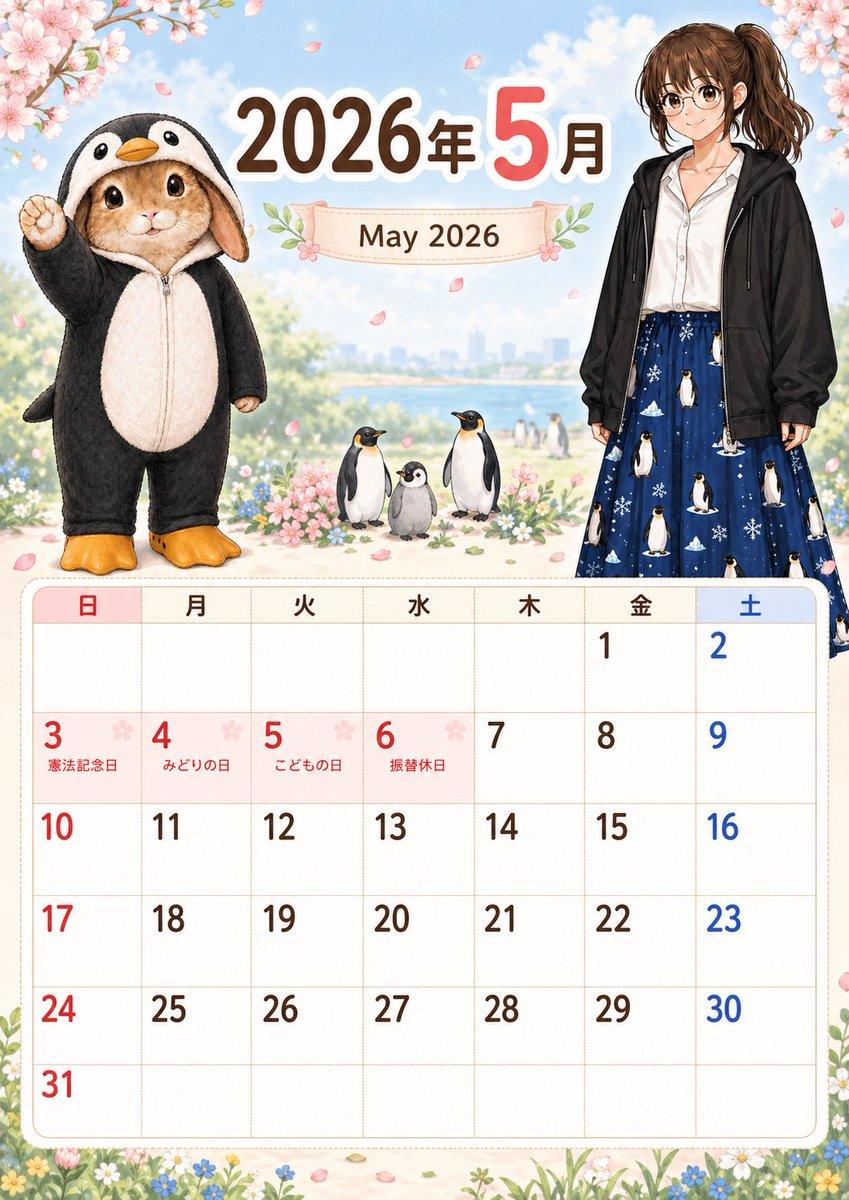
This generates a printable illustrated monthly calendar poster for May 2026 with Japanese holiday labels, spring cherry blossoms, a bunny in a penguin costume, and a casually dressed young woman. (free to use) — Free AI image template on PicX Studio.
{"type":"illustrated monthly calendar poster","orientation":"portrait","year":"{argument name=\"year\" default=\"2026\"}","month":{"numeric":"{argument name=\"month number\" default=\"5\"}","english":"{argument name=\"month text\" default=\"May 2026\"}","header_text":"2026年5月"},"style":"soft cute Japanese calendar design, polished storybook illustration, pastel spring palette, clean printable layout","scene":{"background":"bright blue sky with soft clouds, distant riverside or lakeside city skyline, light bokeh, cherry blossom branches framing the top left and top right corners, pink petals drifting through the air, flower meadow border along the bottom","season":"late spring, cherry blossom theme"},"characters":{"count":2,"left_character":"an adorable realistic bunny standing upright in a black-and-white penguin kigurumi with hood, orange beak on the hood, pale cream belly panel, orange penguin feet slippers, one paw raised in a cheerful pose, large glossy eyes, plush soft fur texture","right_character":"a full-body young woman standing casually, face simplified or blank, medium brown hair in a high ponytail, white blouse, oversized black zip hoodie, long navy skirt printed with penguins and snowflakes"},"animals":{"count":3,"items":["one adult penguin standing front-facing","one fluffy gray penguin chick in the center","one adult penguin standing front-facing on the right"]},"layout":{"sections":[{"title":"header","position":"top","count":3,"labels":["2026年","5月","May 2026"]},{"title":"weekday row","position":"above calendar grid","count":7,"labels":["日","月","火","水","木","金","土"]},{"title":"holiday labels","position":"inside date cells","count":4,"labels":["憲法記念日","みどりの日","こどもの日","振替休日"]}],"calendar_grid":{"month":"May 2026","rows":6,"columns":7,"week_starts_on":"Sunday","sunday_color":"red","saturday_color":"blue","weekday_color":"dark brown","visible_dates":[{"day":1,"column":"Friday"},{"day":2,"column":"Saturday"},{"day":3,"column":"Sunday","label":"憲法記念日"},{"day":4,"column":"Monday","label":"みどりの日"},{"day":5,"column":"Tuesday","label":"こどもの日"},{"day":6,"column":"Wednesday","label":"振替休日"},{"day":7,"column":"Thursday"},{"day":8,"column":"Friday"},{"day":9,"column":"Saturday"},{"day":10,"column":"Sunday"},{"day":11,"column":"Monday"},{"day":12,"column":"Tuesday"},{"day":13,"column":"Wednesday"},{"day":14,"column":"Thursday"},{"day":15,"column":"Friday"},{"day":16,"column":"Saturday"},{"day":17,"column":"Sunday"},{"day":18,"column":"Monday"},{"day":19,"column":"Tuesday"},{"day":20,"column":"Wednesday"},{"day":21,"column":"Thursday"},{"day":22,"column":"Friday"},{"day":23,"column":"Saturday"},{"day":24,"column":"Sunday"},{"day":25,"column":"Monday"},{"day":26,"column":"Tuesday"},{"day":27,"column":"Wednesday"},{"day":28,"column":"Thursday"},{"day":29,"column":"Friday"},{"day":30,"column":"Saturday"},{"day":31,"column":"Sunday"}]},"composition":"large decorative illustration in the upper half, spacious monthly calendar table in the lower half, rounded cream-colored calendar frame, delicate floral accents around the title banner and corners"},"typography":{"main_year":"bold rounded dark brown Japanese numerals","main_month":"large pink numeral with white outline","subtitle":"serif-style brown text on a pale ribbon banner","weekday_headers":"simple rounded Japanese characters, Sunday in red and Saturday in blue"},"rendering":"high-resolution print-ready poster, crisp text, balanced margins, cute commercial stationery aesthetic"}
Use Cute May 2026 Spring Calendar to plan an AI image around gpt-image-2 generation, themes such as en and gpt-image-2. Match the preview's composition first, then personalize the subject, setting, and mood for your own project.
Use the primary action to load the template settings in PicX Studio.
Adjust the subject and creative details for your destination.
Create the image, compare the result with the preview, and refine one variable at a time.
A continuous mix — similar concepts first, woven with same-model prompts and fresh picks from the catalog.
Choose the primary action to open PicX Studio with the available template settings. Review the model and format, personalize the creative direction, and generate when ready.
Yes. You can change the subject, setting, lighting, mood, format, and available model controls before creating your image.
This template is free to open and customize. Generation usage is shown in PicX Studio before you create.
Start with gpt-image-2, which is the model associated with this template. You can compare another compatible model for a different finish.
A continuous mix — similar concepts first, woven with same-model prompts and fresh picks from the catalog.
Follow a topic to a crawlable collection of related PicX Studio templates.
36,410 public templates available. Verified via the PicX Studio public templates API; refreshed hourly.