How do I use the Travel Ad Conversion Comparison Slide template?
Edit the prompt in the box under the preview — the template's model and format are already selected — and press Generate. Your version appears right on this page.
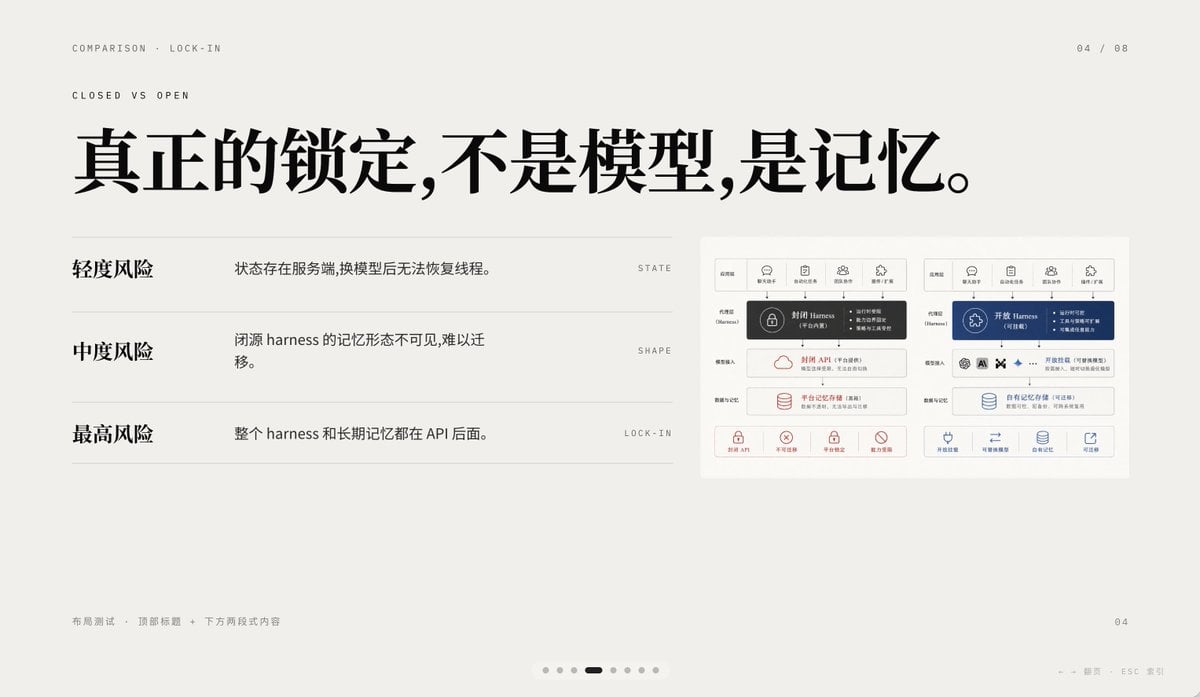
A Japanese presentation-style comparison slide showing a GPT-Image-2-generated travel brochure ad versus Canva Magic Layers and a custom PPTX conversion tool, useful for demos of editable layer reconstruction.

This template uses your photo — add one with the + button.
{"type":"comparison presentation slide with two large poster-layout travel advertisements","style":"clean Japanese business presentation, white background, black divider lines, screenshot-like composite layout","canvas":{"aspect_ratio":"16:9","background":"white"},"layout":{"sections":[{"title":"left comparison area","position":"top-left and bottom-left","count":3,"labels":["元画像 GPT-Image-2で生成","Canva Magic layers","Magic Layers"]},{"title":"right comparison area","position":"top-right and bottom-right","count":2,"labels":["自作ツールpptx(改良中)"]}],"dividers":"one thick vertical divider near center and one thick horizontal divider across the middle, with thin black borders around the ad boards","composition":"top row shows source on the left and converted output on the right; bottom row shows enlarged reconstructed layouts side by side"},"text_elements":{"top_left_heading":"元画像 GPT-Image-2で生成","bottom_left_brand":"Canva Magic layers","bottom_right_label":"自作ツールpptx(改良中)"},"embedded_ad_design":{"type":"Japanese travel magazine / tourism app promotional brochure","count":4,"brand_name":"旅色","issue":"06","subtitle":"TABIIRO","theme":"sunset coastal shrine trip in Japan","color_palette":["sky blue","sunset gold","warm beige","white","black"],"main_pages":4,"page_descriptions":["cover page with blue sky background, traditional shrine building, and a woman in a straw hat seen from behind in the lower left, large white Japanese headline text, yellow circular badge, and small weather-style icon at the top right","double-page sunset spread with a torii gate in the water, glowing sun near the horizon, a vertical sequence of 4 small yellow numbered markers, and a bottom strip of 4 rectangular food and travel photos","page featuring a large sunset cliff image with Japanese copy, 3 circular destination thumbnails in a row, a pale yellow recommendation box, and a small scenic photo of a woman raising her arms by the sea","bottom information strip with 5 square feature icons, a smartphone mockup held by a hand, a QR code, and 2 app store badges"]},"visual_details":{"canva_logo":{"present":true,"position":"left center","description":"purple layered square icon with a small New badge above, and the words Magic Layers below"},"reconstruction_difference":"the right-side output arranges the same ad components as separated editable blocks with tighter alignment and visible modularity","ad_components_count":{"circular_thumbnails":3,"bottom_feature_icons":5,"app_store_badges":2,"qr_codes":1,"small_bottom_strip_photos":4}},"rendering":"flat presentation screenshot, crisp typography, high-resolution UI/document mockup aesthetic"}
Edit the prompt in the box under the preview — the template's model and format are already selected — and press Generate. Your version appears right on this page.
Yes. You can change the subject, setting, lighting, mood, format, and available model controls before creating your image.
Opening and editing this template is free. Generating uses credits, shown on the Generate button when you are signed in.
Start with GPT Image 2, which is the model associated with this template. You can compare another compatible model for a different finish.
Follow a topic to a crawlable collection of related PicX Studio templates.

![Nano Banana — One Day In [CITY] Travel Route](https://cdn.picxstudio.com/cdn-cgi/image/format=auto,quality=85,fit=scale-down,onerror=redirect,width=828,dpr=2,metadata=none/uploads/ai_gezgini_travel_d9a86f2e-c1f5-41a8-a4ef-5d96a8a7a023.jpg)