How do I use the Epic Desert Couture Heroine template?
Choose the primary action to open PicX Studio with the available template settings. Review the model and format, personalize the creative direction, and generate when ready.
A cinematic vertical fashion portrait of a wind-swept desert heroine standing on dunes at sunset, useful for epic film-style character imagery. Change the subject, setting, or lighting one variable at a time.
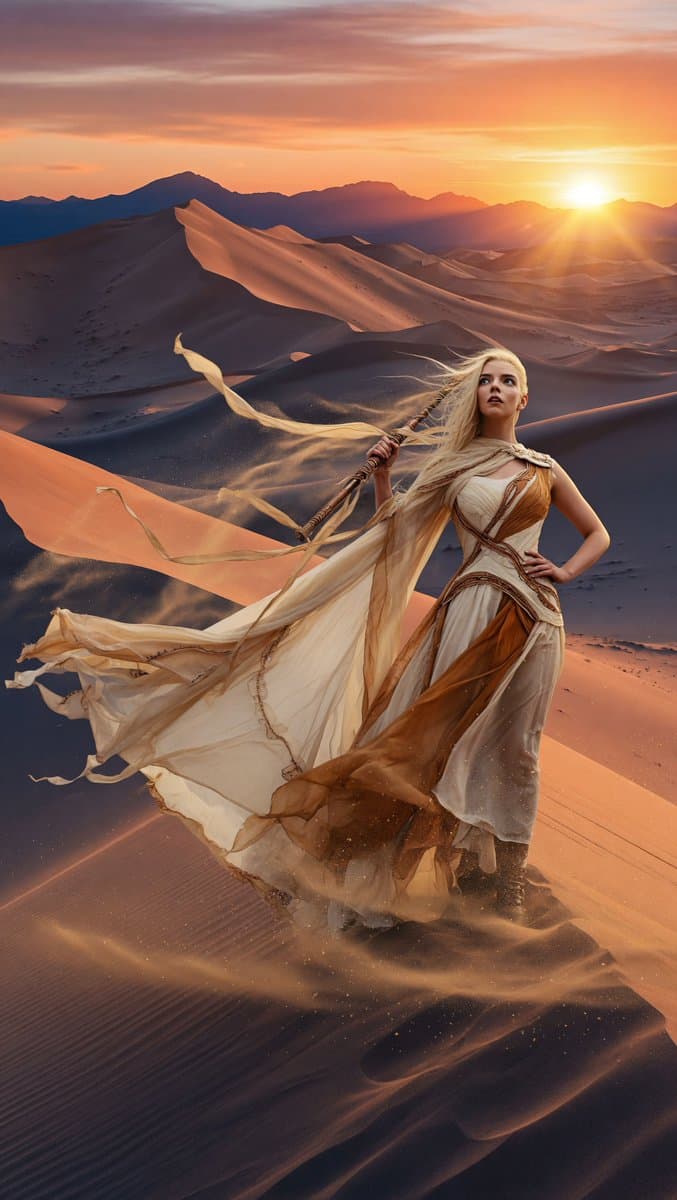
Create a vertical 9:16 large-format cinematic fashion portrait of {argument name="character name" default="Anya Taylor-Joy"} as the heroine of an epic desert fantasy film, standing powerfully on the crest of a high sand dune at sunset. Her face is intentionally soft, indistinct, and featureless, with the emphasis on silhouette, posture, costume, and atmosphere rather than facial detail. She has very long pale blonde hair blown sideways by strong wind, and she wears a dramatic couture desert gown in {argument name="dress colors" default="ivory, cream, and warm bronze"}: layered translucent chiffon, flowing panels, leather-like sculptural straps, fitted bodice, asymmetrical drapery, and long ribbons streaming far into the air. She holds one long staff or banner pole diagonally across her body, with a pale fabric streamer whipping behind her, while her other hand rests confidently on her hip. The environment is a vast realistic desert with endless rippled dunes, deep shadowed valleys, distant dark mountain silhouettes, airborne dust, and glowing atmospheric perspective. Place the low sun near the right horizon, producing intense golden rim light, sun flare rays, long dramatic shadows, and illuminated dust particles around the figure and dress. Camera angle is slightly below eye level, making her look heroic and commanding despite the enormous landscape. Use IMAX-scale cinematic composition, extreme environmental realism, high-detail sand texture, windblown fabric motion, volumetric golden haze, warm orange and rose sunset sky, deep blue-purple shadows, and premium epic movie color grading. No text, no watermark, no extra people, no modern objects.
Choose the primary action to open PicX Studio with the available template settings. Review the model and format, personalize the creative direction, and generate when ready.
Yes. You can change the subject, setting, lighting, mood, format, and available model controls before creating your image.
This template is free to open and customize. Generation usage is shown in PicX Studio before you create.
Start with GPT Image 2, which is the model associated with this template. You can compare another compatible model for a different finish.
© 2026 PicX Studio. All rights reserved.

Follow a topic to a crawlable collection of related PicX Studio templates.
43,474 public templates available. Verified via the PicX Studio public templates API; refreshed hourly.










![Epic premium automotive poster — Create an epic premium automotive poster of
[CAR MODEL].
Place the car as the heroic central subje…](https://images.meigen.ai/tweets/2048752153343545390/0.jpg)


![Minimalist Flat Vector Travel Poster — Premium minimalist flat-vector travel poster for {argument name="city name" default="[CITY_NAME]"}, 3:4 vertical format.](https://cms-assets.youmind.com/media/1787917359711_3ug846_HQX205cbMAA6F6S-300x400.jpg)
























![92-premium-marketing-shots-with-nano-banana — A high-end editorial photo of a [PRODUCT] placed flat on a [TEXTURED SURFACE], captured from a direct top-down vie](/_next/image?url=https%3A%2F%2Fcdn.picxstudio.com%2Fuploads%2Fpost92_img0_cd84004d-5efa-40c5-abdf-947da0ba10f5.jpg&w=828&q=100)



![3D Brand Advertisement Mockup — Create a creative 3D advertisement for {argument name="brand name" default="[type here any brand]"}, featuring a surreal object](https://cms-assets.youmind.com/media/1777797558748_mza2yv_HHSbDkyb0AAOqEr.jpg)