How do I use the Cyberpunk Anime Rooftop Key Visual template?
Edit the prompt in the box under the preview — the template's model and format are already selected — and press Generate. Your version appears right on this page.
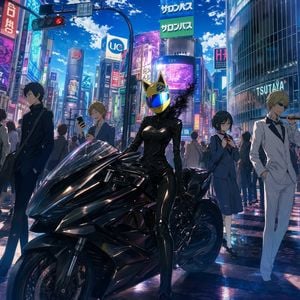
A cinematic anime key visual prompt for generating a short-haired cyberpunk heroine crouched above a neon megacity.

This template uses your photo — add one with the + button.
Create a high-detail anime cyberpunk key visual of {argument name="character name" default="Tomoshibi Kii, short-haired version"}: a fierce young woman crouching on the narrow edge of a skyscraper rooftop high above a dense futuristic city at night. Use a dramatic vertical 2:3 composition, extreme high-angle perspective looking down into glowing canyons of buildings, with the character dominating the foreground and centered slightly right. She has short tousled {argument name="hair color" default="deep violet hair with yellow-gold underlayers and streaks"}, sharp golden eyes, pale skin, a serious defiant expression, and a small black headset microphone at her cheek. Outfit: black tactical streetwear with gold accents, including a high-collar oversized hooded jacket, cropped black top with strap details, choker, fingerless gloves, loose cargo pants, knee padding, heavy boots, belts, zippers, brass snaps, and a shield-like geometric insignia patch on the sleeve. Lighting is moody neon purple and amber, with strong rim light on hair and jacket edges, glossy fabric highlights, rain-damp rooftop reflections, and dense detail in the city windows. Background: towering skyscrapers packed with tiny lit windows, glowing purple holographic billboards, orange warning UI graphics, and a vast night skyline fading into darkness. Include exactly 4 prominent holographic screens: 1 large purple portrait screen of the same girl on the upper left, 1 smaller purple emblem/abstract symbol screen on the lower left, 1 orange warning triangle screen on the upper right, and 1 purple waveform/data screen on the mid-right. Style should be polished Japanese anime key art, intricate linework, cinematic depth, luminous cyberpunk atmosphere, ultra-detailed background, sharp focus on the character, no visible watermark, no extra readable text beyond abstract UI marks.
Create a high-detail anime cyberpunk key visual of {argument name="character name" default="Tomoshibi Kii, short-haired version"}: a fierce young woman crouching on the narrow edge of a skyscraper rooftop high above a dense futuristic city at night. Use a dramatic vertical 2:3 composition, extreme high-angle perspective looking down into glowing canyons of buildings, with the character dominating the foreground and centered slightly right. She has short tousled {argument name="hair color" default="deep violet hair with yellow-gold underlayers and streaks"}, sharp golden eyes, pale skin, a serious defiant expression, and a small black headset microphone at her cheek. Outfit: black tactical streetwear with gold accents, including a high-collar oversized hooded jacket, cropped black top with strap details, choker, fingerless gloves, loose cargo pants, knee padding, heavy boots, belts, zippers, brass snaps, and a shield-like geometric insignia patch on the sleeve. Lighting is moody neon purple and amber, with strong rim light on hair and jacket edges, glossy fabric highlights, rain-damp rooftop reflections, and dense detail in the city windows. Background: towering skyscrapers packed with tiny lit windows, glowing purple holographic billboards, orange warning UI graphics, and a vast night skyline fading into darkness. Include exactly 4 prominent holographic screens: 1 large purple portrait screen of the same girl on the upper left, 1 smaller purple emblem/abstract symbol screen on the lower left, 1 orange warning triangle screen on the upper right, and 1 purple waveform/data screen on the mid-right. Style should be polished Japanese anime key art, intricate linework, cinematic depth, luminous cyberpunk atmosphere, ultra-detailed background, sharp focus on the character, no visible watermark, no extra readable text beyond abstract UI marks.
Edit the prompt in the box under the preview — the template's model and format are already selected — and press Generate. Your version appears right on this page.
Yes. You can change the subject, setting, lighting, mood, format, and available model controls before creating your image.
Opening and editing this template is free. Generating uses credits, shown on the Generate button when you are signed in.
Start with GPT Image 2, which is the model associated with this template. You can compare another compatible model for a different finish.
Follow a topic to a crawlable collection of related PicX Studio templates.