How do I use the Anime Schoolgirl Reference Sheet template?
Choose the primary action to open PicX Studio with the available template settings. Review the model and format, personalize the creative direction, and generate when ready.
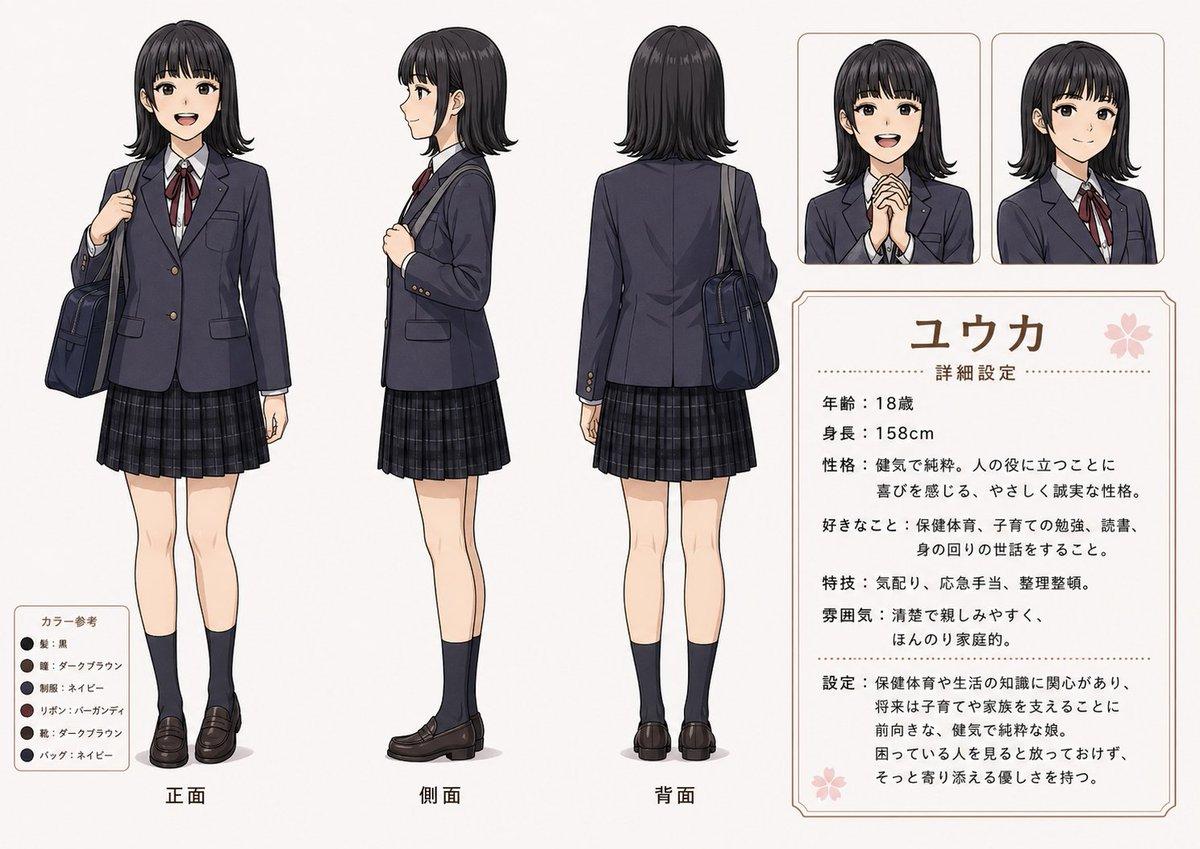
A polished Japanese-style character design sheet showing a schoolgirl from multiple views with portrait insets, color swatches, and a detailed profile card for character development or presentation use. (free to use) — Free AI image template on PicX Studio.
{ "type": "anime character reference sheet", "style": "clean modern Japanese character design sheet, soft cel shading, crisp line art, muted realistic school-uniform palette, light gray background, professional layout with thin beige rounded frames and subtle decorative accents", "subject": { "character": "{argument name=\"character name\" default=\"ユウカ\"}", "gender presentation": "teenage schoolgirl", "age": "18", "height": "158 cm", "appearance": { "hair": { "color": "{argument name=\"hair color\" default=\"black\"}", "style": "straight medium bob with full blunt bangs, slightly curled ends, neat and glossy" }, "eyes": { "color": "dark brown", "expression": "gentle, calm, sincere" }, "build": "slender, average height", "skin": "fair" }, "outfit": { "pieces": [ "navy school blazer with gold buttons", "white dress shirt", "burgundy ribbon tie", "dark navy plaid pleated skirt", "dark navy knee socks", "dark brown loafers", "navy shoulder school bag" ], "count": 7 } }, "layout": { "canvas": "wide landscape reference board", "sections": [ { "title": "main full-body views", "position": "left to center", "count": 3, "labels": ["正面", "側面", "背面"], "details": "three full-body figures showing front view, side view, and back view; each standing neutrally; front and side carry the shoulder bag, back view shows bag hanging behind the right shoulder" }, { "title": "portrait insets", "position": "upper right", "count": 2, "labels": ["hands clasped portrait", "neutral portrait"], "details": "two rounded-rectangle bust close-ups; first shows the character smiling softly with both hands clasped in front of the chest, second shows a standard bust portrait facing slightly left" }, { "title": "profile text card", "position": "lower right", "count": 1, "labels": ["ユウカ", "詳細設定"], "details": "large bordered information panel with a pink cherry blossom icon near the top right and several Japanese text blocks" }, { "title": "color reference", "position": "lower left", "count": 1, "labels": ["カラー参考", "髪:黒", "瞳:ダークブラウン", "制服:ネイビー", "リボン:バーガンディ", "靴:ダークブラウン", "バッグ:ネイビー"], "details": "small rounded box with 6 circular swatches and matching Japanese labels" } ] }, "text": { "headline": "{argument name=\"headline text\" default=\"ユウカ\"}", "subheading": "詳細設定", "body": [ "年齢:18歳", "身長:158cm", "性格:健気で純粋。人の役に立つことに喜びを感じる、やさしく誠実な性格。", "好きなこと:保健体育・子育ての勉強、読書、身の回りの世話をすること。", "特技:気配り、応急手当、整理整頓。", "雰囲気:清楚で親しみやすく、ほんのり家庭的。", "設定:保健体育や生活の知識に関心があり、将来は子育てや家族を支えることに前向きな、健気で純粋な娘。困っている人を見ると放っておけず、そっと寄り添える優しさを持つ。" ] }, "composition": { "pose direction": "front, left-facing side, and back", "spacing": "evenly spaced figures with large right-side info column", "rendering": "full character visible head to toe, minimal shadows under feet, balanced margins" }, "quality": "highly polished anime reference sheet suitable for character design presentation, visual novel planning, or profile documentation" }
Use Anime Schoolgirl Reference Sheet to plan an AI image around gpt-image-2 generation, themes such as en and gpt-image-2. Match the preview's composition first, then personalize the subject, setting, and mood for your own project.
Use the primary action to load the template settings in PicX Studio.
Adjust the subject and creative details for your destination.
Create the image, compare the result with the preview, and refine one variable at a time.
A continuous mix — similar concepts first, woven with same-model prompts and fresh picks from the catalog.
Choose the primary action to open PicX Studio with the available template settings. Review the model and format, personalize the creative direction, and generate when ready.
Yes. You can change the subject, setting, lighting, mood, format, and available model controls before creating your image.
This template is free to open and customize. Generation usage is shown in PicX Studio before you create.
Start with gpt-image-2, which is the model associated with this template. You can compare another compatible model for a different finish.
A continuous mix — similar concepts first, woven with same-model prompts and fresh picks from the catalog.
Follow a topic to a crawlable collection of related PicX Studio templates.
36,410 public templates available. Verified via the PicX Studio public templates API; refreshed hourly.