How do I use the Modern Samurai Outfit Reference Sheet template?
Choose the primary action to open PicX Studio with the available template settings. Review the model and format, personalize the creative direction, and generate when ready.
Generates a studio fashion collage showing an anonymized male character in a modern samurai-inspired outfit for costume, character, or wardrobe reference. Change the subject, setting, or lighting one variable at a time.
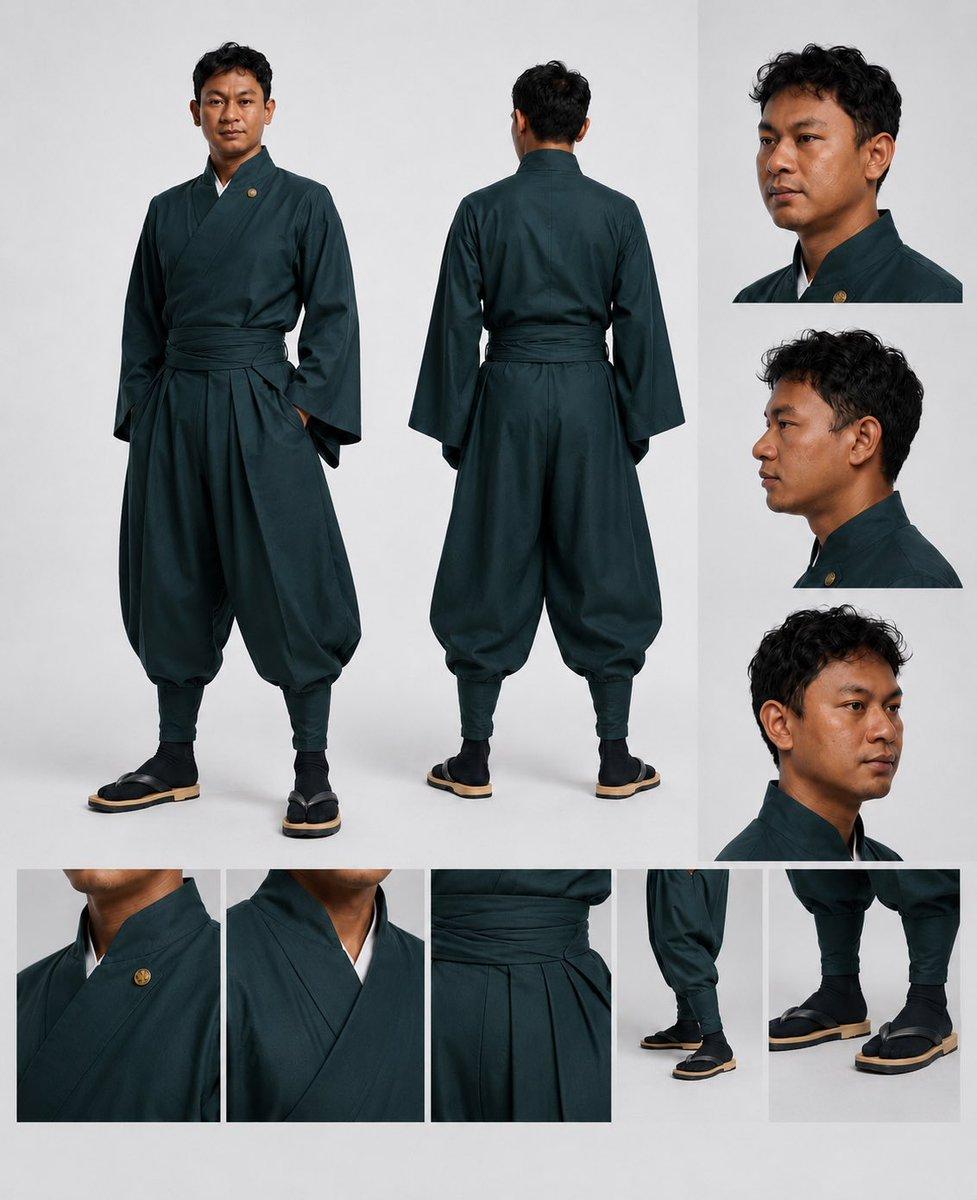
Goal: Create a clean fashion character reference sheet for a modern samurai-inspired outfit worn by {argument name="character name" default="a young adult man"}, with the face intentionally anonymized by a smooth rectangular blur in every visible portrait. Canvas: Square 1:1 studio layout on a pale light-gray background, high-resolution editorial product photography, soft even lighting, subtle floor shadows, no text, no logos, no watermark. Layout: Arrange exactly 10 image panels in one cohesive collage. Include 2 large full-body views in the main area: one front-facing full-body pose on the left with one hand tucked into the garment, and one back-facing full-body pose in the center. Include 3 stacked portrait panels on the right column: a three-quarter head-and-shoulders view from the front-right, a strict side profile, and a lower three-quarter cropped head-and-shoulders view. Include 5 detail panels along the bottom row: close-up of the left chest with a small round gold pin, close-up of the crossed kimono collar showing a white inner layer, close-up of the wrapped waist sash and pleated front folds, close-up of the lower leg and footwear from the side, and close-up of both shoes from the front. Subject details: The model has short curly {argument name="hair color" default="black"} hair, medium brown skin, average athletic build, and an upright calm fashion-model posture. His face is covered in each portrait by a centered soft-edged rectangular blur matching skin tones, obscuring all facial features while leaving hair, ears, jawline edges, and clothing visible. Outfit: A dark {argument name="outfit color" default="deep teal green"} Japanese-inspired robe ensemble with a kimono-style crossed V-neck top, long wide sleeves, a white inner collar peeking out, a broad wrapped waist sash, voluminous pleated hakama-style trousers gathered at the calves, fitted dark leg wraps or socks, and black split-toe tabi-style shoes with thick beige wooden-looking soles. Add one small circular gold crest pin on the upper chest. Fabric should look matte cotton or linen with subtle folds, seams, and realistic drape. Visual style: Minimalist studio fashion catalog reference, sharp garment detail, realistic proportions, consistent lighting across panels, neutral gray background blocks separating the collage panels, precise garment construction visible. Constraints: Use exactly 2 full-body views, exactly 3 portrait crops, and exactly 5 clothing detail close-ups for a total of 10 discrete panels. Keep the outfit consistent across all panels. Do not add weapons, props, captions, decorative borders, extra people, or facial features.
Choose the primary action to open PicX Studio with the available template settings. Review the model and format, personalize the creative direction, and generate when ready.
Yes. You can change the subject, setting, lighting, mood, format, and available model controls before creating your image.
This template is free to open and customize. Generation usage is shown in PicX Studio before you create.
Start with GPT Image 2, which is the model associated with this template. You can compare another compatible model for a different finish.
Follow a topic to a crawlable collection of related PicX Studio templates.
43,474 public templates available. Verified via the PicX Studio public templates API; refreshed hourly.





![Movement Sheet - Dance Reference (Seedance 2.0) — [STYLE]
Monochrome grayscale illustration, 3D-rendered character, clean instructional reference sheet, white b](https://pbs.twimg.com/media/HGzSvcnboAA_bjD.jpg?name=orig)


![Paper Cut Craft Illustration — A paper-cut craft illustration of a [Subject], layered colorful paper textures, soft drop depth effect, handmade craft appearance](/_next/image?url=https%3A%2F%2Fcdn.picxstudio.com%2Fuploads%2F06_2f292f8d-0a7c-4f41-a701-1a16260a9214.jpg&w=828&q=100)
![Premium Editorial Branding Poster Charcoal Green — Create a premium modern editorial branding poster for [RUCHI].
TOPIC:
[EDITORIAL / FASHION / LIFESTYLE THEME](/_next/image?url=https%3A%2F%2Fcdn.picxstudio.com%2Fuploads%2Ffashion_412202cf7d38_48edde4e-d0f0-42aa-bd80-d78b31632979.jpg&w=828&q=100)





![Minimalist Flat Vector Travel Poster — Premium minimalist flat-vector travel poster for {argument name="city name" default="[CITY_NAME]"}, 3:4 vertical format.](https://cms-assets.youmind.com/media/1787917359711_3ug846_HQX205cbMAA6F6S-300x400.jpg)



















![K-Pop Choreography Instruction Sheet — K-Pop Dance 16-Step Instruction Sheet (4×4 Grid)
[VISUAL STYLE]
High-end K-pop choreography guide in monochrome grayscal](https://cms-assets.youmind.com/media/1777539302475_28y0fd_HHFfuhfbkAAWGXK.jpg)

![Surreal Melting Logo Generation Template — A surreal, melting logo of {argument name="brand name" default="[BRAND]"} in the style of Salvador Dali, highly detai](https://pbs.twimg.com/media/G_WyHjqW0AAKafN.png)








![Edible Cityscape Diorama (Double Inference) — Anchor: {argument name="country city name" default="[Country/City Name]"}::4
Morphology: Miniature architectural c](https://pbs.twimg.com/media/G9868g7XAAAkpDL.jpg)