
Chaotic Japan Weather Meme
Generates a bold Japanese meme infographic showing three regional weather extremes on the same day, suitable for viral social posts or thumbnail-style commentary.
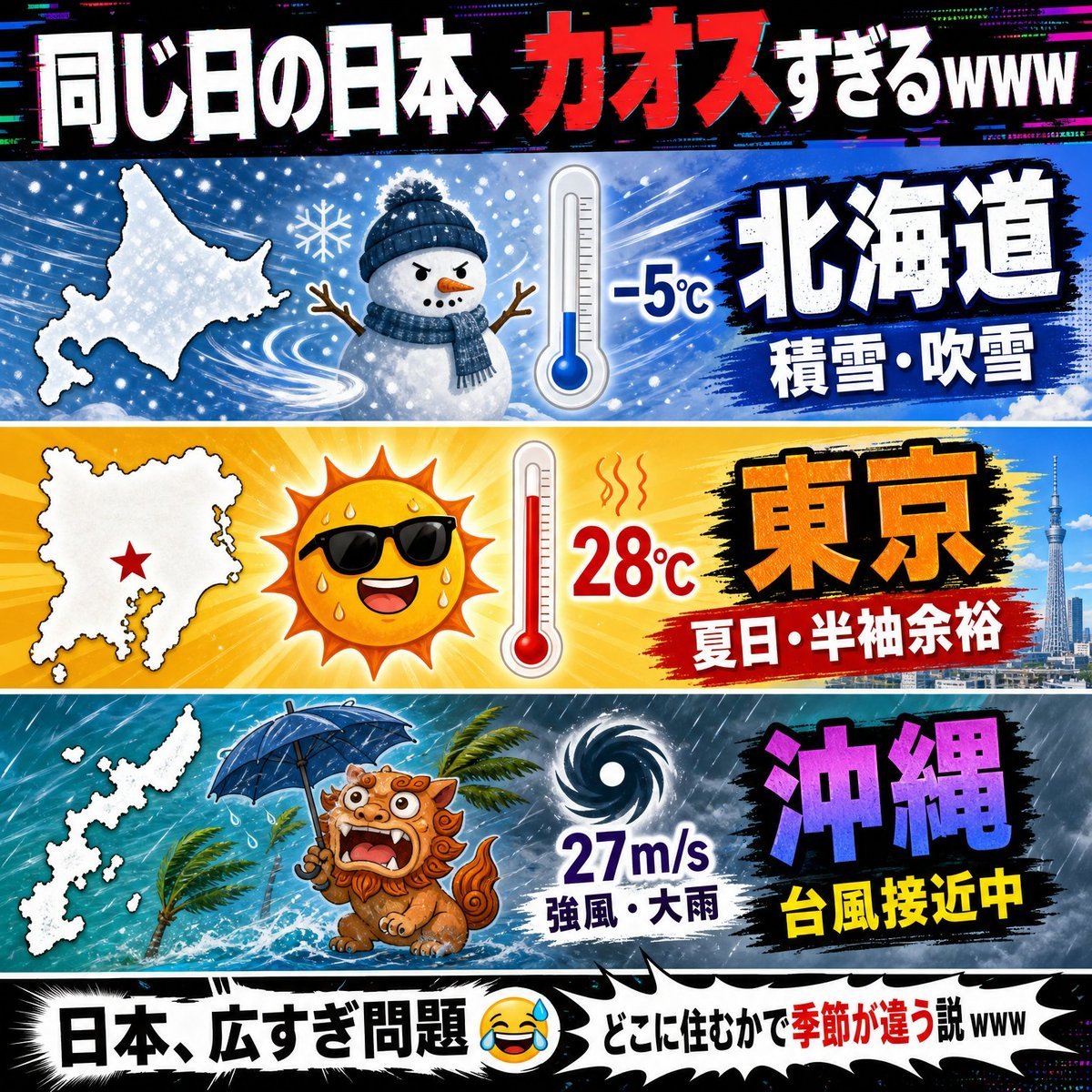
- Prompt included
- Model and format preset
- Free template
The prompt behind this image
Copy the exact prompt behind Chaotic Japan Weather Meme, or open it in the studio and make it yours.
- Type
- viral Japanese social media infographic / meme thumbnail
- Theme
- same day in Japan has wildly different weather across regions
- Canvas
- square 1:1 composition, high contrast, bold YouTube-thumbnail energy, glitchy RGB chromatic aberration, comic-book impact lines, exaggerated weather icons, thick black outlines, saturated colors
- Headline › Position
- top full-width black banner
- Headline › Text
- {argument name="headline text" default="同じ日の日本、カオスすぎるwww"}
- Headline › Style
- huge bold Japanese lettering, white text with red emphasis on カオス, distressed glitch effects, slight 3D shadow
- Layout › Panel Count
- 3
- Layout › Panels › 0 › Position
- top weather panel
- Layout › Panels › 0 › Region Label
- {argument name="first region label" default="北海道"}
- Layout › Panels › 0 › Background
- icy blue blizzard scene with swirling snow, snowflakes, wind streaks
- Layout › Panels › 0 › Map
- white silhouette map of Hokkaido on the left
- Layout › Panels › 0 › Weather Icons Count
- 2
- Layout › Panels › 0 › Weather Icons
- cute snowman wearing a navy knit hat and scarf with twig arms, blue thermometer showing freezing temperature
- Layout › Panels › 0 › Temperature
- -5°C
- Layout › Panels › 0 › Condition Text
- 積雪・吹雪
- Layout › Panels › 0 › Region Text Style
- massive white Japanese characters with dark blue outline on black brush-stroke patch
- Layout › Panels › 1 › Position
- middle weather panel
- Layout › Panels › 1 › Region Label
- {argument name="second region label" default="東京"}
- Layout › Panels › 1 › Background
- bright yellow-orange summer heat burst with sun rays, Tokyo skyline and Skytree on the right
- Layout › Panels › 1 › Map
- white silhouette map of the Kanto/Tokyo area on the left with a red star marker
- Layout › Panels › 1 › Weather Icons Count
- 2
- Layout › Panels › 1 › Weather Icons
- smiling blazing sun wearing black sunglasses, sweating, red thermometer showing hot temperature with heat squiggles
- Layout › Panels › 1 › Temperature
- 28°C
- Layout › Panels › 1 › Condition Text
- 夏日・半袖余裕
Raw JSON
{"type":"viral Japanese social media infographic / meme thumbnail","theme":"same day in Japan has wildly different weather across regions","canvas":"square 1:1 composition, high contrast, bold YouTube-thumbnail energy, glitchy RGB chromatic aberration, comic-book impact lines, exaggerated weather icons, thick black outlines, saturated colors","headline":{"position":"top full-width black banner","text":"{argument name=\"headline text\" default=\"同じ日の日本、カオスすぎるwww\"}","style":"huge bold Japanese lettering, white text with red emphasis on カオス, distressed glitch effects, slight 3D shadow"},"layout":{"panel_count":3,"panels":[{"position":"top weather panel","region_label":"{argument name=\"first region label\" default=\"北海道\"}","background":"icy blue blizzard scene with swirling snow, snowflakes, wind streaks","map":"white silhouette map of Hokkaido on the left","weather_icons_count":2,"weather_icons":["cute snowman wearing a navy knit hat and scarf with twig arms","blue thermometer showing freezing temperature"],"temperature":"-5°C","condition_text":"積雪・吹雪","region_text_style":"massive white Japanese characters with dark blue outline on black brush-stroke patch"},{"position":"middle weather panel","region_label":"{argument name=\"second region label\" default=\"東京\"}","background":"bright yellow-orange summer heat burst with sun rays, Tokyo skyline and Skytree on the right","map":"white silhouette map of the Kanto/Tokyo area on the left with a red star marker","weather_icons_count":2,"weather_icons":["smiling blazing sun wearing black sunglasses, sweating","red thermometer showing hot temperature with heat squiggles"],"temperature":"28°C","condition_text":"夏日・半袖余裕","region_text_style":"huge orange Japanese characters with black outline on black brush-stroke patch"},{"position":"bottom weather panel","region_label":"{argument name=\"third region label\" default=\"沖縄\"}","background":"stormy teal ocean with heavy rain, waves, palm trees bending in wind, dark cyclone sky","map":"white silhouette map of Okinawa islands on the left","weather_icons_count":2,"weather_icons":["frightened Okinawan shisa lion dog holding a blue umbrella, mouth open, rain splashing around","black-and-white spiral typhoon symbol"],"wind_speed":"27m/s","condition_text":"強風・大雨","alert_text":"台風接近中","region_text_style":"giant purple Japanese characters with black outline, yellow alert text underneath"}]},"footer":{"position":"bottom full-width comic caption banner","text":"{argument name=\"footer text\" default=\"日本、広すぎ問題 😂💦 どこに住むかで季節が違う説www\"}","style":"white jagged speech-bubble strip with thick black border, bold black Japanese text, red emphasis on 季節が違う, laughing-with-sweat emoji"},"overall_style":"Japanese meme infographic, chaotic but readable, three horizontal bands separated by white borders, dramatic typography, crisp vector-cartoon icons mixed with photo-like city detail, vivid blue/yellow/teal palette, playful exaggerated disaster-weather humor"}How to use Chaotic Japan Weather Meme in 3 steps
- 1Upload ImagePNG, JPG or paste
Add your photo
Upload the photo the template builds on. The prompt, model and format are already set.
- 2…a portrait of your subject in softgolden-hour light, 85mm…
Personalize
Edit the subject and creative details for your destination.
- 3Generate
Generate
Press Generate — your image is created in PicX Studio, so you can compare it with the original and refine one variable at a time.
More like this
Templates with the same subject, style or setup. Open one to see its prompt.
Weathered Japanese Crossing Signs
Chaotic Japanese Guest Announcement Poster

Japan Neon Speed City Racing Poster

Captain Tsubasa Anime World Cup Poster
Brazil Versus Japan Knockout Split Rivalry Poster

Minecraft You Died Winter Death Screen
Surreal Japanese Meme Thumbnail at Pyramid
Weathered Folk Poster Collage
Surreal Weather Armchair in Hotel Lobby
Weathered JP Morgan Bank Check
Sayaka Weather Presenter Studio
Blue Weather Skincare Visual Proposal
Make it yours
Chaotic Japan Weather Meme works as-is. These are the safest ways to change it without losing the look.
Swap the setting
Keep the rest of the prompt and replace the location block. The current setting is “icy blue blizzard scene with swirling snow, snowflakes, wind streaks”.
Change one field
Copy a single group, rewrite it, and generate again so you can see what that field is doing.
Keep the frame, change the subject
Hold the composition and light of Chaotic Japan Weather Meme, then swap wardrobe, props or the person for a new take.
| If the result… | Why | Fix |
|---|---|---|
| The result drifts from the preview | Too many fields changed at once. | Reuse Chaotic Japan Weather Meme as-is first, then change one group — subject, light, or setting. |
| GPT Image 2 ignores part of the JSON | Some models flatten or skip nested keys. | Keep the same values and paste them as a short paragraph instead. |
More GPT Image 2 templates
Other prompts made for GPT Image 2.

Six VTuber Japanese Logo Sheet

Realistic Portrait of Woman and Deer

The Vista Modular Condo Poster

AI Model Routing Comparison Infographic

2.5D Anime Art Board

Isometric Productivity Desk Scene

New York Double Exposure Poster

Four-Panel AI Landscape Comparison

Japanese Tatami Lifestyle Magazine Cover

NESCAFÉ Coffee Map Poster
More image prompts
Fresh picks from across the catalog.

Ultra-Photoreal Lifestyle Portrait in an Art Studio with Pink Paint
Clean Photo of The Last Supper Fresco

Black and White Noir Fashion Editorial Portrait

Censored Glam Selfie

Golden Hour Riverside Portrait with Identity Lock

Image Editing and Background Replacement Workflow
Life-Size Holding Miniature Self Prompt
Photorealistic Candid Street Romance Prompt (Galata Bridge)
Nano Banana Pro Prompt: Tarot Card 18 (The Moon) with Mális Mizer and Pisces
Candid Subway Commuter Prompt
Browse template categories
Chaotic Japan Weather Meme questions
How do I use the Chaotic Japan Weather Meme template?
Add your photo if the template asks for one, edit the prompt if you like — the template's model and format are already selected — and press Generate. Your version opens in PicX Studio.
Can I customize the Chaotic Japan Weather Meme template?
Yes. You can change the subject, setting, lighting, mood, format, and available model controls before creating your image.
Is the Chaotic Japan Weather Meme template free?
Opening and editing this template is free. Generating uses credits, shown on the Generate button when you are signed in.
Which AI model should I use?
Start with GPT Image 2, which is the model associated with this template. You can compare another compatible model for a different finish.
Looking for something else? Browse all templates.

Your photo, any look
Thousands of ready templates for every top image and video model, from one credit balance.