How do I use the Japanese Woman Polaroid Portrait template?
Choose the primary action to open PicX Studio with the available template settings. Review the model and format, personalize the creative direction, and generate when ready.
A highly detailed prompt for generating a realistic polaroid-style portrait of a young Japanese woman with natural features and soft lighting. Change the subject, setting, or lighting one variable at a time.
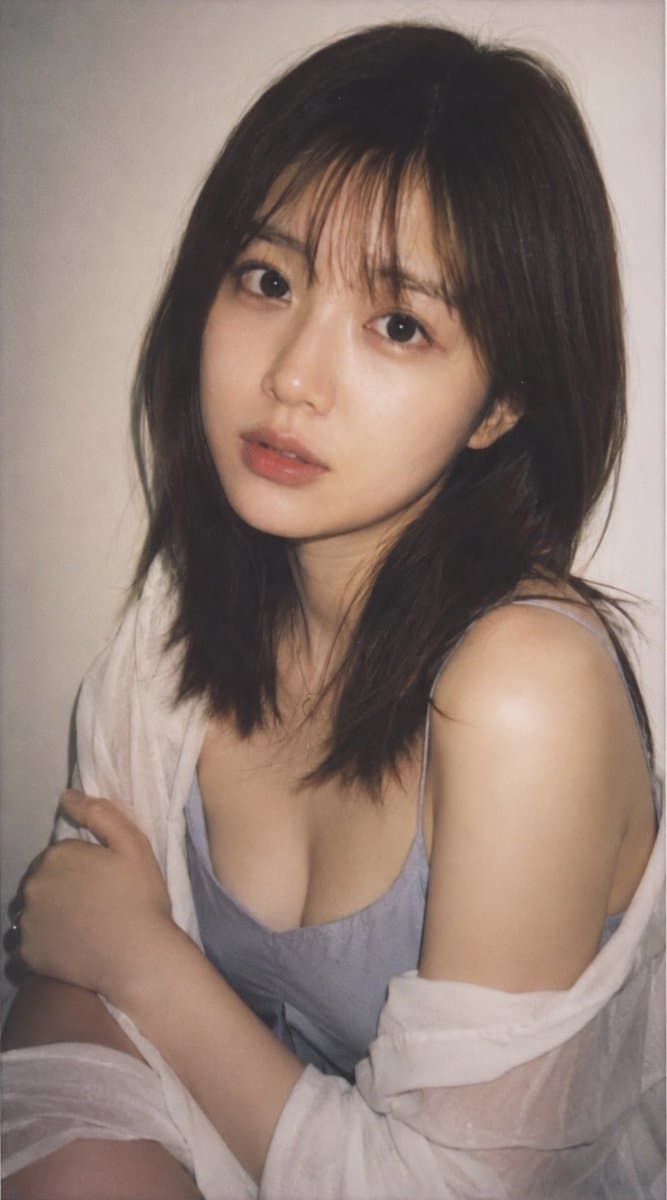
主題:ポラロイドカメラで撮影したような、{argument name="年齢" default="18〜21"}歳の日本人女性の高品質リアルポートレート 人物・表情:実在人物ではない若い日本人女性、{argument name="髪型" default="肩にかかる長さのブラウンヘア"}、自然な前髪、二重まぶた、透明感のある肌、ナチュラルメイク、少し儚げで落ち着いた表情、柔らかなカメラ目線 服装・ポーズ:{argument name="服装" default="淡いブルーグレーのキャミソールに白い薄手のシャツをゆるく羽織る"}、上半身を少し斜めに向け、片腕を体の前に添えた自然なポーズ 背景・光:室内のシンプルな淡いベージュ背景、ポラロイド特有の柔らかなフラッシュ光、控えめな影、淡く少し退色したフィルムトーン 構図・カメラ:縦長34:65、バストアップ寄りのポートレート、顔を中心にした近距離構図、インスタントカメラ風の白い余白フレーム、浅い被写界深度、自然なスナップ写真感 質感・スタイル:高精細、リアルな肌質、繊細な髪のディテール、淡い色調、軽いフィルムグレイン、ポラロイド写真風、raw style、自然で飾りすぎないAI写真 ネガティブ:低画質、不自然な手、崩れた顔、余分な指、過度な美肌加工、強すぎる露出、文字、ロゴ、透かし
Choose the primary action to open PicX Studio with the available template settings. Review the model and format, personalize the creative direction, and generate when ready.
Yes. You can change the subject, setting, lighting, mood, format, and available model controls before creating your image.
This template is free to open and customize. Generation usage is shown in PicX Studio before you create.
Start with GPT Image 2, which is the model associated with this template. You can compare another compatible model for a different finish.
Follow a topic to a crawlable collection of related PicX Studio templates.
43,474 public templates available. Verified via the PicX Studio public templates API; refreshed hourly.




![118-google-nano-banana-pro-skincare-product- — A professional skincare shot of a [product container] with [cap/lid], labeled [brand, product, descriptor, volume](/_next/image?url=https%3A%2F%2Fcdn.picxstudio.com%2Fuploads%2Fpost118_img0_332898b8-29ea-42a9-87ab-9ed746a3f944.jpg&w=828&q=100)



![69-untitled — FORMAT: 15s / 145 BPM / 14 SHOTS
SUBJECT: @[image1]
WARDROBE: Clean modern outfit
ENVIRONMENT: Street / indoor transitions
MOOD: Discovery → contr](/_next/image?url=https%3A%2F%2Fcdn.picxstudio.com%2Fuploads%2Fpost69_img0_d45faecf-38c3-4bcb-81a4-f6eb1cf42bb2.jpg&w=828&q=100)














![Minimalist Flat Vector Travel Poster — Premium minimalist flat-vector travel poster for {argument name="city name" default="[CITY_NAME]"}, 3:4 vertical format.](https://cms-assets.youmind.com/media/1787917359711_3ug846_HQX205cbMAA6F6S-300x400.jpg)































![Product as Architecture Miniature Urban Scene — A dreamlike miniature urban scene where an oversized [{argument name="brand product" default="BRAND PRODUCT"}] i](https://pbs.twimg.com/media/G-RxU80asAEvxle.jpg)