How do I use the Fenty Beauty Gloss Scoop Product Shoot template?
Choose the primary action to open PicX Studio with the available template settings. Review the model and format, personalize the creative direction, and generate when ready.
A ready image prompt for PicX Studio. Change the subject, setting, or lighting one variable at a time.
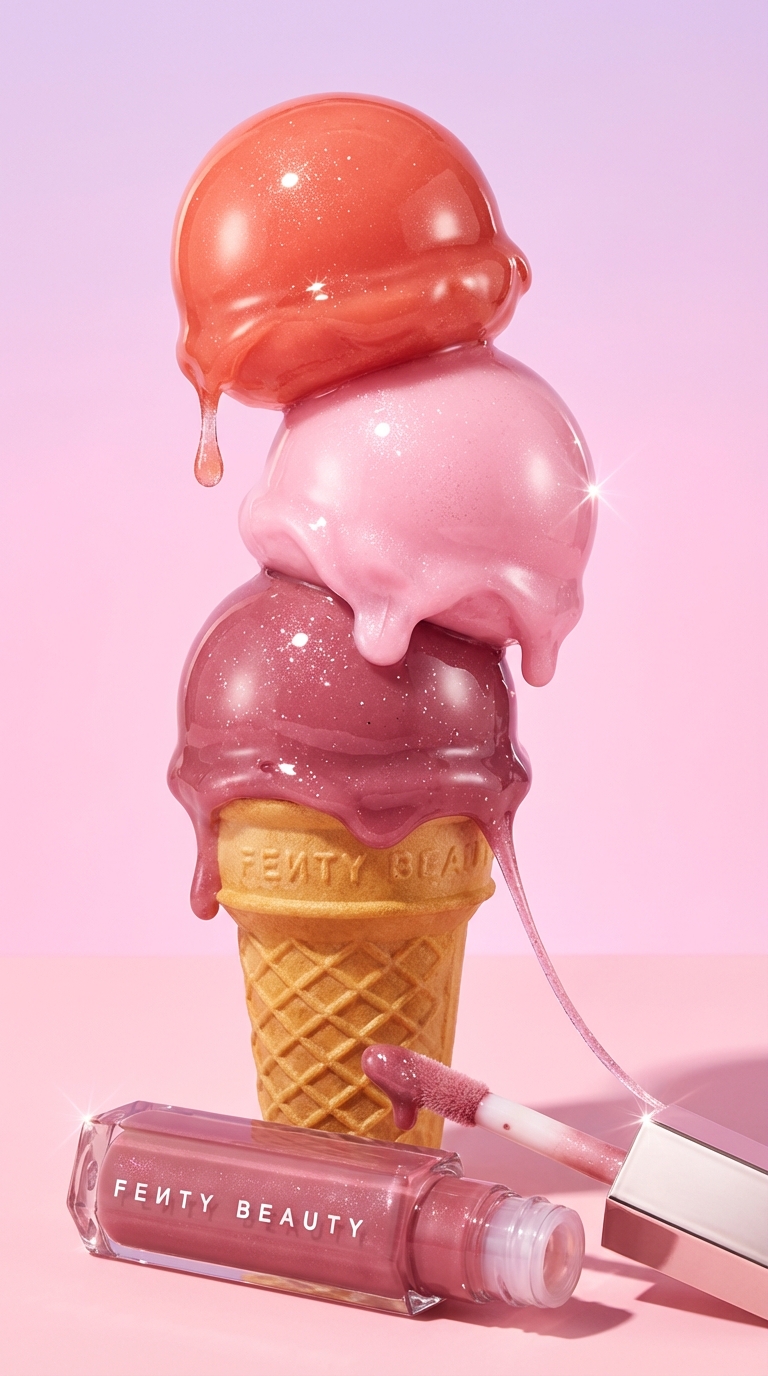
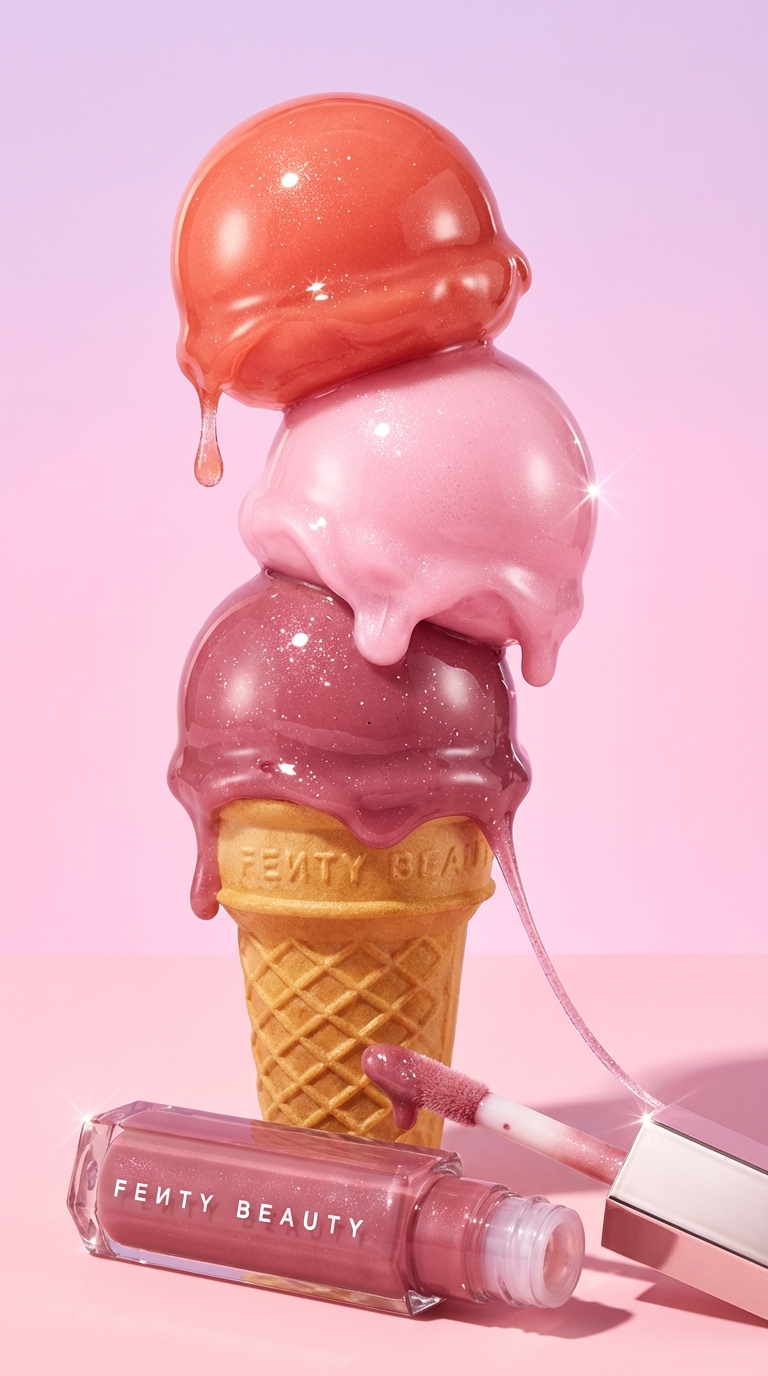
Ultra-premium creative beauty product photography in vertical 9:16 format, featuring Fenty Beauty lip gloss as the hero product. At the center, a triple-scoop ice-cream cone made from realistic lip gloss textures is stacked elegantly — top scoop in warm coral, middle scoop in soft baby pink, bottom scoop in deep rose-mauve. Each scoop has mirror-like shine, smooth curvature, subtle micro-sparkle, and realistic gloss thickness, with gentle drip edges frozen mid-motion. The waffle cone is crisp, golden, and highly detailed, with subtle embossed Fenty Beauty branding and natural baked texture. The actual Fenty Beauty lip gloss product is clearly included: – One Fenty Beauty lip gloss tube placed diagonally at the base of the cone, label facing camera, brand name sharp and readable – A doe-foot applicator beside it, coated with gloss, with a thin stretch of product connecting back to the scoop, adding motion and storytelling Background is a soft pastel pink gradient, clean and modern, with no distractions. Lighting is luxury cosmetic studio lighting — strong key light to enhance gloss shine, soft fill to preserve true color, and rim lighting to define edges and elevate volume. Subtle grounded shadows add realism. Shot using a macro beauty lens, shallow depth of field with the product and branding in perfect focus, extreme clarity, flawless color accuracy, no noise, no blur. High-fashion cosmetic campaign aesthetic, playful yet luxurious mood, Sephora-level advertising quality, hyper-realistic, photoreal, 8K beauty photography, scroll-stopping, commercially ready.
Choose the primary action to open PicX Studio with the available template settings. Review the model and format, personalize the creative direction, and generate when ready.
Yes. You can change the subject, setting, lighting, mood, format, and available model controls before creating your image.
This template is free to open and customize. Generation usage is shown in PicX Studio before you create.
Choose a compatible model in PicX Studio based on the style, speed, and output controls your project needs.
© 2026 PicX Studio. All rights reserved.

Follow a topic to a crawlable collection of related PicX Studio templates.
43,474 public templates available. Verified via the PicX Studio public templates API; refreshed hourly.
![Luxury Dessert Logo Product Photography — Minimalist luxury product photography of an edible sculpture inspired by the [brand name] logo. Logo transformed into](/_next/image?url=https%3A%2F%2Fcdn.picxstudio.com%2Fuploads%2Fmeigen_a9d271403edd_04fd5565-6f29-4349-9b66-e8e43523ac87.jpg&w=828&q=100)
![Playful Futuristic Brand Kit Board — Create a polished multi-page (multiple images) brand kit for a company called [YOYOYO]. The brand sh…](/_next/image?url=https%3A%2F%2Fcdn.picxstudio.com%2Fuploads%2Fmeigen_35482e665691_a87e3ac0-b1e5-4a95-a750-7378b7788369.jpg&w=828&q=100)
![Low Angle Product Fashion Campaign — Low-angle fashion campaign photograph of a confident model holding a large [product name] very close…](/_next/image?url=https%3A%2F%2Fcdn.picxstudio.com%2Fuploads%2Fmeigen_4c03edc4df35_6f63201c-902b-410c-8eaa-7760408114bb.jpg&w=828&q=100)


![Oversized Hero Product Fashion Editorial — [person], [pose], oversized product as main hero prop, playful fun energy, fashion editorial styling, clean minimal b](/_next/image?url=https%3A%2F%2Fcdn.picxstudio.com%2Fuploads%2Fmeigen_43b3d6f04208_a5c18968-9001-4977-a6d2-83d92ba0940f.jpg&w=828&q=100)


![Moss Logo Minimalist Brand Flat Lay — [BRAND NAME]: Enter the brand name here.
Goal: Generate a minimalist organic image where a stylized logo icon of [BRAND NA](/_next/image?url=https%3A%2F%2Fcdn.picxstudio.com%2Fuploads%2Fmeigen_c099b4a510e0_2c38b884-72c5-4839-8374-99d9fab74c05.jpg&w=828&q=100)

![A hyper-realistic beauty product photograph of a pink jar placed — A hyper-realistic beauty product photograph of a pink [LANEIGE Lip Sleeping Mask] jar placed](https://images.meigen.ai/tweets/2019637570133717072/0.jpg)



![Commercial Cosmetic Product Photography Prompt — A centrally placed pink cosmetic jar labeled “LANEIGE Lip Sleeping Mask [Berry] 3 g” sits on top of a large spi](https://pbs.twimg.com/media/HDhRyeEaIAAW8dL.jpg)






![Selfie with Movie Character Template Prompt — I’m taking a selfie with {argument name="movie character" default="[movie character]"} on the set of {argument nam](https://pbs.twimg.com/media/G752JHzbsAAho4B.jpg)