How do I use the Rainy Night Gyaru Fashion Photo template?
Choose the primary action to open PicX Studio with the available template settings. Review the model and format, personalize the creative direction, and generate when ready.
A cinematic low-angle luxury street fashion scene of a gyaru woman in red rain boots splashing through a rainy city night. Change the subject, setting, or lighting one variable at a time.
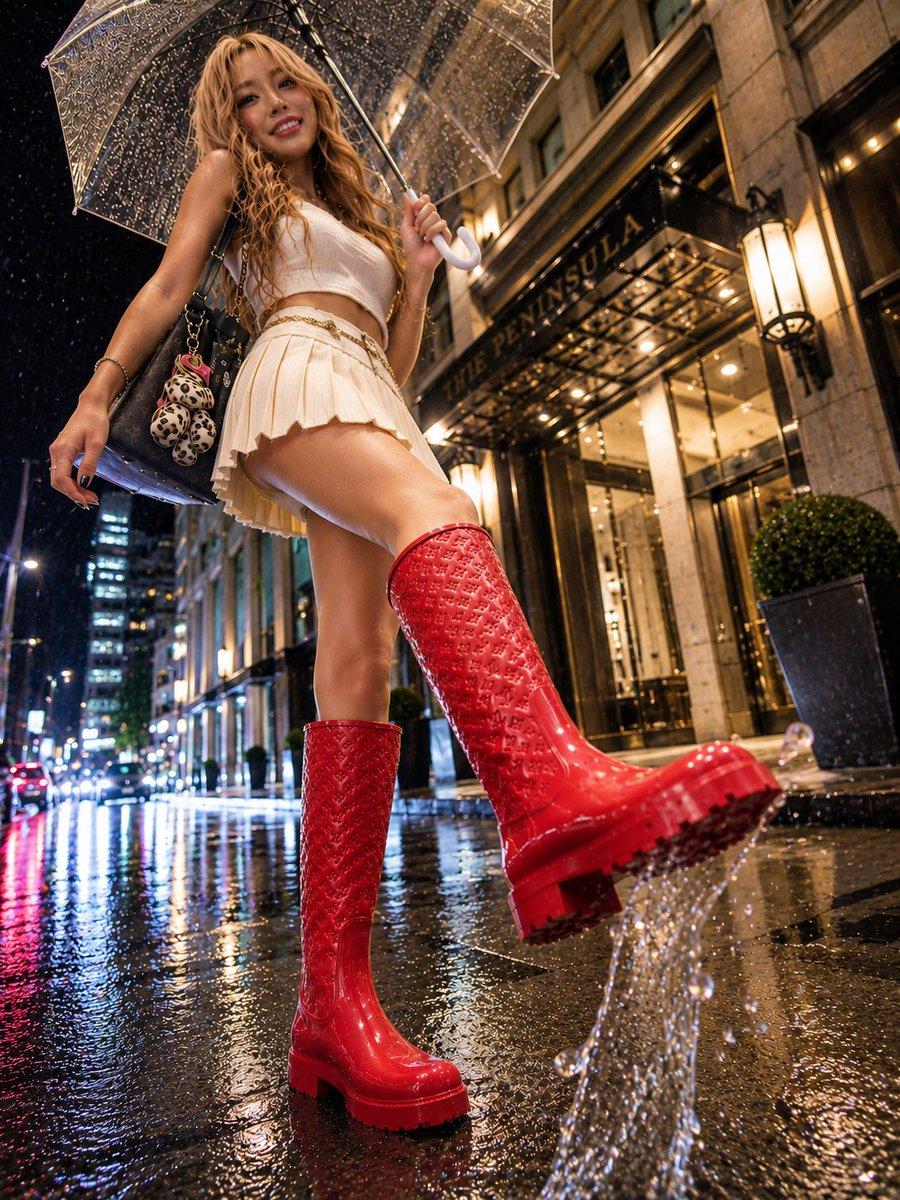
Create a hyper-realistic vertical fashion street photograph of a glamorous gyaru-style young woman walking in heavy rain at night outside a luxury hotel entrance, with a cinematic low-angle wide-lens perspective from near the wet pavement. She holds a transparent umbrella covered in raindrops above her head, her face intentionally covered by a plain brown rectangular privacy block. She has {argument name="hair color" default="long wavy blonde hair"} cascading over her shoulders and wears {argument name="outfit color" default="a white cropped sleeveless top and cream pleated mini skirt"}, a thin gold chain belt, and glossy {argument name="boot color" default="bright red"} knee-high monogram-pattern rain boots with chunky soles. One boot is planted on the reflective sidewalk while the other is lifted forward toward the camera, splashing water dramatically from the sole in a clear arc of droplets. She carries exactly 1 black designer-style shoulder bag with chain strap on her left shoulder, decorated with exactly 2 plush leopard-print teddy bear charms. Add jewelry details: bracelets, rings, manicured nails, and a confident fashion-model pose. The setting is {argument name="location sign" default="THE PENINSULA"} hotel façade with warm golden entrance lights, stone architecture, glass canopy, lanterns, potted greenery, and a rain-soaked city street receding into the background with car headlights, neon reflections, and tall buildings. Emphasize wet skin texture, glossy boots, transparent umbrella ribs, sparkling raindrops, puddle reflections, bokeh city lights, and high-end editorial realism. Use dramatic perspective distortion, sharp foreground water splash, rich contrast, warm hotel lighting against cool rainy blue-black night tones, no extra people, no watermark.
Choose the primary action to open PicX Studio with the available template settings. Review the model and format, personalize the creative direction, and generate when ready.
Yes. You can change the subject, setting, lighting, mood, format, and available model controls before creating your image.
This template is free to open and customize. Generation usage is shown in PicX Studio before you create.
Start with GPT Image 2, which is the model associated with this template. You can compare another compatible model for a different finish.
Follow a topic to a crawlable collection of related PicX Studio templates.
43,474 public templates available. Verified via the PicX Studio public templates API; refreshed hourly.













![Minimalist Flat Vector Travel Poster — Premium minimalist flat-vector travel poster for {argument name="city name" default="[CITY_NAME]"}, 3:4 vertical format.](https://cms-assets.youmind.com/media/1787917359711_3ug846_HQX205cbMAA6F6S-300x400.jpg)



















![Gestural Ink Fashion Illustration — ASPECT_RATIO: [{argument name="aspect ratio" default="3:4"}]
SOURCE_IMAGE: [{argument name="reference" default="uploaded ph](https://cms-assets.youmind.com/media/1777280753932_fx7ly1_HG1FTbYbcAAgUjS.jpg)






![Paper Art Cutout Effect Prompt — [角色] = {argument name="角色" default="路飞"}
木质书桌上摆着一件充满奇趣的手工纸艺作品:将手绘的卡通 [角色] 从纸上剪下,折叠成一个立体的站立小人偶。[角色] [姿势]。在它身旁的纸面上,不仅有那个留下的空白剪影,](https://pbs.twimg.com/media/G7oBY0haEAAeYYc.jpg)

![Hyper-Realistic Product Photography with Liquid Splash — Professional studio product photography of a {argument name="product" default="[PRODUCT]"}, centered. T](https://pbs.twimg.com/media/G9wUTNzXwAAmBnX.jpg)