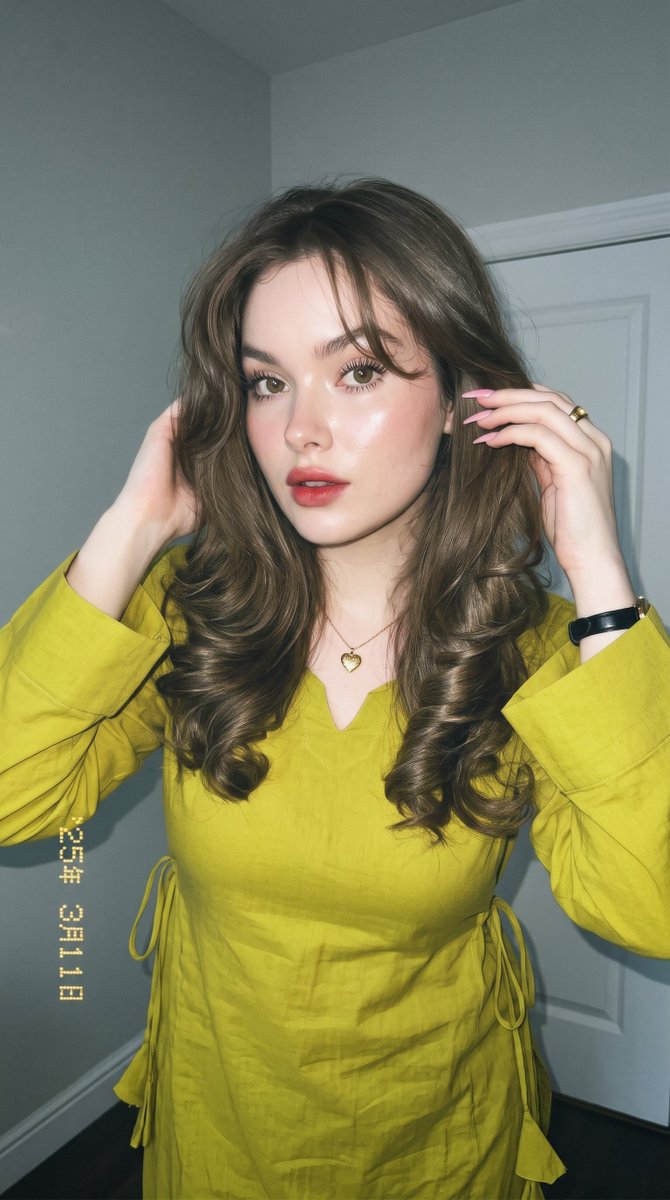


How do I use the Chartreuse Kurta Editorial Portrait template?
Choose the primary action to open PicX Studio with the available template settings. Review the model and format, personalize the creative direction, and generate when ready.
An ultra-detailed prompt for a close-up social media portrait of a woman in traditional attire, featuring high-end makeup and vintage film textures. (free to use) — Free AI image template on PicX Studio.
Maintain her original facial features exactly as they are, preserving her 100% authentic appearance and perfectly symmetrical face. She should look youthful and feminine, with a naturally full bust (not flat). Create a high-resolution, masterpiece-quality image with the best possible quality, perfect detailed lighting, dramatic shadows, a curvy and attractive figure, an innocent face, and a vertical 9:16 composition. Transform the image into a very close-up social media portrait of a fair-skinned white woman wearing radiant, glowing makeup with a glass skin effect. She has long, thick, curled "spider-leg" eyelashes, long and well-defined lower lashes, neatly groomed natural eyebrows, and a reddish gradient (ombre) lip tint. She is wearing a long {argument name="outfit color" default="chartreuse"} cotton kurta featuring a soft V-neckline, long sleeves with wide cuffs, and adjustable corset-style side ties finished with delicate fabric tassels, with the garment covering her hair. Her hair is long, thick, glossy ash brown, cut in multiple layers with softly curled ends, while a few loose strands naturally frame her forehead and face. She wears a very small gold heart-shaped necklace (♥️), a small black watch, long natural pink nails, and a gold ring on her ring finger. The portrait is captured as an extreme close-up from a slightly tilted, low camera angle. She has a gentle, elegant smile, one hand lightly holding her hair near her ear, and looks directly into the camera. The overall style is photogenic celebrity-style portrait photography suitable for Instagram, appearing highly realistic rather than artificial. The lighting combines a camera flash with soft natural indoor illumination, creating an even distribution of light across her face for a bright, luminous complexion. The background is slightly dark, showing a dimly lit room with pale gray walls beside a white door. The image should look as though it was taken with the latest iPhone camera, featuring ultra-realistic skin texture (without an artificial plastic appearance), razor-sharp focus, cinematic depth, 8K Ultra-HD resolution, and a premium editorial magazine portrait aesthetic. Apply a soft vintage film texture with subtle haze to emulate the look of analog film photography or a retro filter. In the bottom-left corner, include a classic white digital timestamp printed vertically reading "25年 3月11日" (March 11, 2026). Use a 9:16 aspect ratio and preserve natural skin texture throughout.
Use Chartreuse Kurta Editorial Portrait to plan an AI image around nano-banana-2 generation. Match the preview's composition first, then personalize the subject, setting, and mood for your own project.
Use the primary action to load the template settings in PicX Studio.
Adjust the subject and creative details for your destination.
Create the image, compare the result with the preview, and refine one variable at a time.
A continuous mix — similar concepts first, woven with same-model prompts and fresh picks from the catalog.
Choose the primary action to open PicX Studio with the available template settings. Review the model and format, personalize the creative direction, and generate when ready.
Yes. You can change the subject, setting, lighting, mood, format, and available model controls before creating your image.
This template is free to open and customize. Generation usage is shown in PicX Studio before you create.
Start with nano-banana-2, which is the model associated with this template. You can compare another compatible model for a different finish.
A continuous mix — similar concepts first, woven with same-model prompts and fresh picks from the catalog.
Follow a topic to a crawlable collection of related PicX Studio templates.
32,032 public templates available. Verified via the PicX Studio public templates API; refreshed hourly.


