

How do I use the Ultra-Realistic High-Rise Luxury Portrait template?
Choose the primary action to open PicX Studio with the available template settings. Review the model and format, personalize the creative direction, and generate when ready.
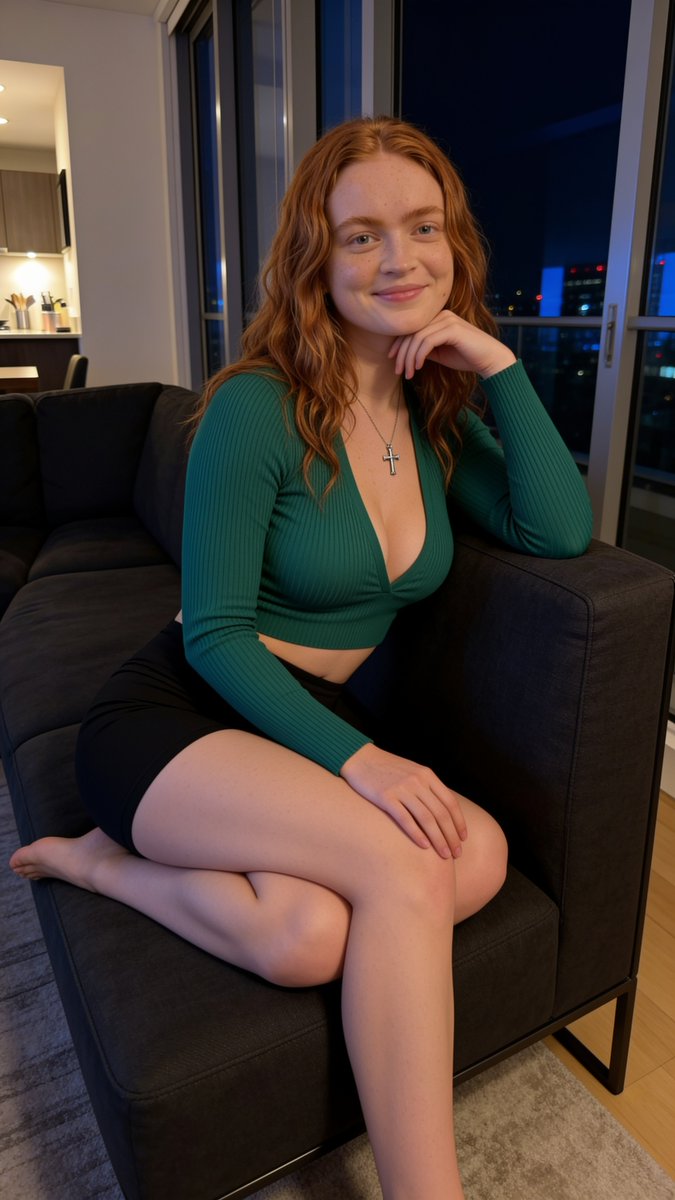
A comprehensive photorealistic prompt for generating a lifestyle portrait of a young woman in a luxury high-rise apartment at night. (free to use) — Free AI image template on PicX Studio.
{ "prompt": "Ultra-realistic lifestyle portrait of {argument name=\"subject\" default=\"a young woman with long wavy copper-red hair\"} sitting comfortably on a modern charcoal-gray sofa inside a luxury high-rise apartment at night. Soft natural freckles, luminous skin with realistic texture, minimal makeup, warm smile, and bright expressive eyes. Wearing a {argument name=\"outfit\" default=\"fitted emerald-green ribbed long-sleeve crop top with a deep V-neckline, black fitted shorts\"}, and a delicate silver cross necklace. Relaxed seated pose with one arm resting beneath her chin and legs folded comfortably on the sofa. Floor-to-ceiling windows reveal a city skyline with blue evening lights and urban reflections. Warm interior lighting from the apartment creates a cozy cinematic atmosphere, balancing the cool tones from the city outside. Contemporary luxury apartment aesthetic, realistic skin texture, lifestyle editorial photography, photorealistic, highly detailed, premium social media content, modern interior design, natural color grading, cozy evening mood, 8K quality.", "negative_prompt": "blurry, low quality, low resolution, distorted anatomy, extra limbs, extra fingers, unrealistic proportions, plastic skin, excessive retouching, cartoon, anime, CGI, painting, watermark, text, logo, cluttered room, warped furniture, duplicate features, overexposed highlights, harsh shadows, noisy image, malformed hands", "style": "photorealistic", "camera": { "type": "full-frame mirrorless", "lens": "50mm", "aperture": "f/2.0", "iso": 400, "angle": "eye-level lifestyle portrait", "depth_of_field": "shallow" }, "lighting": { "type": "warm apartment ambient lighting", "direction": "soft front-side illumination", "mood": "cozy, modern, evening luxury" }, "composition": { "framing": "vertical portrait", "subject_position": "centered on sofa", "background": "luxury apartment interior with floor-to-ceiling windows and city lights" }, "quality": { "resolution": "8k", "detail": "ultra high", "realism": "maximum" } }
Use Ultra-Realistic High-Rise Luxury Portrait to plan an AI image around nano-banana-2 generation. Match the preview's composition first, then personalize the subject, setting, and mood for your own project.
Use the primary action to load the template settings in PicX Studio.
Adjust the subject and creative details for your destination.
Create the image, compare the result with the preview, and refine one variable at a time.
A continuous mix — similar concepts first, woven with same-model prompts and fresh picks from the catalog.
Choose the primary action to open PicX Studio with the available template settings. Review the model and format, personalize the creative direction, and generate when ready.
Yes. You can change the subject, setting, lighting, mood, format, and available model controls before creating your image.
This template is free to open and customize. Generation usage is shown in PicX Studio before you create.
Start with nano-banana-2, which is the model associated with this template. You can compare another compatible model for a different finish.
A continuous mix — similar concepts first, woven with same-model prompts and fresh picks from the catalog.
Follow a topic to a crawlable collection of related PicX Studio templates.
32,032 public templates available. Verified via the PicX Studio public templates API; refreshed hourly.


