How do I use the Photojournalistic Tropical Garden Portrait template?
Choose the primary action to open PicX Studio with the available template settings. Review the model and format, personalize the creative direction, and generate when ready.
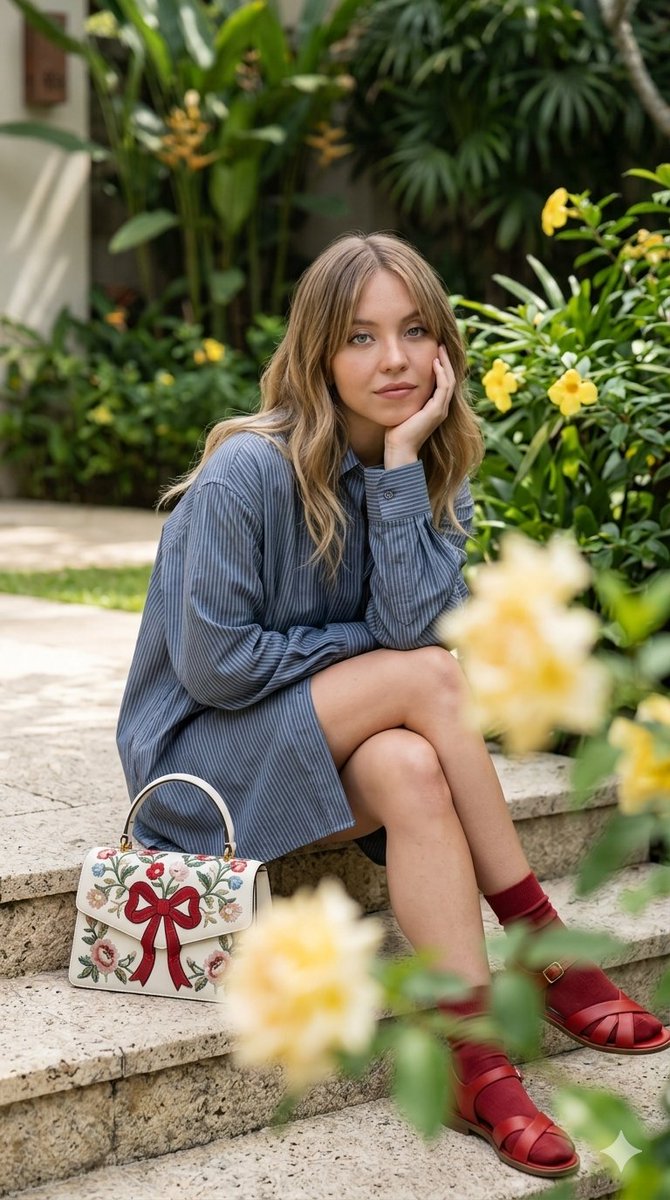
A candid-style portrait prompt featuring Sydney Sweeney in a lush tropical setting wearing a striped shirt-dress. (free to use) — Free AI image template on PicX Studio.
A candid, photo journalistic style portrait photograph of {argument name="subject" default="actress Sydney Sweeney"}, seated on rough stone steps. She is posing with her hand to her chin, making eye contact with the camera. Sweeney wears an {argument name="outfit" default="oversized blue-and-white pinstriped button-down shirt-dress"}, red socks, and red leather sandals. To her left is a {argument name="accessory" default="cream-colored Gucci Dionysus top-handle handbag"} featuring a prominent red bow and detailed floral embroidery. She is in a lush, tropical garden environment, surrounded by green foliage, tropical plants, and yellow flowering bushes. The foreground has blurred out-of-focus yellow rose blooms. The lighting is soft, natural daylight.
Use Photojournalistic Tropical Garden Portrait to plan an AI image around nano-banana-2 generation. Match the preview's composition first, then personalize the subject, setting, and mood for your own project.
Use the primary action to load the template settings in PicX Studio.
Adjust the subject and creative details for your destination.
Create the image, compare the result with the preview, and refine one variable at a time.
A continuous mix — similar concepts first, woven with same-model prompts and fresh picks from the catalog.
Choose the primary action to open PicX Studio with the available template settings. Review the model and format, personalize the creative direction, and generate when ready.
Yes. You can change the subject, setting, lighting, mood, format, and available model controls before creating your image.
This template is free to open and customize. Generation usage is shown in PicX Studio before you create.
Start with nano-banana-2, which is the model associated with this template. You can compare another compatible model for a different finish.
A continuous mix — similar concepts first, woven with same-model prompts and fresh picks from the catalog.
Follow a topic to a crawlable collection of related PicX Studio templates.
32,032 public templates available. Verified via the PicX Studio public templates API; refreshed hourly.


