How do I use the Cinematic Coastal Leopard Fashion template?
Choose the primary action to open PicX Studio with the available template settings. Review the model and format, personalize the creative direction, and generate when ready.
A moody fashion editorial portrait of a woman in a leopard print dress on a rocky shoreline during the blue hour. (free to use) — Free AI image template on PicX Studio.
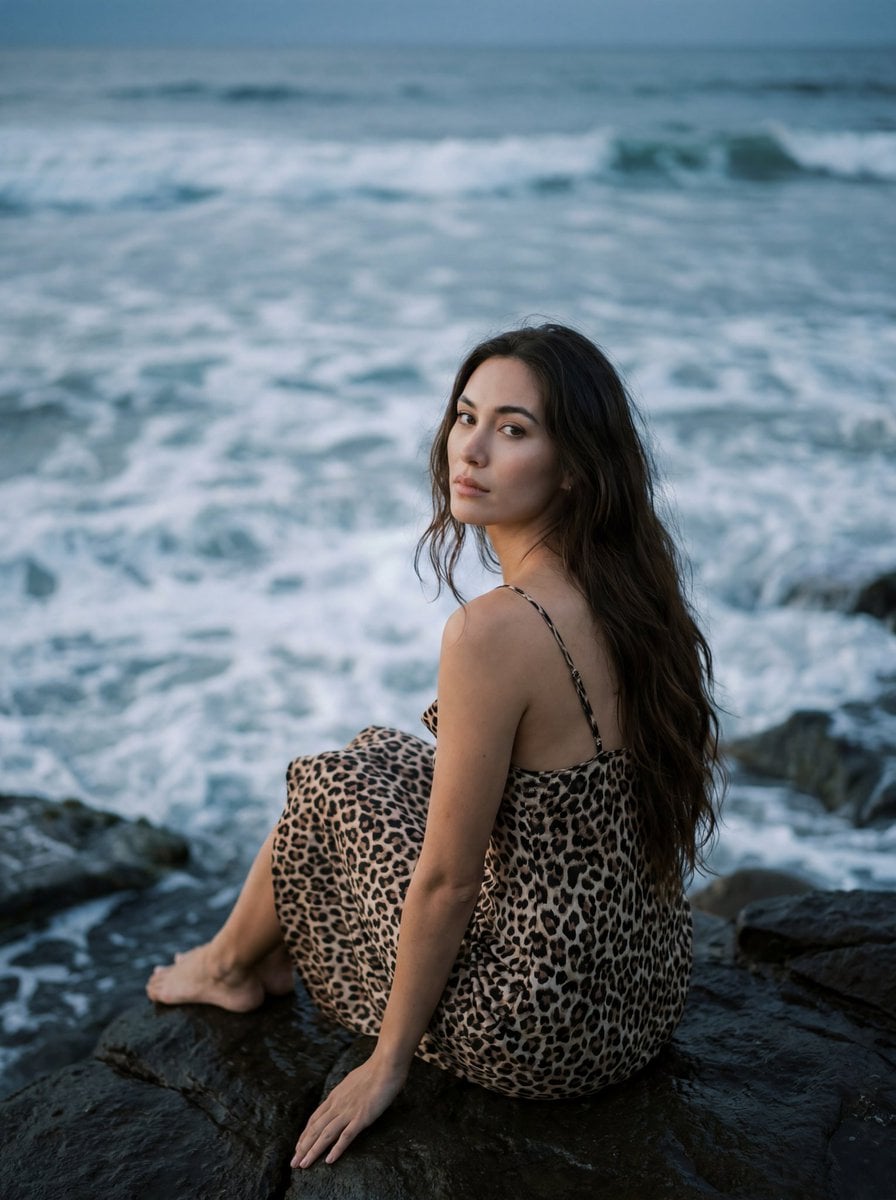
{"image_type":"cinematic_portrait","style":"editorial fashion photography","composition":{"orientation":"vertical","aspect_ratio":"4:5","framing":"three-quarter seated portrait","camera_angle":"slightly elevated","subject_position":"lower center","focus":"subject face and upper body","background":"ocean waves filling entire backdrop","depth":"shallow depth of field with soft water texture"},"subject":{"type":"woman","pose":"seated on coastal rocks, body turned away from camera, looking back over shoulder","expression":"calm, intimate, contemplative","hair":{"color":"deep black","style":"long, loose, naturally wavy"},"features":{"skin_tone":"light warm complexion","eyes":"large expressive eyes","makeup":"natural editorial makeup"},"accessories":["small gold earrings"],"wardrobe":{"garment":"leopard print slip dress","details":["thin spaghetti straps","flowing fabric","animal print pattern"]}},"environment":{"location":"rocky ocean shoreline","elements":["foamy waves","dark coastal rocks","water reflections"],"atmosphere":"moody coastal evening"},"lighting":{"type":"natural ambient light","time":"blue hour or overcast sunset","quality":"soft diffused light","direction":"frontal-side illumination","contrast":"low to moderate","mood":"cinematic and dreamy"},"color_palette":{"primary":["ocean blue-gray","# 6f8791","charcoal","# 2f3438","warm beige","# d8b39a"],"secondary":["leopard brown","# 8a5f43","black","#141414"],"mood":"muted, filmic, nostalgic"},"camera":{"genre":"fashion editorial","lens":"85mm full-frame equivalent","aperture":"f/2.0","focus":"sharp on eyes","depth_of_field":"shallow with creamy background blur"},"image_characteristics":{"contrast":"soft","saturation":"slightly desaturated","grain":"subtle film grain","dynamic_range":"medium","post_processing":["film-inspired color grading","muted highlights","soft skin retouching","cinematic tones"]},"keywords":["coastal portrait","editorial fashion","ocean backdrop","leopard print dress","moody photography","cinematic portrait","film photography aesthetic","natural beauty","soft focus","luxury editorial"],"generation_prompt":"Ultra-realistic cinematic fashion portrait of a woman seated on dark coastal rocks beside the ocean, wearing a flowing leopard print slip dress with thin straps, long wavy black hair, soft natural makeup, looking back over her shoulder directly at the camera, foamy blue-gray waves in the background, dreamy coastal atmosphere, soft diffused evening light, shallow depth of field, 85mm lens, f/2.0, film photography aesthetic, subtle grain, muted color palette, editorial magazine quality, natural skin texture, high detail, photorealistic, moody luxury fashion campaign, creamy bokeh, cinematic color grading"}
Use Cinematic Coastal Leopard Fashion to plan an AI image around nano-banana-2 generation. Match the preview's composition first, then personalize the subject, setting, and mood for your own project.
Use the primary action to load the template settings in PicX Studio.
Adjust the subject and creative details for your destination.
Create the image, compare the result with the preview, and refine one variable at a time.
A continuous mix — similar concepts first, woven with same-model prompts and fresh picks from the catalog.
Choose the primary action to open PicX Studio with the available template settings. Review the model and format, personalize the creative direction, and generate when ready.
Yes. You can change the subject, setting, lighting, mood, format, and available model controls before creating your image.
This template is free to open and customize. Generation usage is shown in PicX Studio before you create.
Start with nano-banana-2, which is the model associated with this template. You can compare another compatible model for a different finish.
A continuous mix — similar concepts first, woven with same-model prompts and fresh picks from the catalog.
Follow a topic to a crawlable collection of related PicX Studio templates.
32,032 public templates available. Verified via the PicX Studio public templates API; refreshed hourly.