How do I use the Chibi Prison Break Comic Scene template?
Choose the primary action to open PicX Studio with the available template settings. Review the model and format, personalize the creative direction, and generate when ready.
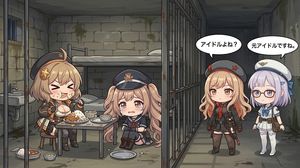
Generates a wide chibi anime comic illustration of an idol prisoner kicking through a jail wall while guards react in the corridor.
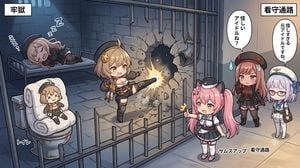
Goal: Create a wide single-panel chibi anime comic illustration about a prison breakout scene, split visually into two labeled areas: a dark jail cell on the left and a brighter guard corridor on the right. Canvas: 16:9 horizontal image, polished digital anime style, cute chibi proportions, clean line art, soft cel shading, dramatic lighting from the wall impact, high detail but readable composition. Layout: The left two-thirds show the prison cell interior with blue-gray stone walls, barred doors, a metal bed, and a toilet. The right third shows the guard corridor outside the bars, lit with warmer beige light. Use a vertical boundary created by the cell bars and wall. Add a large cracked hole being smashed into the stone wall near the center-right of the cell, with debris, dust, and a bright orange impact flash. Text content: Include exactly 6 visible Japanese text elements: 1 top-left white label box reading {argument name="left area label" default="牢獄"}; 1 top-right white label box reading {argument name="right area label" default="看守通路"}; 1 small label near the toilet reading {argument name="toilet label" default="トイレ"}; 1 bottom-right label reading {argument name="bottom label" default="サムズアップ 看守通路"}; 1 speech bubble above the pink-haired guard reading {argument name="first speech bubble" default="怪しいアイドルね?"}; 1 speech bubble above the lavender-haired guard reading {argument name="second speech bubble" default="怪しすぎる元アイドルですね。"}. Add small stylized sleep sound effects around the sleeping prisoner, including Japanese-style blue “zzz” marks and a sleepy ellipsis. Characters: Include exactly 5 chibi female characters. Character 1: a blonde idol prisoner in the center of the cell, energetic and smiling, wearing a black-and-gold idol combat outfit with star accessories and thigh-high boots, mid-kick with one leg extended into the stone wall, creating the explosion and cracks. Character 2: a pink-haired twin-tail guard outside the bars near the lower right center, wearing a navy-and-white uniform with a small black cap, giving a thumbs-up while watching the breakout. Character 3: a red/pink-haired guard in a dark military-style uniform and red-star cap, standing to the right with a suspicious worried expression, sweat drops beside her face. Character 4: a lavender-haired bespectacled guard in a white sailor-like uniform and white cap, standing at the far right with a calm skeptical expression. Character 5: a sleeping prisoner on the upper-left metal bed, pale pink hair, wearing a dark outfit and cap, curled on her side with closed eyes and blue sleep symbols. Props and environment: Include exactly 2 major cell fixtures: 1 metal bed at the upper left and 1 white toilet at the lower left. The toilet has a cloth doll or plush idol with X-shaped eyes sitting on it. Add metal bars in the foreground and background, stone block walls, cracked masonry, scattered rubble, and a small barred window high on the back wall. Visual style: Cute chibi anime, expressive faces, slight isometric perspective, comic panel composition, detailed prison background, contrast between cool blue prison lighting and warm corridor lighting, no photorealism. Constraints: Keep the scene as one continuous illustration, not a multi-panel grid. Preserve the exact count of 5 characters, 2 main fixtures, 6 Japanese text elements, and 2 speech bubbles. Do not add extra characters, extra panels, watermarks, or English replacement text.
Choose the primary action to open PicX Studio with the available template settings. Review the model and format, personalize the creative direction, and generate when ready.
Yes. You can change the subject, setting, lighting, mood, format, and available model controls before creating your image.
This template is free to open and customize. Generation usage is shown in PicX Studio before you create.
Start with GPT Image 2, which is the model associated with this template. You can compare another compatible model for a different finish.
Follow a topic to a crawlable collection of related PicX Studio templates.