
Tanabata Reunion Manga Page
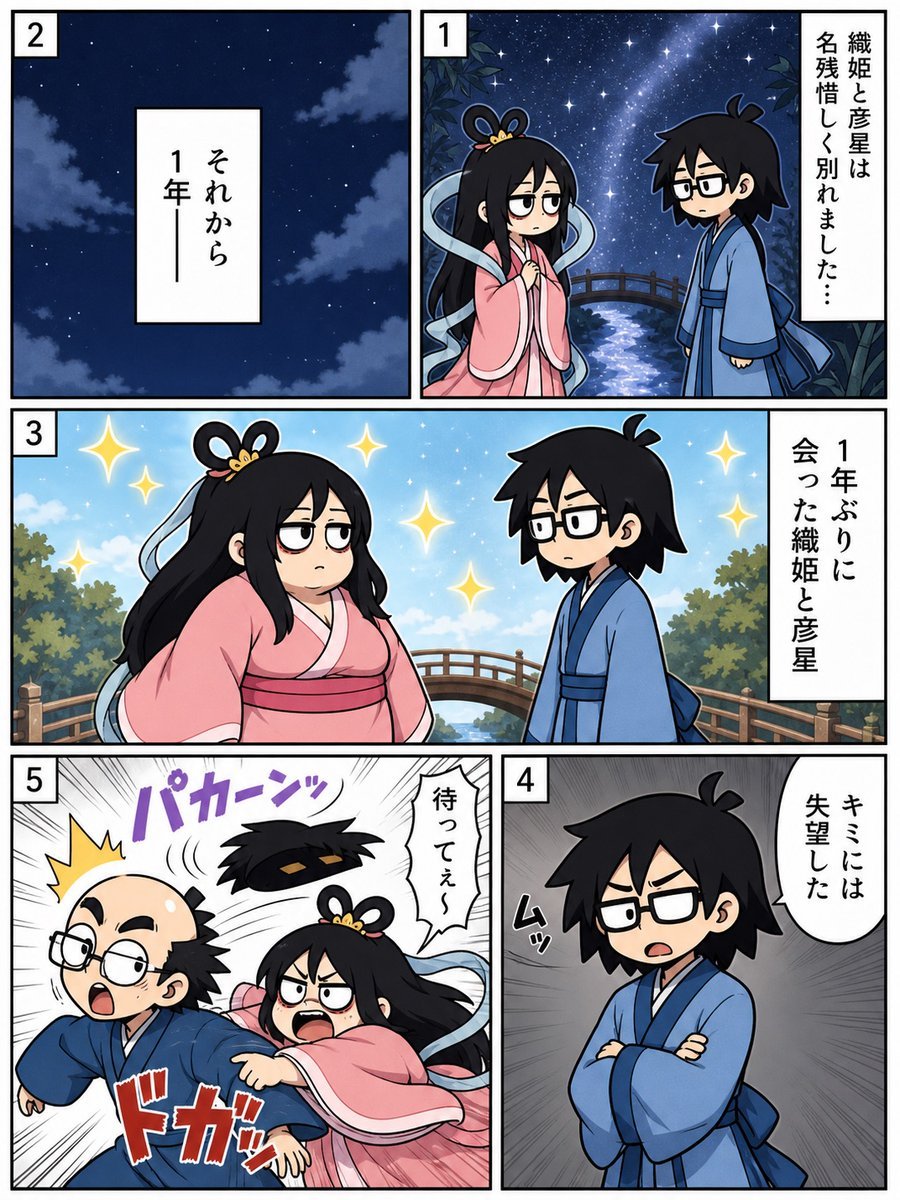
A five-panel chibi manga page about Orihime and Hikoboshi reuniting after one year and turning into a comedic slapstick scene.
- Prompt included
- Model and format preset
- Premium template
The prompt behind this image
Copy the exact prompt behind Tanabata Reunion Manga Page, or open it in the studio and make it yours.
Goal: Create a vertical 5-panel Japanese manga page about Tanabata, showing Orihime and Hikoboshi meeting again after one year, with a sudden comedic emotional change. Canvas: Portrait manga page, roughly 3:4 aspect ratio, thick black outer border, white gutters between panels, clean digital anime line art with soft coloring and dramatic manga effects. Layout: Use exactly 5 numbered panels with small white square number boxes in the upper-left corner of each panel. Panel 1 is the top-right panel, Panel 2 is the top-left panel, Panel 3 is a wide middle panel spanning the page width, Panel 4 is the bottom-right panel, and Panel 5 is the bottom-left panel. Characters: Two chibi/anime-style mythological characters. Orihime is a young woman with long black hair, a looped princess hairstyle ornament, sleepy half-lidded eyes, and flowing pale blue ribbons, wearing a pink kimono with a darker pink obi. Hikoboshi is a young man with messy black hair, rectangular black glasses, and a blue kimono with a dark blue sash. In Panel 5 he appears comically transformed into a balding middle-aged version with glasses, side hair, and a startled expression while still wearing blue. Panel details: - Panel 1: Nighttime Milky Way scene with stars, a small arched bridge over a glowing river, leafy silhouettes at the edges. Orihime and Hikoboshi stand facing each other sadly after parting. Add one vertical narration box on the right reading {argument name="panel 1 narration" default="Orihime and Hikoboshi parted with regret..."}. - Panel 2: Quiet dark blue night sky with scattered stars and soft clouds only, no characters. Center a vertical white narration box reading {argument name="panel 2 narration" default="And then, one year later—"}. - Panel 3: Bright daytime reunion scene on the same bridge with blue sky, trees, sparkles, and both characters facing each other. Orihime looks unimpressed and heavy-lidded; Hikoboshi looks uncertain. Add one vertical narration box on the right reading {argument name="panel 3 narration" default="Orihime and Hikoboshi met for the first time in a year"}. Include several golden star sparkles around them. - Panel 4: Hikoboshi alone, arms crossed, angry and disappointed, on a gray radial speed-line background. Add a white speech balloon on the upper right reading {argument name="panel 4 speech" default="I’m disappointed in you"}. Add a small black sound effect near him suggesting a tense grunt. - Panel 5: High-energy slapstick action panel with black-and-white speed lines. Orihime, furious, punches Hikoboshi hard from behind/side, sending his balding comic version lurching forward with glasses askew and a shocked open mouth. Add a purple impact sound effect at the top reading {argument name="impact sound effect" default="PAKAAAN"}, a large red impact sound effect near the bottom, a yellow burst by his head, and a white speech balloon from Orihime reading “Wait a second!” Visual style: Cute chibi manga characters, expressive faces, bold clean outlines, polished webcomic coloring, dramatic Japanese manga paneling, high contrast between romantic starry Tanabata atmosphere and sudden slapstick violence. Constraints: Use exactly 5 panels, exactly 2 main characters, exactly 5 panel number labels, exactly 4 white narration/speech boxes or balloons plus the action sound effects described, no watermark, no extra panels, no extra characters.
How to use Tanabata Reunion Manga Page in 3 steps
- 1Upload ImagePNG, JPG or paste
Add your photo
Upload the photo the template builds on. The prompt, model and format are already set.
- 2…a portrait of your subject in softgolden-hour light, 85mm…
Personalize
Edit the subject and creative details for your destination.
- 3Generate
Generate
Press Generate — your image is created in PicX Studio, so you can compare it with the original and refine one variable at a time.
More like this
Templates with the same subject, style or setup. Open one to see its prompt.
Hard-Boiled Sakura Reunion Manga Page

Quiet Hamster Manga Page

Late-Night Hamster Manga Page

Surreal Noir Hamster Manga Page

Shojo Horror Manga Corridor Page

Cute AI Manga Lesson Comic Page

Hamster Summons Sol Manga Page

Lazy Day Chibi Manga Page

Overwhelmed Coding Manga Page
Tanabata Manga Misunderstanding

Fantasy Wagashi Manga Cooking Page

Sunny Seaside Anime Manga Page
Make it yours
Tanabata Reunion Manga Page works as-is. These are the safest ways to change it without losing the look.
Change one field
Copy a single group, rewrite it, and generate again so you can see what that field is doing.
Keep the frame, change the subject
Hold the composition and light of Tanabata Reunion Manga Page, then swap wardrobe, props or the person for a new take.
| If the result… | Why | Fix |
|---|---|---|
| The result drifts from the preview | Too many fields changed at once. | Reuse Tanabata Reunion Manga Page as-is first, then change one group — subject, light, or setting. |
| The model over-stylizes the scene | The prose prompt leaves finish and camera underspecified. | Add one camera or lighting sentence and stay on GPT Image 2. |
More GPT Image 2 templates
Other prompts made for GPT Image 2.

Six VTuber Japanese Logo Sheet

Realistic Portrait of Woman and Deer

The Vista Modular Condo Poster

AI Model Routing Comparison Infographic

2.5D Anime Art Board

Isometric Productivity Desk Scene

New York Double Exposure Poster

Four-Panel AI Landscape Comparison

Japanese Tatami Lifestyle Magazine Cover

NESCAFÉ Coffee Map Poster
More image prompts
Fresh picks from across the catalog.
Cozy-Sweet Editorial Portrait with Cotton Candy
Gothic Mirror Selfie in Messy Bedroom
Decorative Folk Doodle Transformation
Vintage Glamour Piano Series Prompt
Candid Vintage Photo Aesthetic Prompt for Nano Banana Pro

Social Media Profile Neon Line Art
Minimalist Fashion Illustration
Childlike Jazz Beat Crayon Lesson
Cinematic Noir Night Street Walk

Cinematic Portrait of a Golfer
Browse template categories
Tanabata Reunion Manga Page questions
How do I use the Tanabata Reunion Manga Page template?
Add your photo if the template asks for one, edit the prompt if you like — the template's model and format are already selected — and press Generate. Your version opens in PicX Studio.
Can I customize the Tanabata Reunion Manga Page template?
Yes. You can change the subject, setting, lighting, mood, format, and available model controls before creating your image.
Is the Tanabata Reunion Manga Page template free?
Opening and editing this template is free. Generating uses credits, shown on the Generate button when you are signed in.
Which AI model should I use?
Start with GPT Image 2, which is the model associated with this template. You can compare another compatible model for a different finish.
Looking for something else? Browse all templates.

Your photo, any look
Thousands of ready templates for every top image and video model, from one credit balance.