How do I use the Blonde Girls at Summer Festival template?
Choose the primary action to open PicX Studio with the available template settings. Review the model and format, personalize the creative direction, and generate when ready.
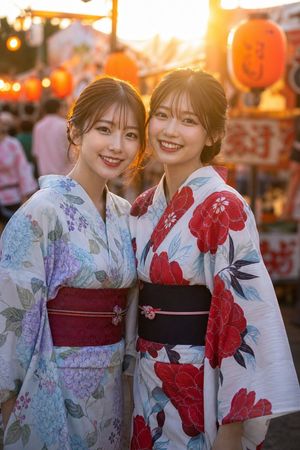
A photorealistic smartphone-style matsuri photo of two blonde young women in floral yukata enjoying ramune and shaved ice at night.
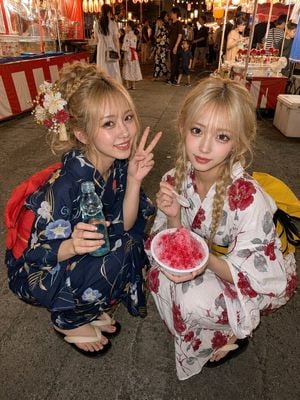
Create a photorealistic vertical smartphone snapshot at a lively Japanese summer festival at night, taken with a wide-angle phone flash from slightly above eye level. In the foreground, show exactly two young Japanese women with {argument name="hair color" default="blonde"} hair crouching together on gray asphalt and looking directly into the camera. The woman on the left wears a dark navy yukata with pale floral patterns, beige geta sandals, a red obi visible behind her, and an ornate side hair ornament with white flowers, red accents, gold beads, and tassels; her hair is in a soft messy updo with bangs, she smiles warmly, holds a blue glass ramune bottle in one hand, and makes a peace sign with the other. The woman on the right wears a white yukata with large red flower and gray leaf patterns, a yellow obi with a black bow visible at the side/back, and black sandals; her hair is in two loose braids with wispy bangs, she has glossy gyaru-style makeup and big eyes, and she holds a white bowl of {argument name="festival dessert" default="bright red shaved ice"} with a small white spoon. Make the background a busy matsuri street lined with illuminated food and game stalls, red-and-white striped booth curtains, hanging lanterns, warm string lights, festival-goers in yukata, a goldfish-scooping style stall on the left, candied-apple or snack display on the right, and a white cooler near the right edge. Use strong on-camera flash on the subjects, warm lantern bokeh in the distance, realistic skin texture, natural casual posing, shallow-to-moderate depth of field, high detail, candid social-media photo aesthetic. No text overlay, no watermark, no extra foreground people, no distorted hands, no duplicated bowls or bottles.
Choose the primary action to open PicX Studio with the available template settings. Review the model and format, personalize the creative direction, and generate when ready.
Yes. You can change the subject, setting, lighting, mood, format, and available model controls before creating your image.
This template is free to open and customize. Generation usage is shown in PicX Studio before you create.
Start with GPT Image 2, which is the model associated with this template. You can compare another compatible model for a different finish.
Follow a topic to a crawlable collection of related PicX Studio templates.