How do I use the Model With Manga Wall Sketch template?
Choose the primary action to open PicX Studio with the available template settings. Review the model and format, personalize the creative direction, and generate when ready.
A photorealistic studio portrait of a woman posing beside a matching manga-style wall sketch, useful for fashion, cosplay, or social media visuals.
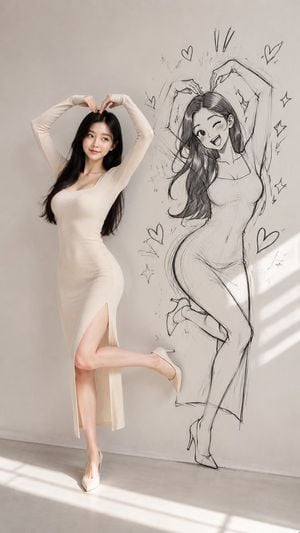
Create a vertical full-body fashion portrait in a minimalist sunlit studio: on the left, a photorealistic young East Asian woman with {argument name="hair color" default="long black hair"} poses gracefully against a plain warm gray wall, wearing a fitted ivory ribbed knit long-sleeve maxi dress with a scoop neckline and a high side slit, plus white pointed high heels. She forms a heart shape above her head with both hands, smiles softly while looking slightly to the side, stands on one leg, and bends the other leg back in a cute playful pose. On the right side of the same wall, draw a large black pencil manga-style sketch version of her, matching the pose and outfit but exaggerated with an anime face, one eye winking, open cheerful smile, long flowing hair, curvy silhouette, and sketched high heels. Surround the manga figure with exactly 5 hand-drawn hearts, 4 sparkle/star doodles, and 3 short exclamation marks above the head. Use a seamless blend of real photography and wall illustration, as if the drawing is sketched directly onto the wall beside the model. The scene has soft natural daylight, diagonal window-shadow stripes across the floor and lower right wall, a clean concrete floor, warm neutral tones, realistic skin texture, elegant editorial styling, and no visible text or watermark. Keep the composition balanced with the real model occupying the left half and the manga sketch occupying the right half, both full-body and similar scale. Optional customization: make the model's outfit {argument name="dress color" default="ivory"}, set the background to {argument name="studio wall color" default="warm light gray"}, and make the overall mood {argument name="mood" default="cute, elegant, playful"}.
Choose the primary action to open PicX Studio with the available template settings. Review the model and format, personalize the creative direction, and generate when ready.
Yes. You can change the subject, setting, lighting, mood, format, and available model controls before creating your image.
This template is free to open and customize. Generation usage is shown in PicX Studio before you create.
Start with GPT Image 2, which is the model associated with this template. You can compare another compatible model for a different finish.
Follow a topic to a crawlable collection of related PicX Studio templates.