How do I use the Rainy Neon Hoodie Selfie template?
Choose the primary action to open PicX Studio with the available template settings. Review the model and format, personalize the creative direction, and generate when ready.
Generates a realistic rainy-night Japanese neon street mirror selfie featuring a masked young woman in an oversized gray hoodie.
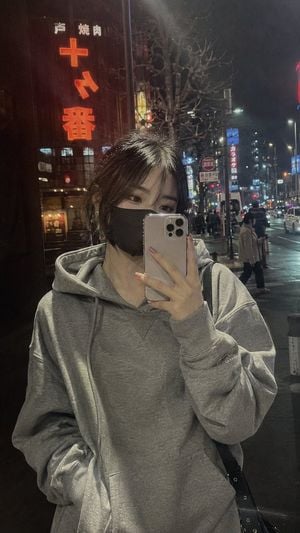
Create a realistic vertical smartphone mirror selfie at night in a rainy neon city street, like an unposed everyday snapshot. A cute young East Asian woman stands close to a reflective dark storefront surface, centered from mid-thigh up, holding a silver triple-camera smartphone in front of the lower half of her face. She wears an oversized {argument name="hoodie color" default="heather gray"} pullover hoodie with visible fabric texture, soft folds, drawstrings, a front kangaroo pocket, and roomy sleeves; one hand is tucked into the hoodie pocket. She has {argument name="hair style" default="black medium-length hair with wispy bangs and loose tied-back strands"}, subtle eye makeup, pale pink manicured nails, and a plain {argument name="face mask color" default="black"} face mask. A black shoulder bag strap is visible on one side. The background is a Japanese entertainment district at night after rain, with wet pavement, strong neon reflections, streetlights, cars, pedestrians, bare winter trees, and tall signs; include one large red vertical sign on the left with Japanese restaurant text and glowing red characters, plus smaller distant signs and blue-red city lights. Use moody night lighting, realistic phone-camera grain, slight softness, natural perspective distortion, reflective glass, damp atmosphere, and authentic candid composition. Keep the outfit combination emphasized: oversized gray hoodie with casual streetwear styling; optionally show {argument name="shoe style" default="white platform sneakers"} only if the lower body is visible. No studio lighting, no glamour pose, no extra text overlays, no watermark.
Choose the primary action to open PicX Studio with the available template settings. Review the model and format, personalize the creative direction, and generate when ready.
Yes. You can change the subject, setting, lighting, mood, format, and available model controls before creating your image.
This template is free to open and customize. Generation usage is shown in PicX Studio before you create.
Start with GPT Image 2, which is the model associated with this template. You can compare another compatible model for a different finish.
Follow a topic to a crawlable collection of related PicX Studio templates.