How do I use the Futuristic X-07 Anime Character Poster template?
Choose the primary action to open PicX Studio with the available template settings. Review the model and format, personalize the creative direction, and generate when ready.
A polished sci-fi anime character poster featuring a silver-haired techwear boy with cyan holographic X-project graphics.
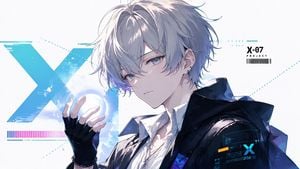
Create a clean futuristic anime key visual in a wide 16:9 canvas. Show one androgynous young male anime character, {argument name="character name" default="X-07"}, in a close-up three-quarter pose facing slightly left, with pale skin, cool gray-blue eyes, a calm serious expression, and messy layered {argument name="hair color" default="silver-white"} hair with long bangs partially covering one eye. He wears a crisp white shirt under a glossy oversized black techwear jacket with a high collar and subtle blue-purple reflections, plus a black fingerless glove on the raised left hand, a thin necklace, bracelet, and small ear piercings. His raised hand hovers near a glowing blue-white circular energy orb. The background is bright white and minimal, filled with cyan sci-fi UI graphics: exactly 1 huge distressed turquoise letter X behind him on the left, exactly 1 horizontal magenta-to-blue barcode-like color strip near the lower left, exactly 1 small top-right label reading “{argument name="project label" default="X-07"}” with “PROJECT” below it and a barcode underneath, exactly 1 small holographic interface panel on the character’s sleeve with a cyan X and tiny unreadable data lines, and fine dotted cyan guide lines crossing the composition. Use high-detail Japanese anime illustration style, delicate line art, luminous cel shading, soft gradients, sharp facial rendering, glossy fabric highlights, and a cool cyan/blue/white color palette with small magenta accents. Keep the composition polished like a sci-fi character poster, no extra characters, no watermark, no cluttered background.
Choose the primary action to open PicX Studio with the available template settings. Review the model and format, personalize the creative direction, and generate when ready.
Yes. You can change the subject, setting, lighting, mood, format, and available model controls before creating your image.
This template is free to open and customize. Generation usage is shown in PicX Studio before you create.
Start with GPT Image 2, which is the model associated with this template. You can compare another compatible model for a different finish.
Follow a topic to a crawlable collection of related PicX Studio templates.