How do I use the Anime Summer Festival Couple template?
Choose the primary action to open PicX Studio with the available template settings. Review the model and format, personalize the creative direction, and generate when ready.
Generates a vertical anime illustration of a yukata-clad couple holding hands at a lantern-lit Japanese summer festival.
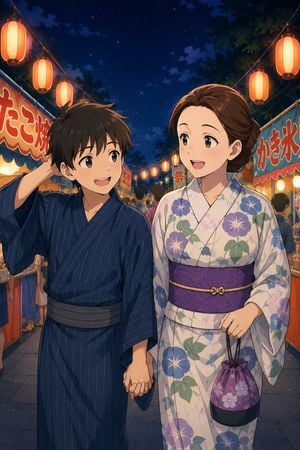
Create a polished anime-style vertical illustration of a romantic summer festival night in Japan. In the foreground, show two young adults walking hand in hand through a lively yatai food-stall street under a deep navy starry sky. The boy on the left has messy short black hair, bright brown eyes, a cheerful shy smile, and wears a dark navy blue striped yukata with a gray obi; his free hand is raised behind his head in a bashful gesture. The woman on the right has warm brown hair swept into a neat low bun, expressive brown eyes, and an open happy smile; she wears a pale cream yukata with large blue, purple, and pink morning-glory flowers and green leaves, a wide purple obi with a small gold cord accent, and carries a small purple floral drawstring kinchaku bag in her right hand. The couple should be looking at each other while walking, centered waist-up to full-body, with their joined hands visible near the lower middle. Surround them with glowing red-orange paper lanterns strung diagonally overhead, dense festival crowds in the midground, and colorful stalls on both sides. Include exactly two prominent stall signs with readable Japanese text: the left stall sign says 「たこ焼」 in large red letters, and the right stall sign says 「かき氷」 in large red letters. Use warm lantern light on the characters’ faces, soft rim lighting, rich evening blues, detailed cloth folds, clean linework, expressive faces, and a high-quality modern Japanese anime aesthetic. No watermark, no subtitles, no extra text beyond the stall signage.
Choose the primary action to open PicX Studio with the available template settings. Review the model and format, personalize the creative direction, and generate when ready.
Yes. You can change the subject, setting, lighting, mood, format, and available model controls before creating your image.
This template is free to open and customize. Generation usage is shown in PicX Studio before you create.
Start with GPT Image 2, which is the model associated with this template. You can compare another compatible model for a different finish.
Follow a topic to a crawlable collection of related PicX Studio templates.