How do I use the Low-Angle Night Fashion Editorial template?
Choose the primary action to open PicX Studio with the available template settings. Review the model and format, personalize the creative direction, and generate when ready.
A photorealistic cinematic fashion portrait of an adult woman posing in denim under dramatic low-key urban lighting.
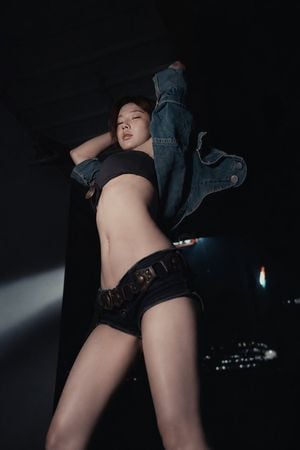
Create a low-angle cinematic fashion editorial photo of an {argument name="subject" default="adult East Asian woman in her 20s"} posing dramatically in a dark urban interior at night. She is standing with her torso arched, both arms lifted behind and above her head, eyes half closed, calm confident expression, viewed from below to make her legs and body appear elongated. Outfit: an open oversized {argument name="jacket" default="blue denim jacket"} slipping off the shoulders, a simple {argument name="top" default="black bandeau crop top"}, very short dark denim shorts, and a wide dark leather belt with large round metal studs and buckle details. Lighting is moody and high contrast, with a narrow hard spotlight from the left illuminating her skin and leaving much of the background in deep shadow. Background: nearly black industrial room or parking-garage-like space with a dark ceiling, one vertical wall edge, faint city lights or small blurred lights in the distance on the lower right. Use realistic skin texture, subtle makeup, glossy lips, dark hair loosely pulled back with a few strands near the face. Composition: vertical 2:3 frame, subject centered slightly left, head near upper third, legs cropped near the bottom edge, strong perspective distortion from a wide-angle lens. Style: photorealistic, cinematic night photography, fashion magazine editorial, shallow depth of field, dramatic shadows, cool blue-black color grading, no text, no watermark.
Choose the primary action to open PicX Studio with the available template settings. Review the model and format, personalize the creative direction, and generate when ready.
Yes. You can change the subject, setting, lighting, mood, format, and available model controls before creating your image.
This template is free to open and customize. Generation usage is shown in PicX Studio before you create.
Start with GPT Image 2, which is the model associated with this template. You can compare another compatible model for a different finish.
Follow a topic to a crawlable collection of related PicX Studio templates.