
Solemn Cathedral Organist
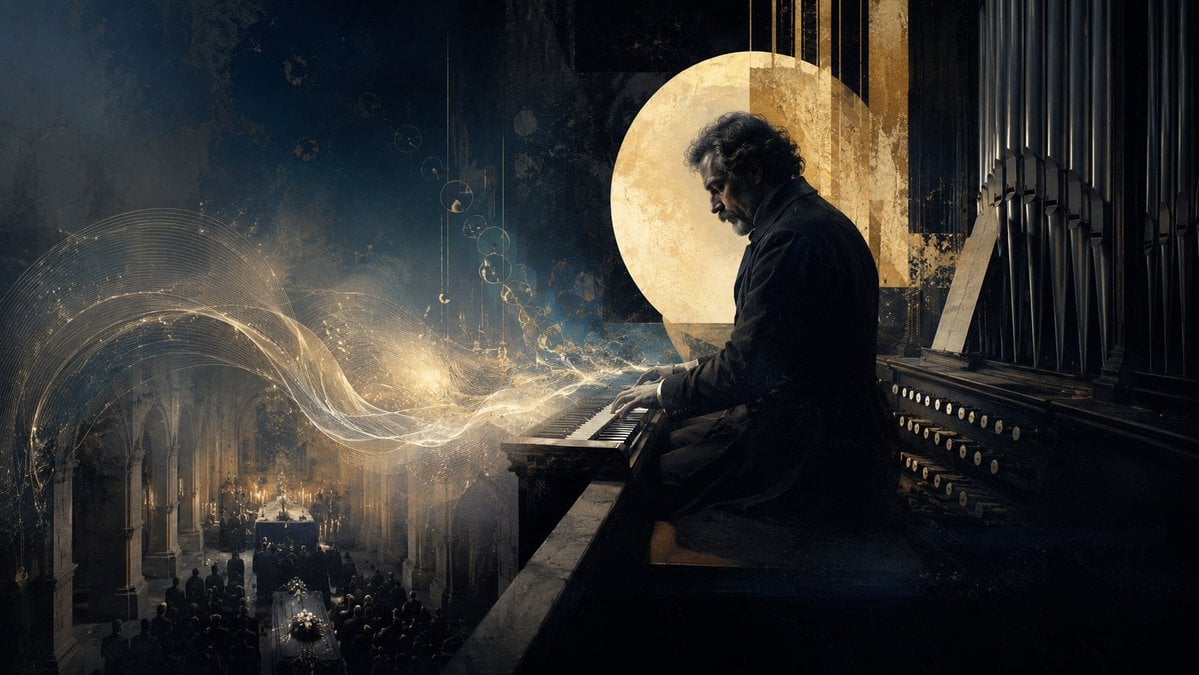
A cinematic illustration of a somber organist playing luminous sacred music over a candlelit funeral inside a Gothic cathedral.
- Prompt included
- Model and format preset
- Free template
The prompt behind this image
Copy the exact prompt behind Solemn Cathedral Organist, or open it in the studio and make it yours.
Create a cinematic dark sacred-music illustration in a wide 16:9 aspect ratio. Show {argument name="character name" default="a solitary elderly organist"} seated in profile on the right side, playing a massive cathedral pipe organ. He has curly gray hair, a short beard, a somber expression, and wears a long black coat, with his hands on the manuals. Behind him are tall black organ pipes, rows of round white stop knobs, and a weathered wooden organ console. Place a large textured golden circular halo or moon-like disc behind his head and shoulders, partially intersected by vertical golden architectural strips, creating a sacred yet ambiguous aura. On the left side, depict a dim Gothic church interior far below with stone arches, candlelight, mourners, and exactly 1 funeral coffin in the aisle covered with white flowers, surrounded by a dark congregation. From the organ keys, paint luminous flowing musical energy: transparent golden-white ribbons, fine staff-like curves, sparkling particles, and delicate circular note-like glyphs sweeping leftward over the funeral scene. Use a moody palette of deep navy, charcoal black, antique gold, smoky gray, and candle amber. The style should blend painterly realism, matte painting, and subtle surrealism, with dramatic chiaroscuro, grainy texture, dust, aged plaster, and soft volumetric light. Keep the composition solemn, consoling, and paradoxically sacred; no readable text, no modern objects, no watermark.
How to use Solemn Cathedral Organist in 3 steps
- 1Upload ImagePNG, JPG or paste
Add your photo
Upload the photo the template builds on. The prompt, model and format are already set.
- 2…a portrait of your subject in softgolden-hour light, 85mm…
Personalize
Edit the subject and creative details for your destination.
- 3Generate
Generate
Press Generate — your image is created in PicX Studio, so you can compare it with the original and refine one variable at a time.
More like this
Templates with the same subject, style or setup. Open one to see its prompt.

Solemn Knight on Ashen Battlefield
Crimson Angel Princess in Floral Cathedral
Gothic Saint Pilgrimage Cathedral
Subterranean Cathedral and Mechanical Whale
Rabbit-Eared Swordswoman in Ruined Cathedral

Knight Facing Cathedral Giant
Silver-Haired Cathedral Battle Maiden
Milan Cathedral Night Group Hug
Gothic Nun Cathedral Portrait
Battle Maid in Ruined Cathedral
Cinematic Gothic Cathedral Portrait

Cathedral Choir Loft
Make it yours
Solemn Cathedral Organist works as-is. These are the safest ways to change it without losing the look.
Change one field
Copy a single group, rewrite it, and generate again so you can see what that field is doing.
Keep the frame, change the subject
Hold the composition and light of Solemn Cathedral Organist, then swap wardrobe, props or the person for a new take.
| If the result… | Why | Fix |
|---|---|---|
| The result drifts from the preview | Too many fields changed at once. | Reuse Solemn Cathedral Organist as-is first, then change one group — subject, light, or setting. |
| The model over-stylizes the scene | The prose prompt leaves finish and camera underspecified. | Add one camera or lighting sentence and stay on GPT Image 2. |
More GPT Image 2 templates
Other prompts made for GPT Image 2.

Six VTuber Japanese Logo Sheet

Realistic Portrait of Woman and Deer

The Vista Modular Condo Poster

AI Model Routing Comparison Infographic

2.5D Anime Art Board

Isometric Productivity Desk Scene

New York Double Exposure Poster

Four-Panel AI Landscape Comparison

Japanese Tatami Lifestyle Magazine Cover

NESCAFÉ Coffee Map Poster
More image prompts
Fresh picks from across the catalog.
Photorealistic Selfie Prompts (Japanese Restaurant & Bathroom)

3D Social Media Profile Card

FIFA World Cup 2026 Sports Poster

Dreamy Anime Sayori Banner

Futuristic Cyberpunk Portrait with Golden Circuitry

Split-Screen Athleisure Ad

Hero-style product advertising poster

Premium Advertising Campaign Photograph

Egyptian Style Editorial Diner Shot

Pixar-Quality 3D Chibi Character with Mini Jeep
Browse template categories
Solemn Cathedral Organist questions
How do I use the Solemn Cathedral Organist template?
Add your photo if the template asks for one, edit the prompt if you like — the template's model and format are already selected — and press Generate. Your version opens in PicX Studio.
Can I customize the Solemn Cathedral Organist template?
Yes. You can change the subject, setting, lighting, mood, format, and available model controls before creating your image.
Is the Solemn Cathedral Organist template free?
Opening and editing this template is free. Generating uses credits, shown on the Generate button when you are signed in.
Which AI model should I use?
Start with GPT Image 2, which is the model associated with this template. You can compare another compatible model for a different finish.
Looking for something else? Browse all templates.

Your photo, any look
Thousands of ready templates for every top image and video model, from one credit balance.