How do I use the Albino Kelpie Galloping Through Village template?
Choose the primary action to open PicX Studio with the available template settings. Review the model and format, personalize the creative direction, and generate when ready.
A cinematic fantasy realism prompt for generating a white red-eyed kelpie charging through a medieval village with dramatic water splashes.
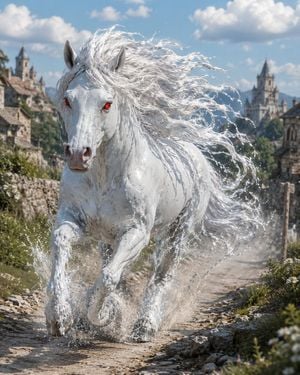
Create a cinematic high-fantasy action scene of {argument name="creature type" default="an albino kelpie magical horse"} galloping straight toward the viewer down a narrow cobblestone road in a medieval stone village. The creature is pure white with wet glossy skin, a powerful muscular body, pointed horse ears, a long muzzle, and intense {argument name="eye color" default="glowing red eyes"}; its extremely long white mane and tail stream backward in tangled windblown strands like flowing water. Show the front legs lifted mid-stride and the rear legs pushing through puddles, with bright splashes, droplets, mist, and dust exploding around the hooves to emphasize speed. The setting is {argument name="setting" default="an old European fantasy village with stone cottages, castle towers, church spires, low walls, wildflowers, and distant hills"}, under a bright blue sky with puffy white clouds. Use a low front-facing camera angle, shallow depth of field, dramatic natural daylight, crisp realistic detail, volumetric sparkle on water droplets, dynamic motion, and epic fantasy realism. No rider, no saddle, no harness, no text, no frame, no watermark.
Choose the primary action to open PicX Studio with the available template settings. Review the model and format, personalize the creative direction, and generate when ready.
Yes. You can change the subject, setting, lighting, mood, format, and available model controls before creating your image.
This template is free to open and customize. Generation usage is shown in PicX Studio before you create.
Start with GPT Image 2, which is the model associated with this template. You can compare another compatible model for a different finish.
Follow a topic to a crawlable collection of related PicX Studio templates.