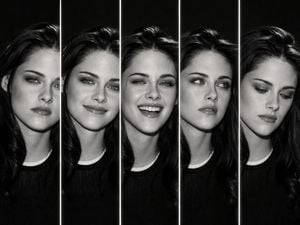
How do I use the Five Expression Monochrome Portrait template?
Edit the prompt in the box under the preview — the template's model and format are already selected — and press Generate. Your version appears right on this page.
Generates a high-contrast black-and-white five-panel portrait collage showing one man with distinct facial expressions for editorial or character emotion studies.

This template uses your photo — add one with the + button.
Create a dramatic black-and-white studio portrait collage of {argument name="character name" default="the same handsome young man"} shown in exactly 5 vertical panels, each panel separated by a thin glowing white divider line. Canvas is horizontal 4:3, dark charcoal-to-black background, high-contrast monochrome lighting, sharp editorial fashion photography, realistic skin texture, short dark styled hair, light stubble, black crew-neck shirt, tight head-and-shoulders crop. Layout: five equal narrow slices across the frame, all showing the same face from slightly different angles and expressions. Count and depict exactly 5 expressions from left to right: 1) intense stern glare with furrowed brow, 2) warm closed-mouth smile, 3) broad joyful laugh with teeth visible and eyes squinting, 4) thoughtful skeptical look gazing upward-left with one hand on chin, 5) calm neutral direct stare. Use moody side lighting, deep shadows, glossy highlights in the hair, cinematic contrast, subtle film grain, no text, no watermark, no extra people, no color.
Create a dramatic black-and-white studio portrait collage of {argument name="character name" default="the same handsome young man"} shown in exactly 5 vertical panels, each panel separated by a thin glowing white divider line. Canvas is horizontal 4:3, dark charcoal-to-black background, high-contrast monochrome lighting, sharp editorial fashion photography, realistic skin texture, short dark styled hair, light stubble, black crew-neck shirt, tight head-and-shoulders crop. Layout: five equal narrow slices across the frame, all showing the same face from slightly different angles and expressions. Count and depict exactly 5 expressions from left to right: 1) intense stern glare with furrowed brow, 2) warm closed-mouth smile, 3) broad joyful laugh with teeth visible and eyes squinting, 4) thoughtful skeptical look gazing upward-left with one hand on chin, 5) calm neutral direct stare. Use moody side lighting, deep shadows, glossy highlights in the hair, cinematic contrast, subtle film grain, no text, no watermark, no extra people, no color.
Edit the prompt in the box under the preview — the template's model and format are already selected — and press Generate. Your version appears right on this page.
Yes. You can change the subject, setting, lighting, mood, format, and available model controls before creating your image.
Opening and editing this template is free. Generating uses credits, shown on the Generate button when you are signed in.
Start with GPT Image 2, which is the model associated with this template. You can compare another compatible model for a different finish.
Follow a topic to a crawlable collection of related PicX Studio templates.