How do I use the Miniature Street Food Diorama template?
Choose the primary action to open PicX Studio with the available template settings. Review the model and format, personalize the creative direction, and generate when ready.
A detailed prompt for creating a 2x2 grid of miniature food dioramas featuring underrated street foods, cultural typography, and tiny interacting figures.
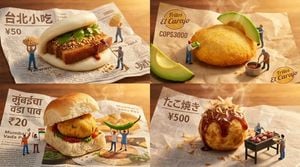
2x2 grid, 16:9, do this for 4 underrated street foods : { "Aesthetic": "Miniature Food Diorama, Cultural Typography", "Subject": "{argument name="food item" default="[FOOD/DISH]"}", "AI_Semantic_Inference": { "The_Base": "Crumpled, culturally accurate street-food wrapping paper. Printed with AI_INFER(vintage typography, logos, and prices from {argument name="culture" default="[CULTURE/COUNTRY]"}).", "The_Food": "A giant, incredibly appetizing piece of {argument name="food item" default="[FOOD/DISH]"} resting on the wrapper.", "The_Interactions": "AI_INFER(Tiny figures interacting with the garnishes. E.g., hoisting giant sesame seeds, painting on sauce with brooms, or grilling tiny meats on a miniature BBQ)." }, "Lighting": "Cozy, warm street-lamp or golden-hour sunlight. Glowing steam." }
Choose the primary action to open PicX Studio with the available template settings. Review the model and format, personalize the creative direction, and generate when ready.
Yes. You can change the subject, setting, lighting, mood, format, and available model controls before creating your image.
This template is free to open and customize. Generation usage is shown in PicX Studio before you create.
Start with gemini-3-pro-image-preview, which is the model associated with this template. You can compare another compatible model for a different finish.
Follow a topic to a crawlable collection of related PicX Studio templates.