How do I use the Cinematic Urban Decay Fashion Portrait template?
Choose the primary action to open PicX Studio with the available template settings. Review the model and format, personalize the creative direction, and generate when ready.
A detailed photography prompt for creating high-contrast black and white editorial shots featuring tailored fashion against a backdrop of industrial ruin and ur
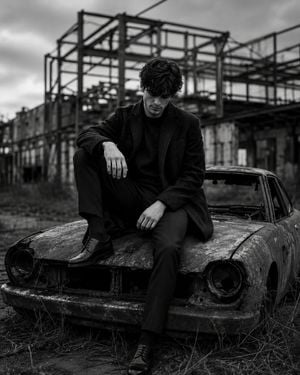
A medium telephoto lens photograph in black and white captures a {argument name="subject" default="man, likely in his early to mid-20s"}, perched on the hood of an {argument name="vehicle" default="abandoned and rusted-out car"} in a {argument name="location" default="derelict urban lot"} — surrounding him, the collapsed shells of warehouses and factory buildings, their skeletal steel frames exposed against an overcast sky, weeds forcing through cracked concrete. He is dressed in dark, tailored attire — a coat with a woollen textured finish, slim trousers, polished dress shoes — hair glossy and styled, one knee raised, posture relaxed yet deliberate, gaze directed downward. The immaculate clothing against the surrounding decay creates a studied visual tension. Shallow depth of field dissolves the background ruins into soft grey texture. Strong contrast between deep blacks and soft greys defines this high-resolution digital photograph — post-industrial, editorial, quietly surreal.
Choose the primary action to open PicX Studio with the available template settings. Review the model and format, personalize the creative direction, and generate when ready.
Yes. You can change the subject, setting, lighting, mood, format, and available model controls before creating your image.
This template is free to open and customize. Generation usage is shown in PicX Studio before you create.
Start with GPT Image 2, which is the model associated with this template. You can compare another compatible model for a different finish.
Follow a topic to a crawlable collection of related PicX Studio templates.